レイアウトXML のスキーマ
座標位置の考え方
レイアウト XML において、top / left / bottom / right / height / width 属性で指定する座標位置は、端末のPortrait 時の横幅を 640 とした論理位置となります。
端末のアスペクト比は、端末によって異なりますので、WebViewの高さが端末によって変化する形になります。
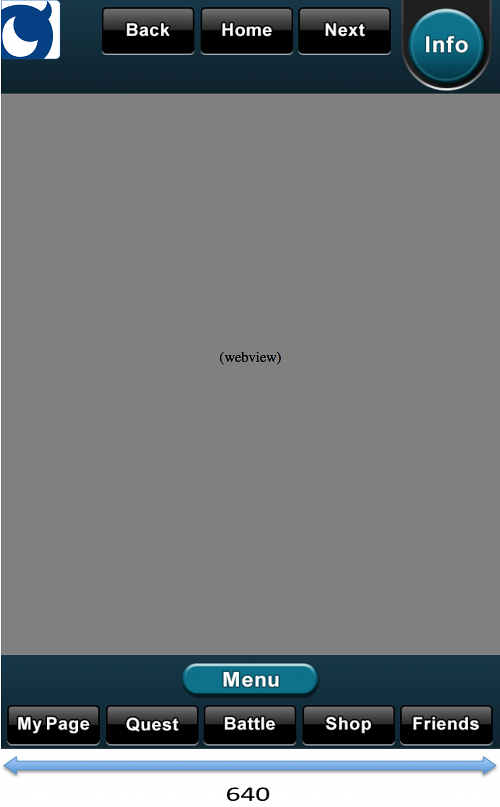
layout 要素
レイアウト設定ファイルのルート要素になります。
communityButton 要素(非推奨)
2014 年 7 月 22 日の Shell App Framework の更新により、非推奨となりました。次の節の showCommunityUI の使用を推奨します。
標準コミュニティボタンを表示したい場合は下記の要素をレイアウト XML に追加してください。
	<!-- Community button -->
	<communityButton gravity="TopLeft" />
| 属性 | 値 | 必須 |
|---|---|---|
| gravity | コミュニケーションボタンの表示位置です。(TopLeft / TopRight / BottomLeft / BottomRight のいずれか) | 必須 |
| theme | ボタンのテーマを指定します。(basic / gray / blue / dark のいずれか) | 任意 |
theme 属性が省略された場合のデフォルト値は、basic になります。
showCommunityUI の設置(推奨)
標準コミュニティボタンを表示しない場合は、以下の要素はレイアウト XML に追加しないでください。追加すると必ずコミュニティボタンが表示されてしまいます。
	<!-- Community button -->
	<communityButton gravity="TopLeft" />
コミュニティボタンを表示しない場合には、トップ画面もしくはメイン画面から2タップ以内で Mobage コミュニティが表示できるような導線をゲーム内に設置する必要があります。Mobage コミュニティの呼び出しは mobage.shellapp.Service.showCommunityUI メソッドで行います。
詳細は下記のドキュメントを参照してください。
-
webview 要素
WebView のレイアウト情報を指定する要素です。layout 要素の子要素であり、必須(1..1)です。
属性 値 必須 top WebView の top 位置を指定します。(数値) 必須 left WebView の left 位置を指定します。(数値) 必須 bottom WebView の bottom 位置を指定します。(数値) 必須 right WebView の right 位置を指定します。(数値) 必須 scalesToFit viewportを有効にするかのフラグです。省略した場合はfalseになります。(true/false) 任意 backkeyToExit AndroidのBackキーを押した際にアプリケーションを即座終了するかのフラグです。省略した場合はfalseになります。true の場合は、BackKeyを押すとアプリケーション終了確認のダイアログが表示されます。false の場合は、WebViewのブラウザーバックの挙動になり、戻る画面がなくなった時点でアプリケーション終了確認のダイアログが表示されます。 任意
header 要素
ヘッダのレイアウト情報を指定する要素です。layout 要素の子要素であり、任意の数の要素(0..-)が定義可能です。
- アプリケーション起動時に表示するヘッダのレイアウトを指定するため、header要素が複数ある場合は、必ず1つの要素に対してdefault属性をtrueにしなければなりません。
- 複数のheader要素に対してdefault属性をtrueにした場合の動作は保証されません。
- ヘッダが不要な場合は、header要素を定義しないでください。
| 属性 | 値 | 必須 |
|---|---|---|
| name | ヘッダの名前を指定します。("main" / "battle" などの任意の文字列) | 必須 |
| default | アプリケーション起動時のデフォルトのヘッダであることを設定します。省略した場合はfalseになります。(true/false) | 任意 |
| background | ヘッダに使用する画像のファイル名を指定します。("header_base.png”などの文字列) | 必須 |
| top | ヘッダの top 位置を指定します。(数値) | 必須 |
| left | ヘッダの left 位置を指定します。(数値) | 必須 |
| height | ヘッダの高さを指定します。(数値) | 必須 |
| width | ヘッダの幅を指定します。(数値) | 必須 |
button 要素 (ヘッダ用)
ボタンのレイアウト情報を指定する要素です。header 要素の子要素であり、任意の数の要素(0..-)が定義可能です。
| 属性 | 値 | 必須 |
|---|---|---|
| normal | ボタンの通常時の画像ファイルを指定します。("header_button1.png”などの文字列) | 必須 |
| over | ボタンのタップ時の画像ファイルを指定します。省略した場合は、タップ時もnormalの画像のままになります。("header_button_over1.png”などの文字列) | 任意 |
| top | ボタンの top 位置を指定します。(数値) | 必須 |
| left | ボタンの left 位置を指定します。(数値) | 必須 |
| height | ボタンの高さを指定します。(数値) | 必須 |
| width | ボタンの幅を指定します。(数値) | 必須 |
| href | ボタンの挙動を指定します。(下記 href に指定可能な値参照) | 必須 |
| hrefSandbox | ボタンの挙動を指定します。(Sandbox用)(下記 href に指定可能な値参照) | 任意 |
| soundeffect | ボタンのタップ時に再生するサウンドファイルを指定します。("select.ogg”などの文字列) | 任意 |
- hrefSandbox 属性が省略された場合は、Sandbox環境でも href 属性の値が有効になります。
href に指定可能な値
| 値 | 機能 |
|---|---|
| top | gadget.xmlのstartUrlへ遷移します |
| back | 前のページに遷移します |
| reload | 現在のページを再読み込みします |
| forward | 先のページに遷移します |
| showBankUI | モバコイン購入画面をダイアログ形式で表示します |
| (Javascript) | javascript: func(); 形式の指定が可能です |
| (URL) | 遷移先の任意のゲームサーバーのURLを指定可能です。(GadgetサーバーのURLは含まず、URLエンコードも不要です) |
footer 要素
フッタのレイアウト情報を指定する要素です。layout 要素の子要素であり、任意の数の要素(0..-)が定義可能です。
- アプリケーション起動時に表示するフッタのレイアウトを指定するため、footer要素が複数ある場合は、必ず1つの要素に対してdefault属性をtrueにしなければなりません。
- 複数のfooter要素に対してdefault属性をtrueにした場合の動作は保証されません。
- フッタが不要な場合は、footer要素を定義しないでください。
| 属性 | 値 | 必須 |
|---|---|---|
| name | フッタの名前を指定します。("main" / "battle" などの任意の文字列) | 必須 |
| default | アプリケーション起動時のデフォルトのフッタであることを設定します。省略した場合はfalseになります。(true/false) | 任意 |
| background | フッタに使用する画像のファイル名を指定します。("header_base.png”などの文字列) | 必須 |
| bottom | フッタの bottom 位置を指定します。(数値) | 必須 |
| left | フッタの left 位置を指定します。(数値) | 必須 |
| height | フッタの高さを指定します。(数値) | 必須 |
| width | フッタの幅を指定します。(数値) | 必須 |
button 要素 (フッタ用)
ボタンのレイアウト情報を指定する要素です。footer 要素の子要素であり、任意の数の要素(0..-)が定義可能です。
| 属性 | 値 | 必須 |
|---|---|---|
| normal | ボタンの通常時の画像ファイルを指定します。("header_button1.png”などの文字列) | 必須 |
| over | ボタンのタップ時の画像ファイルを指定します。省略した場合は、タップ時もnormalの画像のままになります。("header_button_over1.png”などの文字列) | 任意 |
| bottom | ボタンの bottom 位置を指定します。(数値) | 必須 |
| left | ボタンの left 位置を指定します。(数値) | 必須 |
| height | ボタンの高さを指定します。(数値) | 必須 |
| width | ボタンの幅を指定します。(数値) | 必須 |
| href | ボタンの挙動を指定します。(下記 href に指定可能な値参照) | 必須 |
| hrefSandbox | ボタンの挙動を指定します。(Sandbox用)(下記 href に指定可能な値参照) | 任意 |
| soundeffect | ボタンのタップ時に再生するサウンドファイルを指定します。("select.ogg”などの文字列) | 任意 |
- hrefSandbox 属性が省略された場合は、Sandbox環境でも href 属性の値が有効になります。
href に指定可能な値
| 値 | 機能 |
|---|---|
| top | gadget.xmlのstartUrlへ遷移します |
| back | 前のページに遷移します |
| reload | 現在のページを再読み込みします |
| forward | 先のページに遷移します |
| showBankUI | モバコイン購入画面をダイアログ形式で表示します |
| (Javascript) | javascript: func(); 形式の指定が可能です |
| (URL) | 遷移先の任意のゲームサーバーのURLを指定可能です。(GadgetサーバーのURLは含まず、URLエンコードも不要です) |
レイアウト設定ファイルのサンプル
レイアウト設定 XML ファイルのサンプルは下記のようになります。※ コミュニティボタンは表示されません
<layout>
	<!-- WebView layout -->
	<webview
		bottom="120"
		left="0"
		right="0"
		scalesToFit="true"
		backkeyToExit="true"
		top="120" />
	<!-- Header 1 -->
	<header
		name="main"
		background="ui_black_header_base.png"
		default="true"
		height="120"
		left="0"
		top="0"
		width="640" >
		<button
			height="62"
			href="back"
			left="130"
			normal="ui_black_header_back.png"
			over="ui_black_header_back_on.png"
			soundeffect="select.ogg"
			top="10"
			width="119" />
		<button
			height="62"
			href="top"
			left="256"
			normal="ui_black_header_home.png"
			over="ui_black_header_home_on.png"
			soundeffect="start.ogg"
			top="10"
			width="119" />
		<button
			height="62"
			href="forward"
			left="382"
			normal="ui_black_header_next.png"
			over="ui_black_header_next_on.png"
			soundeffect="select.ogg"
			top="10"
			width="119" />
		<button
			height="116"
			href="showBankUI"
			left="514"
			normal="ui_black_header_info.png"
			over="ui_black_header_info_on.png"
			soundeffect="select.ogg"
			top="0"
			width="116" />
	</header>

	<!-- Header 2 -->
	<header
		name="header2"
		background="ui_beige_header_base.png"
		default="false"
		height="120"
		left="0"
		top="0"
		width="640" >
		<button
			height="62"
			href="back"
			left="130"
			normal="ui_beige_header_back.png"
			over="ui_beige_header_back_on.png"
			soundeffect="select.ogg"
			top="10"
			width="119" />
		<button
			height="62"
			href="top"
			left="256"
			normal="ui_beige_header_home.png"
			over="ui_beige_header_home_on.png"
			soundeffect="start.ogg"
			top="10"
			width="119" />
		<button
			height="62"
			href="forward"
			left="382"
			normal="ui_beige_header_next.png"
			over="ui_beige_header_next_on.png"
			soundeffect="select.ogg"
			top="10"
			width="119" />
		<button
			height="116"
			href="showBankUI"
			left="514"
			normal="ui_beige_header_info.png"
			over="ui_beige_header_info_on.png"
			soundeffect="select.ogg"
			top="0"
			width="116" />
	</header>
	<!-- Footer 1 -->
	<footer
		name="main"
		background="ui_black_footer_base.png"
		bottom="0"
		default="true"
		height="120"
		left="0"
		width="640" >
		<button
			height="53"
			href="http://gameserver.com/mypage.php"
			hrefSandbox="http://dev.gameserver.com/mypage.php"
			left="9"
			normal="ui_black_footer_icon1.png"
			over="ui_black_footer_icon1_on.png"
			soundeffect="select.ogg"
			bottom="5"
			width="119" />
		<button
			height="53"
			href="http://gameserver.com/quest.php"
			hrefSandbox="http://dev.gameserver.com/quest.php"
			left="135"
			normal="ui_black_footer_icon2.png"
			over="ui_black_footer_icon2_on.png"
			soundeffect="select.ogg"
			bottom="5"
			width="119" />
		<button
			height="53"
			href="http://gameserver.com/battle.php"
			hrefSandbox="http://dev.gameserver.com/battle.php"
			left="261"
			normal="ui_black_footer_icon3.png"
			over="ui_beige_footer_icon3_on.png"
			soundeffect="select.ogg"
			bottom="5"
			width="119" />
		<button
			height="53"
			href="http://gameserver.com/shop.php"
			hrefSandbox="http://dev.gameserver.com/shop.php"
			left="387"
			normal="ui_black_footer_icon4.png"
			over="ui_black_footer_icon4_on.png"
			soundeffect="select.ogg"
			bottom="5"
			width="119" />
		<button
			height="53"
			href="http://gameserver.com/friends.php"
			hrefSandbox="http://dev.gameserver.com/friends.php"
			left="513"
			normal="ui_black_footer_icon5.png"
			over="ui_black_footer_icon5_on.png"
			soundeffect="select.ogg"
			bottom="5"
			width="119" />
		<button
			height="42"
			href="javascript:openMenu();"
			left="233"
			normal="ui_black_footer_menu.png"
			over="ui_black_footer_menu_on.png"
			soundeffect="start.ogg"
			bottom="68"
			width="175" />
	</footer>
	<!-- Footer 2 -->
	<footer
		name="footer2"
		background="ui_beige_footer_base.png"
		bottom="0"
		default="false"
		height="120"
		left="0"
		width="640" >
		<button
			height="53"
			href="http://gameserver.com/mypage.php"
			hrefSandbox="http://dev.gameserver.com/mypage.php"
			left="9"
			normal="ui_beige_footer_icon1.png"
			over="ui_beige_footer_icon1_on.png"
			soundeffect="select.ogg"
			bottom="5"
			width="119" />
		<button
			height="53"
			href="http://gameserver.com/quest.php"
			hrefSandbox="http://dev.gameserver.com/quest.php"
			left="135"
			normal="ui_beige_footer_icon2.png"
			over="ui_beige_footer_icon2_on.png"
			soundeffect="select.ogg"
			bottom="5"
			width="119" />
		<button
			height="53"
			href="http://gameserver.com/battle.php"
			hrefSandbox="http://dev.gameserver.com/battle.php"
			left="261"
			normal="ui_beige_footer_icon3.png"
			over="ui_beige_footer_icon3_on.png"
			soundeffect="select.ogg"
			bottom="5"
			width="119" />
		<button
			height="53"
			href="http://gameserver.com/shop.php"
			hrefSandbox="http://dev.gameserver.com/shop.php"
			left="387"
			normal="ui_beige_footer_icon4.png"
			over="ui_beige_footer_icon4_on.png"
			soundeffect="select.ogg"
			bottom="5"
			width="119" />
		<button
			height="53"
			href="http://gameserver.com/friends.php"
			hrefSandbox="http://dev.gameserver.com/friends.php"
			left="513"
			normal="ui_beige_footer_icon5.png"
			over="ui_beige_footer_icon5_on.png"
			soundeffect="select.ogg"
			bottom="5"
			width="119" />
		<button
			height="42"
			href="javascript:openMenu();"
			left="233"
			normal="ui_beige_footer_menu.png"
			over="ui_beige_footer_menu_on.png"
			soundeffect="start.ogg"
			bottom="68"
			width="175" />
	</footer>
</layout>
更新履歴
- 2014/07/23
-
communityButton 要素に関する仕様変更
-
- 2012/12/11
- 新規作成