Bank Debit
本文档无中文版本,
请查看其他语言。
Endpoint for Bank API
Mobage Simplified Chinese Platform
| Production Bank | http://sp.mobage-platform.cn/social/api/restful/v2.02 |
| Sandbox Bank | http://sp.sb.mobage-platform.cn/social/api/restful/v2.02 |
| Environment | URL |
| --- | --- |
Mobage Traditional Chinese Platform
| Environment | URL |
|---|---|
| Production Bank | http://sp.mobage-platform.tw/social/api/restful/v2.02 |
| Sandbox Bank | http://sp.sb.mobage-platform.tw/social/api/restful/v2.02 |
| API Name | HTTP Method | REST URI Fragment | Description |
|---|---|---|---|
| Get Bank Debit | GET | /bank/debit/{appId}/{-list|,|transactionId} | Retrieve transaction resource or collection. |
| Create Bank Debit | POST | /bank/debit/{appId} | Create a transaction resource. |
| Update Bank Debit | PUT | /bank/debit/{appId}/{transactionId} | Update a transaction resource. |
Data Type Definition
| Name | Type | Description |
|---|---|---|
| id | String | Unique transaction identifier |
| items | BankBillingItem, Array<BankBillingItem> | Billing items |
| comment | String | Any comment for developer |
| state | String | "new" / "authorized" / "open" / "closed" / "canceled" |
| published | Date | Publish date of this transaction |
| updated | Date | Last updated date of this transaction |
| Name | Type | Description |
|---|---|---|
| item | BankItem | Item to bill |
| quantity | Number | Quantity to bill |
| Name | Type | Description |
|---|---|---|
| id | String | Unique item identifier. ALPHA / DIGIT / "_". 64 or less characters. |
| name | String | Item name |
| price | Number | Item price |
| description | String | Item description |
| imageUrl | String | Image URL of the Item |
Create Bank Debit
Description
Create a transaction resource.
URI Fragment
/bank/debit/{appId}
Supported Formats
JSON
HTTP Method
POST
Request Headers
Any request to the Mobage REST APIs must include the Authorization header. For more details, see How to add the Authorization Header .
REST Query and URI Template Parameters
| Name | Type | Required/Optional | Parameter | Description |
|---|---|---|---|---|
| appId | AppId | Required | URI Template Parameters | Only @app is specifiable |
Request Body
Response Status Code
| HTTP Status Code | HTTP Status Message | Meaning |
|---|---|---|
| 201 | Created | Data successfully created |
| 400 | Bad Request | Corrupt request data on the client side |
| 401 | Unauthorized | Authorization error |
| 403 | Forbidden | The resource exists, but access is not possible due to a reason other than an authorization error. |
| 404 | Not Found | The resource doesn’t exist |
| 500 | Internal Server Error | An error on the API server side |
| 503 | Service Unavailable | The API cannot be used temporarily |
Response Body
The response body contains a single JSON object with 1 property. The following table describes the property of the JSON object in the response body.
| Name | Type | Description |
|---|---|---|
| id | String | transaction id |
Example. Create Single Transaction Resource with Item Detail
HTTPS Request
POST /social/api/restful/v2.02/bank/debit/@app
Content-Type: application/json; charset=utf-8

{
  "items": [
    {
      "item": {
        "id": "ZZZZZZZZZ",
        "name": "Sample Item",
        "price": 100,
        "description": "This is a sample item",
        "imageUrl": "http://server/images/ZZZZZZZZZ.png"
      },
      "quantity": 10
    }
  ],
  "comment" : "hogehoge",
  "state" : "new"
}
HTTPS Response
HTTP/1.1 201 Created
Content-Type: application/json; charset=utf-8

{"id" : "08EB3775-92FB-34E6-83F1-C98854C924AD"}
Get Bank Debit
Description
Retrieve transaction resource or collection.
URI Fragment
/bank/debit/{appId}/{-list|,|transactionId}
Supported Formats
JSON
HTTP Method
GET
REST Query and URI Template Parameters
| Name | Type | Required/Optional | Parameter | Description |
|---|---|---|---|---|
| appId | AppId | Required | URI Template Parameters | Only @app is specifiable |
| transactionId | TransactionId, Array<TransactionId> | Required | URI Template Parameters | |
| fields | Array | Optional | Query String | |
| format | String | Optional | Query String | Only json is specifiable |
Request Headers
Any request to the Mobage REST APIs must include the Authorization header. For more details, see How to add the Authorization Header .
Request Body
None
Response Status Code
| HTTP Status Code | HTTP Status Message | Meaning |
|---|---|---|
| 200 | OK | Data successfully acquired |
| 400 | Bad Request | Corrupt request data on the client side |
| 401 | Unauthorized | Authorization error |
| 403 | Forbidden | The resource exists, but access is not possible due to a reason other than an authorization error. |
| 404 | Not Found | The resource doesn’t exist |
| 500 | Internal Server Error | An error on the API server side |
| 503 | Service Unavailable | The API cannot be used temporarily |
Response Body
Example. Retrieve Single Transaction Resource
HTTPS Request
GET /social/api/restful/v2.02/bank/debit/@app/08EB3775-92FB-34E6-83F1-C98854C924AD
HTTPS Response
HTTP/1.1 200 OK
Content-Type: application/json; charset=utf-8

{
  "id" : "08EB3775-92FB-34E6-83F1-C98854C924AD",
  "items": [
    {
      "item": {
        "id": "XXXXXXXXX"
      },
      "quantity": 10
    }
  ],
  "comment" : "hogehoge",
  "state" : "open",
  "published" : "2011-03-04T13:31:18",
  "updated" : "2011-03-04T13:32:00"
}
Update Bank Debit
Description
Update a transaction resource.
URI Fragment
/bank/debit/{appId}/{transactionId}
Supported Formats
JSON
HTTP Method
PUT
REST Query and URI Template Parameters
| Name | Type | Required/Optional | Parameter | Description |
|---|---|---|---|---|
| appId | AppId | Required | URI Template Parameters | Only @app is specifiable |
| transactionId | TransactionId, Array<TransactionId> | Required | URI Template Parameters | |
| fields | Array | Optional | Query String | |
| format | String | Optional | Query String | Only json is specifiable |
Request Body
Request Headers
Any request to the Mobage REST APIs must include the Authorization header. For more details, see How to add the Authorization Header .
Response Body
Response Status Code
| HTTP Status Code | HTTP Status Message | Meaning |
|---|---|---|
| 202 | Accepted | Data successfully updated |
| 400 | Bad Request | Corrupt request data on the client side |
| 401 | Unauthorized | Authorization error |
| 403 | Forbidden | The resource exists, but access is not possible due to a reason other than an authorization error. |
| 404 | Not Found | The resource doesn’t exist |
| 409 | Conflict | Illegal state |
| 500 | Internal Server Error | An error on the API server side |
Notes
A new state can only be updated to authorized.
An authorized state can only be updated to open.
An open state can only be updated to closed.
A closed state cannot be updated to canceled.
Example. Update Single Transaction Resouce
HTTPS Request
PUT /social/api/restful/v2.02/bank/debit/@app/08EB3775-92FB-34E6-83F1-C98854C924AD
Content-Type: application/json; charset=utf-8

{
  "state" : "open"
}
HTTPS Response
HTTP/1.1 202 Accepted
Content-Type: application/json; charset=utf-8

{
  "id" : "08EB3775-92FB-34E6-83F1-C98854C924AD",
  "items": [
    {
      "item": {
        "id": "ZZZZZZZZZ",
        "name": "Sample Item",
        "price": 100,
        "description": "This is a sample item",
        "imageUrl": "http://server/images/ZZZZZZZZZ.png"
      },
      "quantity": 10
    }
  ],
  "comment" : "hogehoge",
  "state" : "open",
  "published" : "2011-03-04T13:31:18",
  "updated" : "2011-03-04T13:32:00"
}
How to Add the Authorization Header
Step 1. Create the base string**
- build a string for OAuth parameters: firstly sort the following parameters alphabetically and URL encode the names and values, then join name and value with "=", finally join name/value pairs with "
&"
| Parameter | Description | Value |
|---|---|---|
oauth_consumer_key | The Consumer Key for the application | Issued when resist the application |
oauth_nonce | Unique value for each request | Generated on the game server |
oauth_signature_method | Hash method | Only HMAC-SHA1 is specifiable |
oauth_timestamp | UNIX timestamp | Generated on the game server |
oauth_token | The token code | oauth_token is obtained from the token credential. |
oauth_version | OAuth version | Only 1.0 |
- URL encode the following three parameters.
| Parameter | Description |
|---|---|
| Request Method | HTTP Method to the API Server |
| API URL | URL to the API Server (exclude query parameters) |
| OAuth Parameters | A string Built in previous step |
- join the encoded parameters with "&".
Step 2. Generate the oauth_signature
-
Build a secret by joining the Consumer Secret and the Token Secret (obtained from the token credential) with "
&". -
Pass the base string and secret to the HMAC-SHA1 hashing algorithm.
-
the output of HMAC-SHA1 hashing algorithm is a binary string. Use base64 encode to produce the signature string.
A tool is provided to verify whether your signature is correct. Refer to Oauth Signature Tool.
Step 3. Build the Authorization Header
Follow the steps to build the “Authorization” header:
-
URL encode the parameter names and values in the table below
-
Double quote the value, join name and value with "=", join name/value pairs with ","
-
Add realm parameter as an option
-
Add "OAuth " (including the space at the end) to the beginning of the header.
| Parameter | Value |
|---|---|
| oauth_consumer_key | Issued when resist the application |
| oauth_nonce | Generated on the game server |
| oauth_signature | Generated on the game server, Refer to Step 2. Generate the oauth_signature |
| oauth_signature_method | only "HMAC-SHA1" is specifiable |
| oauth_timestamp | Generated on the game server |
| oauth_token | oauth_token is obtained from the token credential. |
| oauth_version | Only 1.0 |
Authorization Header Example
OAuth realm="", oauth_consumer_key="195dcf3f2b64da74549f", oauth_nonce="abb5031d1d767d3626e4", oauth_signature="nzWySwCI9oIUU9mSTnIvrti7V7I%3D", oauth_signature_method="HMAC-SHA1", oauth_timestamp="1363057344", oauth_token="sp_client_id%3A6317c85392724d8914904f708f16d01d", oauth_version="1.0"
Appendix
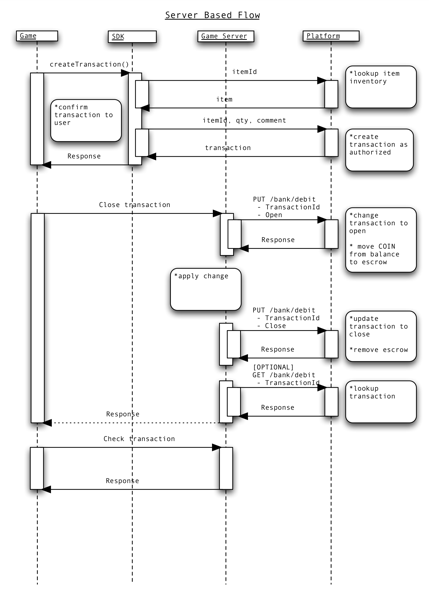
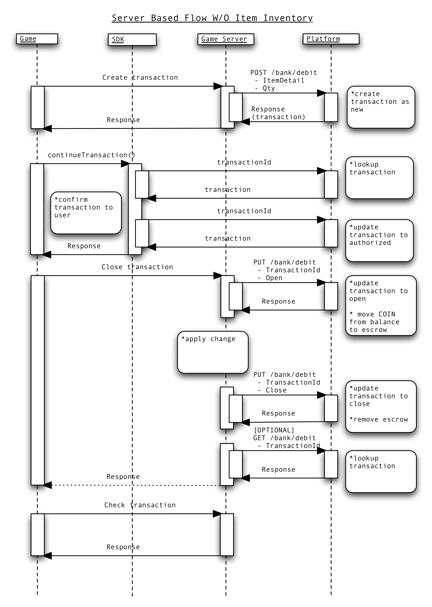
These sequence diagrams display patterns for the Bank Debit APIs.