AndApp SecureLib for Unity 的使用方法
本页介绍有关 AndApp SecureLib for Unity 的使用方法。
有关 AndApp SecureLib for Unity 提供的 API ,详见 AndApp SecureLib for Unity 的附件文档。
使用****方法
启动 Unity Project ,导入 AndAppSecureLib.unitypackage 。
通过导入 AndAppSecureLib.unitypackage ,即可调用 AndApp SecureLib 的功能。
功能列表
HTTP Public Key Pinning
本功能为防止通过非法 SSL 证书进行中间人攻击,故禁止通过非法证书进行通信。
将 Public Key 植入客户端,只能与植入 Public Key 一致的服务器进行通信。
使用****方法
获取 Public Key ,转换成 byte 型数组
首先,获取在 Public Key Pinning 中进行 HTTPS 通信的服务器的 Public Key ,将获取的 Public Key 转换成 byte 型数组 。
可采用如下所述的方法获取 Public Key / 转换成byte 型数组。
使用 Google Chrome 获取 Public Key 的方法
请务必使用 Windows 环境的 Google Chrome 。 在其他环境下, Public Key 的显示方式有所不同。
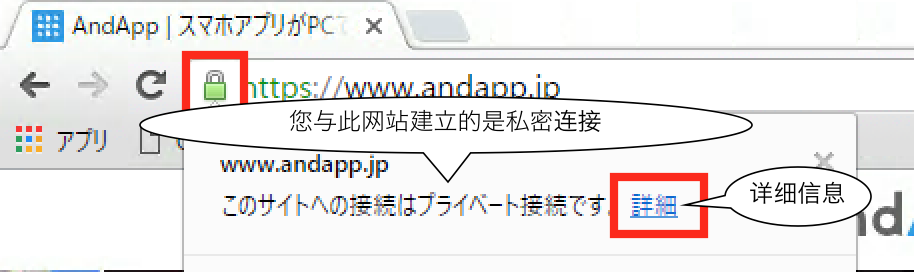
在Google Chrome 中访问Public Key 获取服务器,点击地址栏中的“挂锁标记”。
然后在打开的面板中点击“详细信息”链接。
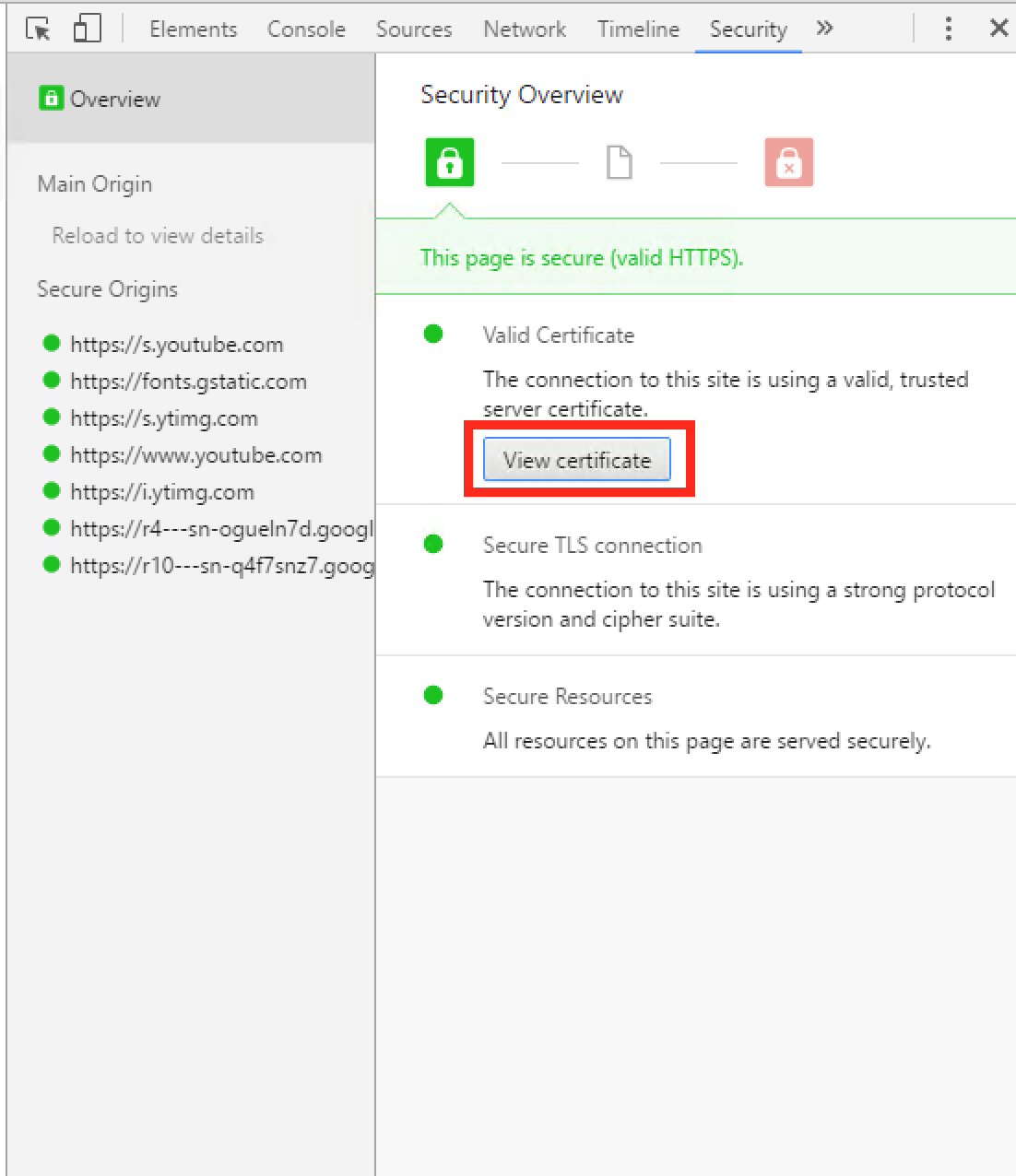
点击“详细”链接后,会显示Security OverView 。
选择希望获取Public Key 的域名,点击 View certificate 键。
点击 View certificate 键后,在打开的证书面板中选择“详细信息”选项卡,从选项中选择“公钥”。
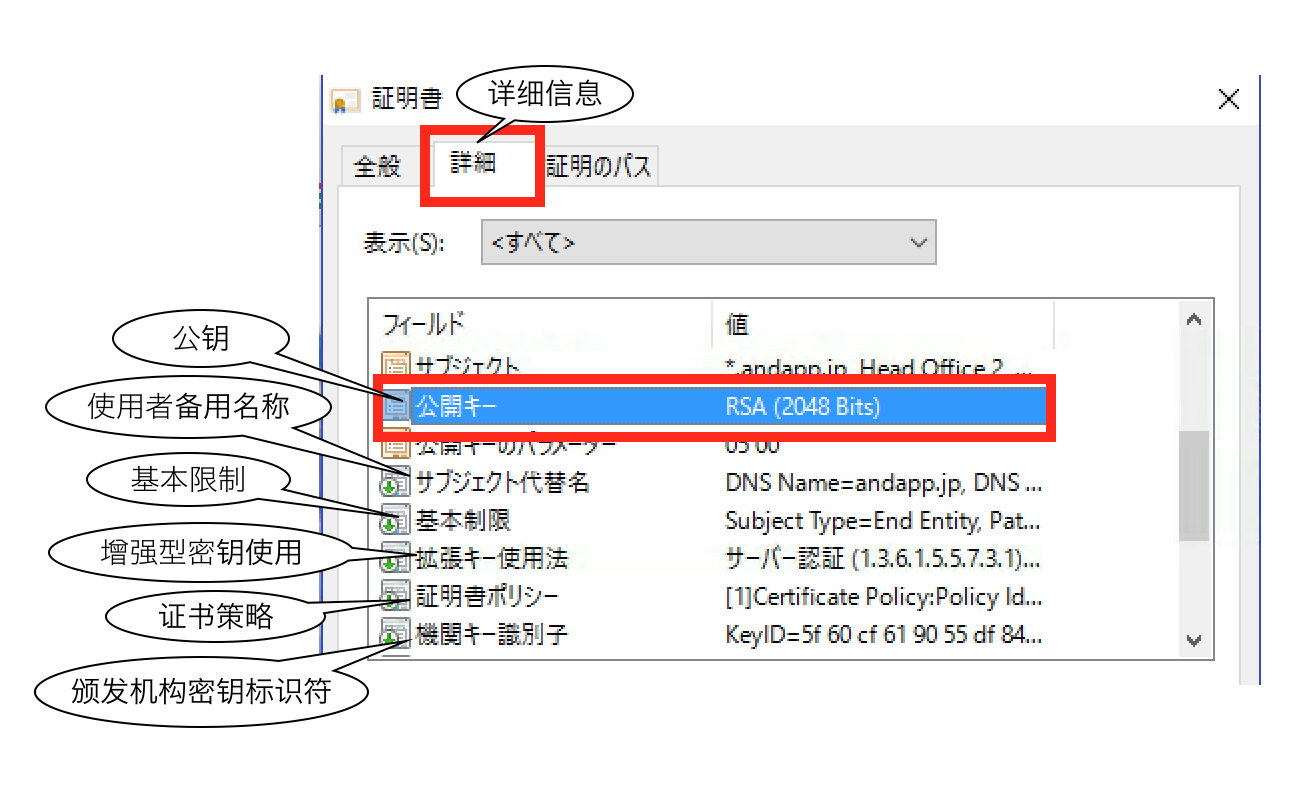
选择公钥后,会显示 Public Key 字符串,保存该字符串。
将获取的 Public Key 字符串转换成如下所述的 std::vector
string publicKey = "A6 83 CD ...";

byte[] bytes = null;
char[] sep = { ' ' };
string[] comps = publicKey.Split(sep);
if (comps.Length > 0)
{
    int j = 0;
    bytes = new byte[comps.Length];
    foreach (string comp in comps)
    {
         bytes[j] = Convert.ToByte(comp, 16);
          j++;
     }
}
使用openssl 命令获取公钥的方法
输入如下所述的命令明获取 16进制字符串的 Public Key 。
获取# www.andapp.jp 的 Public Key 时

openssl s_client -servername www.andapp.jp -connect www.andapp.jp:443 < /dev/null | openssl x509 -outform PEM | openssl x509 -pubkey -noout | sed '/^-/d' | awk '{printf "%s", $1}' | base64 --decode | tail -c +25 | xxd -i
输入上述命令后,会反馈如下所述的结果。
0x30, 0x82, 0x01, 0x0a, 0x02, 0x82...
在通信对象的 SSL 证书中使用 RSA 以外的加密方式时,获取方法可能有所不同。遇此情况时,敬请垂询。
使用openssl 命令获取的 16进制字符串带有 byte 型数组变量。
byte[] bytes = {
   0x30, 0x82, 0x01, 0x0a, 0x02, 0x82...
}
将转换成 byte 型的 Public Key 传递至 AndApp.SecureLib 进行通信
接着,将进行 HTTPS 通信的 URL 主机和 Public Key 转换后的 byte 型数组传递至 AndApp.SecureLib.WWW.PinPublicKey 中。
在此状态下调用 AndApp.SecureLib.WWW(url) ,生成 AndApp.SecureLib.WWW 对象并开始后台下载。
AndApp.SecureLib.WWW.PinPublicKey("www.andapp.jp", bytes);
AndApp.SecureLib.WWW www = new AndApp.SecureLib.WWW(url);
更新履****历
- 2016/09/02
- 使用openssl 命令获取公钥的方法有误,故更正
- 2016/09/01
- 新建