AndApp SecureLib for C++ 的使用方法
本页介绍有关 AndApp SecureLib for C++ 的使用方法。
有关 AndApp SecureLib for C++ 提供 的 API ,详见 AndApp SecureLib for C++ 的附件文档。
SDK 提供形式
AndApp SecureLib for C++ 的提供形式为静态链接库形式。
使用的库根据 Visual Studio 的版本、[配置属性] -> [C/C++] -> [代码生成] -> [运行时库]中设置的项目而不同。
- Visual Studio 2013
- 多线程 (/MT)
- ./lib/VS2013/Release/x86/AndAppSecureLib_MT.lib
- 多线程 调试 (/MTd)
- ./lib/VS2013/Debug/x86/AndAppSecureLib_MT.lib
- 多线程 DLL (/MD)
- ./lib/VS2013/Release/x86/AndAppSecureLib_MD.lib
- 多线程 调试 DLL (/MDd)
- ./lib/VS2013/Debug/x86/AndAppSecureLib_MD.lib
- 多线程 (/MT)
- Visual Studio 2015
- 多线程 (/MT)
- ./lib/VS2015/Release/x86/AndAppSecureLib_MT.lib
- 多线程 调试 (/MTd)
- ./lib/VS2015/Debug/x86/AndAppSecureLib_MT.lib
- 多线程 DLL (/MD)
- ./lib/VS2015/Release/x86/AndAppSecureLib_MD.lib
- 多线程 调试 DLL (/MDd)
- ./lib/VS2015/Debug/x86/AndAppSecureLib_MD.lib
- 多线程 (/MT)
使用方法
进行 SDK 导入。SDK 的导入如下所述。
- 将 AndAppSecureLib 文件夹复制到项目的适当位置。
- 在项目属性中进行 include 文件夹的设置。
- 添加在[配置属性] -> [C/C++] -> [整体] -> [附加包含目录] 中已添加的 AndAppSecureLib 文件夹中的 include 文件夹。
- 将 AndAppSecureLib 文件夹放在项目文件的同位置时,目录为 $(ProjectDir)AndAppSecureLib\include。
- 添加在[配置属性] -> [C/C++] -> [整体] -> [附加包含目录] 中已添加的 AndAppSecureLib 文件夹中的 include 文件夹。
- 在项目属性中设置库。
- 添加在[配置属性] -> [附加库目录] 中已添加的 AndAppSecureLib 文件夹中的 .\lib\VS2013\Debug\x86 。(根据 Visual Studio 的版本、Debug / Release 的设置而有所不同)
- AndAppSDK 文件夹放在项目文件的同位置时,目录为$(ProjectDir)AndAppSecureLib\lib\VS2013\Debug\x86 。
- 请在[配置属性] -> [链接器] -> [输入] -> [附加依赖项] 中添加AndAppSecureLib_MT.lib 。(文件名根据项目运行时的库设置而有所不同)
- 添加在[配置属性] -> [附加库目录] 中已添加的 AndAppSecureLib 文件夹中的 .\lib\VS2013\Debug\x86 。(根据 Visual Studio 的版本、Debug / Release 的设置而有所不同)
- 使用时包含 AndAppSecureLib.h 。只要进行上述设置,即可包含在 #include "AndAppSecureLib.h" 中。
- 请务必将[配置属性] -> [链接器] -> [调试] -> [生成调试信息] 设置为**“否”**。
在正式环境的应用软件中,如果不将 5 [配置属性] -> [链接器] -> [调试] -> [生成调试信息] 设置为“否”,那么会被视为AndApp SecureLib 的符号名,SecureLib 会失效。请务必进行设置。****
如果希望减少编译时的警告,请将与对象 lib 文件相同的文件夹中的 pdb 文件复制到带有执行文件的文件夹。
通过上述操作,可调用 AndApp SecureLib 的功能。
功能****概要
AndApp SecureLib for C++ 1.0.0 具有以下功能。
- AndApp::SecureLib::SecureClass
- 通过继承该类目,可对整个类目进行加密。
- AndApp::SecureLib::SecureFile
- 可进行文件加密。
- AndApp::SecureLib::SecurePrefs
- 可在 Key / Value 形式的加密状态下保存至本地存储器的类目。
- AndApp::SecureLib::HTTPClient
- 不能使用HTTP Public Key Pinning 并通过非法证书进行通信。
功能说****明
- AndApp::SecureLib::SecureClass
- AndApp::SecureLib::SecureFile
- AndApp::SecureLib::SecurePrefs
- AndApp::SecureLib::HTTPClient
AndApp::SecureLib::SecureClass
为了保护内存上的数据,可对整个类目进行加密。如下所示,继承使用 AndApp::SecureLib::SecureClass 。
class Test : public AndApp::SecureLib::SecureClass {
public:
	Test() : x(0), y(1), z(2) {}
	virtual ~Test() {}
	int x;
	int y;
	int z;

protected:

private:

};
类目加密通过 AndApp::SecureLib::SecureClass 的成员函数 Encrypt 进行。
Test *test = new Test();
test->Encrypt(sizeof(Test));
类目解码通过 AndApp::SecureLib::SecureClass 的成员函数 Decrypt 进行。
test->Decrypt(sizeof(Test));
为了将继承 AndApp::SecureLib::SecureClass 的类目删除,删除前需要进行解码。
test->Decrypt(sizeof(Test));
delete test;
AndApp::SecureLib::SecureFile
可进行文件加密。通过传递如下所述的 std::vector
std::string strValue = "AAAAABBBBBBBBBBAAAAAAAAAAAACCCCCCC";
const std::vector<u8> saltBytes = { 0x00, 0x01, 0x02, 0x03 };
const std::vector<u8> data(strValue.begin(), strValue.end());
AndApp::SecureLib::Error err = AndApp::SecureLib::SecureFile::Write("c:¥¥Users¥¥XXXX¥¥cpp_test.txt, saltBytes, data);
可通过如下所述方式进行读取。
const std::vector<u8> saltBytes = { 0x00, 0x01, 0x02, 0x03 };
std::vector<u8> data2;
AndApp::SecureLib::Error err = AndApp::SecureLib::SecureFile::Read("c:¥¥Users¥¥XXXX¥¥cpp_test.txt", saltBytes, data2);
std::string str(data2.begin(), data.2end());
printf("%s", str.c_str());
AndApp::SecureLib::SecurePrefs
本地存储器上可保存的加密 Key / Value 类目。可用如下方法对数据进行保存。可将加密时使用的分发数据传递至salt 。(关于 value 中可指定的类型,请见 SDK 的附件文档)
const std::vector<u8> saltBytes = { 0x00, 0x01, 0x02, 0x03 };
AndApp::SecureLib::SecurePrefs *prefs;
prefs = new AndApp::SecureLib::SecurePrefs();
AndApp::SecureLib::Error err = prefs->Init("c:¥¥Users¥¥XXXX¥¥cpp_test_prefs.txt, saltBytes);

u32 value = 102804;
AndApp::SecureLib::Error err = prefs->Write("num1", value);
可通过如下所述方式进行读取。
u32 value;
AndApp::SecureLib::Error err = prefs->Read("num1", value);
printf("%lu", value);
要将 prefs 对象释放,请使用 delete 。
delete prefs;
AndApp::SecureLib::HTTPClient
本功能为防止使用 HTTP Public Key Pinning 并通过非法 SSL 证书进行中间人攻击,故禁止通过非法证书进行通信。
将 Public Key 植入客户端,只能与植入 Public Key 一致的服务器进行通信。
使用****方法
获取 Public Key ,转换成 byte 型数组
首先,获取在 Public Key Pinning 中进行 HTTPS 通信的服务器的 Public Key ,将获取的 Public Key 转换成 byte 型数组。
可采用如下所述的方法获取 Public Key / 转换成byte 型数组。
使用 Google Chrome 获取 Public Key 的方法
在Google Chrome 中访问要获取Public Key 的服务器,点击地址栏中的“挂锁标记”。
然后在打开的面板中点击“详细信息”链接。
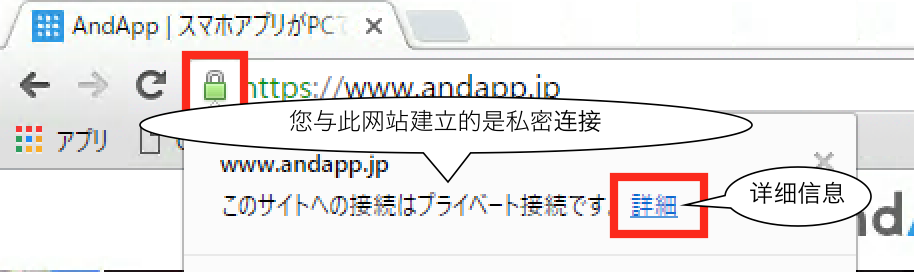
点击“详细信息”链接后,会显示Security OverView 。
选择希望获取Public Key 的域名,点击 View certificate 键。
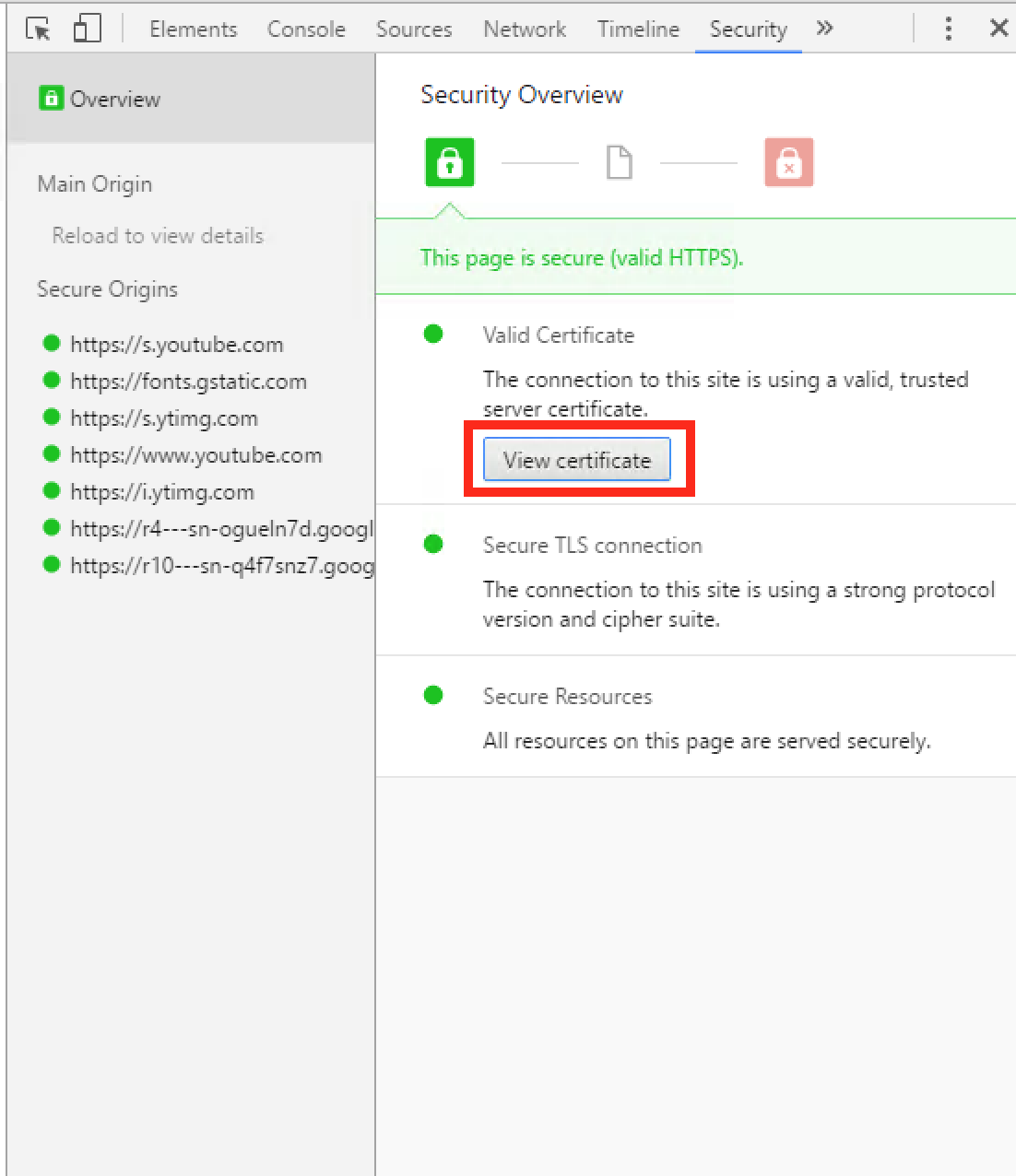
点击 View certificate 键后,在打开的证书面板中选择“详细”选项卡,从选项中选择“公钥”。
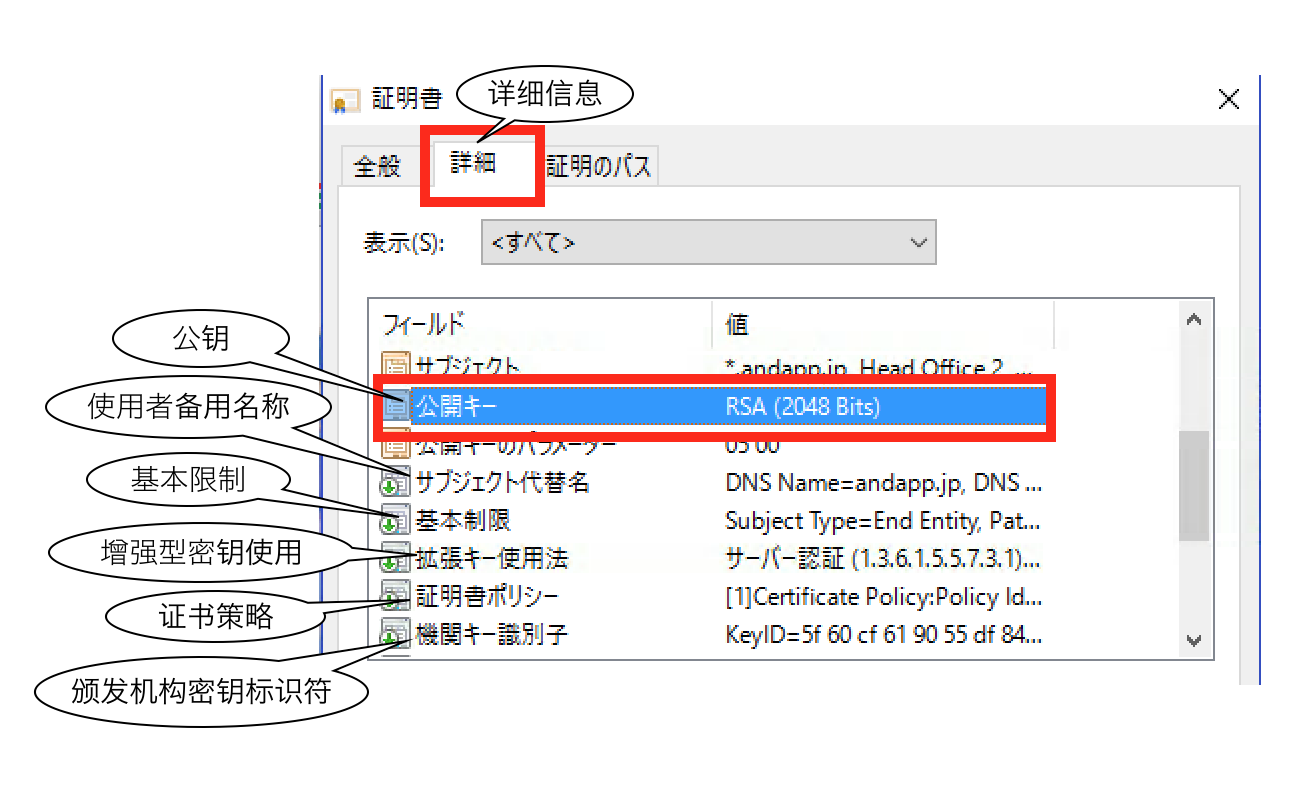
选择公钥后,会显示 Public Key 字符串,保存该字符串。将获取的 Public Key 字符串转换成如下所述的 std::vector
※ 但是,为防止public key 的存在被知晓,建议使用AndApp::SecureLib::SecureClass 加密。通信部分的示例如下。
std::string strPublicKey = "A6 83 CD ...";
std::vector<u8> publicKey;
std::stringstream ss(strPublicKey);
std::string item;
publicKey.clear();
int nBuff;
u8 u8Buff;
char strBuff[20];
while (getline(ss, item, ' ')) {
    if (!item.empty()) {
        sprintf_s(strBuff, "%s", item.c_str());
        sscanf_s(strBuff, "%x", &nBuff);
        u8Buff = (u8)nBuff;
        publicKey.push_back(u8Buff);
    }
}
ss.clear(); // 清除不需要的 publicKey
使用 openssl 命令获取公匙的方法
输入如下所述的命令明获取 16进制字符串的 Public Key 。
获取# www.andapp.jp 的 Public Key 时

openssl s_client -servername www.andapp.jp -connect www.andapp.jp:443 < /dev/null | openssl x509 -outform PEM | openssl x509 -pubkey -noout | sed '/^-/d' | awk '{printf "%s", $1}' | base64 --decode | tail -c +25 | xxd -i
在通信对象的 SSL 证书中使用 RSA 以外的加密方式时,获取方法可能有所不同。遇此情况时,敬请垂询。
输入上述命令后,会反馈如下所述的结果。
0x30, 0x82, 0x01, 0x0a, 0x02, 0x82...
使用openssl 命令获取的 16进制字符串带有 byte 型数组变量。
const u8 bytePublicKey[] = {
   0x30, 0x82, 0x01, 0x0a, 0x02, 0x82...
}
std::vector<u8> publicKey(bytePublicKey, bytePublicKey + sizeof(bytePublicKey));
将转换成 byte 型的 Public Key 传递至 AndApp.SecureLib 进行通信
接着,将进行 HTTPS 通信的 URL 主机和 Public Key 转换后的 std::vector
AndApp::SecureLib::HTTPClient client;
AndApp::SecureLib::Error err = client.Init();
if(err.GetCode() == 0) {
    err = client.PinPublicKey("www.google.com", publicKey);
    if(err.GetCode() == 0) {
        int statusCode = 0;
        std::string finalURI;
        std::map<std::string, std::string> requestHeaders, responseHeaders;
        std::vector<u8> requestBody, responseBody;

        err = client.SendSyncRequest(AALS_HTTP_METHOD_GET, "`https://www.google.com",` requestHeaders, requestBody, finalURI, statusCode, responseHeaders, responseBody);

        if(err.GetCode() == 0) {
            printf("Successfully sent a request");
        }
    }
}
因此如下所述,通过使用 AndApp::SecureLib::SecureClass ,还可对Public Key 等信息进行保护。(但是,HTTPClient::SendASyncRequest 的 Encrypt时机困难,因此不支持)
//  按照SecureClass 継承的类目进行保护
class SecureHTTPClient : public AndApp::SecureLib::SecureClass {
public:
	SecureHTTPClient() {};
	AndApp::SecureLib::Error Init(std::string url, std::vector<u8> publicKey, std::string field, std::string value);
	AndApp::SecureLib::Error SendSyncRequest(AALS_HTTP_METHOD method,
		const std::string& uri,
		const std::map<std::string, std::string>& requestHeaders,
		const std::vector<u8>& requestBody,
		std::string& finalUri,
		int& statusCode,
		std::map<std::string, std::string>& responseHeaders,
		std::vector<u8>& responseBody);
private:
	AndApp::SecureLib::HTTPClient _client;
};
AndApp::SecureLib::Error SecureHTTPClient::Init(std::string url, std::vector<u8> publicKey, std::string field, std::string value) {
	AndApp::SecureLib::Error err;
	err = _client.Init();
	if (err.GetCode() == 0) {
		err = _client.PinPublicKey(url, publicKey);
	}
	else {
		return err;
	}
	if (err.GetCode() == 0 && field.size() > 0) {
		err = _client.SetHeader(field, value);
	}
	else {
		return err;
	}
	return err;
}
AndApp::SecureLib::Error SecureHTTPClient::SendSyncRequest(AALS_HTTP_METHOD method,
	const std::string& uri,
	const std::map<std::string, std::string>& requestHeaders,
	const std::vector<u8>& requestBody,
	std::string& finalUri,
	int& statusCode,
	std::map<std::string, std::string>& responseHeaders,
	std::vector<u8>& responseBody) {
	return _client.SendSyncRequest(method, uri, requestHeaders, requestBody, finalUri, statusCode, responseHeaders, responseBody);
}

// 实际的实现部分 ==============================
SecureHTTPClient *secureClient = new SecureHTTPClient();
AndApp::SecureLib::Error err = secureClient->Init("www.google.com", publicKey, "", "");
secureClient->Encrypt(sizeof(SecureHTTPClient)); // 初步加密
publicKey.clear();
if (err.GetCode() == 0) {
	int statusCode = 0;
	std::string finalURI;
	std::map<std::string, std::string> requestHeaders, responseHeaders;
	std::vector<u8> requestBody, responseBody;
	secureClient->Decrypt(sizeof(SecureHTTPClient)); // 使用前进行解码
	err = secureClient->SendSyncRequest(AALS_HTTP_METHOD_GET, "`https://www.google.com",` requestHeaders, requestBody, finalURI, statusCode, responseHeaders, responseBody);
	if (err.GetCode() == 0) {
		secureClient->Encrypt(sizeof(SecureHTTPClient)); // 使用后加密
		requestHeaders.clear();  // 为慎重起见进行清理
		requestBody.clear();  // 为慎重起见进行清理
		printf("Successfully sent a request");
	}
}
更新履****历
- 2016/09/23
- 新建