AndApp IAP 流程的实现
即使新增了结算方式,结算功能的实现方法不变。
本页介绍AndApp IAP 流程的结算流程。
AndApp IAP 流程是提供当不能使用 Unity IAP 时的结算流程。用于替换现有的结算库。
关于产品
产品是指使用 In-App Payment 的游戏在游戏内出售的内容。游戏需要事先在 AndApp Developer Dashboard 上创建 Sandbox 用产品。
可在产品中设置产品类型。目前 AndApp 支持的产品类型如下。
- 消费型产品 (Consumable Product)
- 消费型产品是指可在游戏内消费的产品。例如,通过使用游戏内虚拟货币或恢复剂等而消费的对虚拟内容适用的产品类型。
今后还预定提供消费型产品以外的产品类型。
创建产品时,需要在AndApp Developer Dashboard 上输入以下属性组。例如,在出售虚拟货币时,请进行虚拟货币出售价位(100 Point、200 Point 等)的多产品注册。
属性 | 说明 |
|---|---|
| 产品 ID | 产品标识符,需要对所有游戏指定唯一的字符串。
|
| 产品类型 | 只能选择消费型产品。 |
| 名称 | 输入商品名。
|
| 说明 | 商品的说明语。(可忽略)
|
| 价格 | 按日元输入价格。请记载用户实际需支付的金额。 |
在Sandbox 中进行产品注册和使用 In-App Payment 的商店嵌入完成后,可向Production 新注册产品。此时可从 Sandbox 向 Production 复制产品。
AndApp IAP 结算流程的实现
下面介绍 AndApp IAP 结算流程。
用语说明
- 游戏
- 实现AndApp SDK 的游戏
- AndApp SDK
- AndApp 的开发套件
- AndApp 客户端
- AndApp 的专用应用
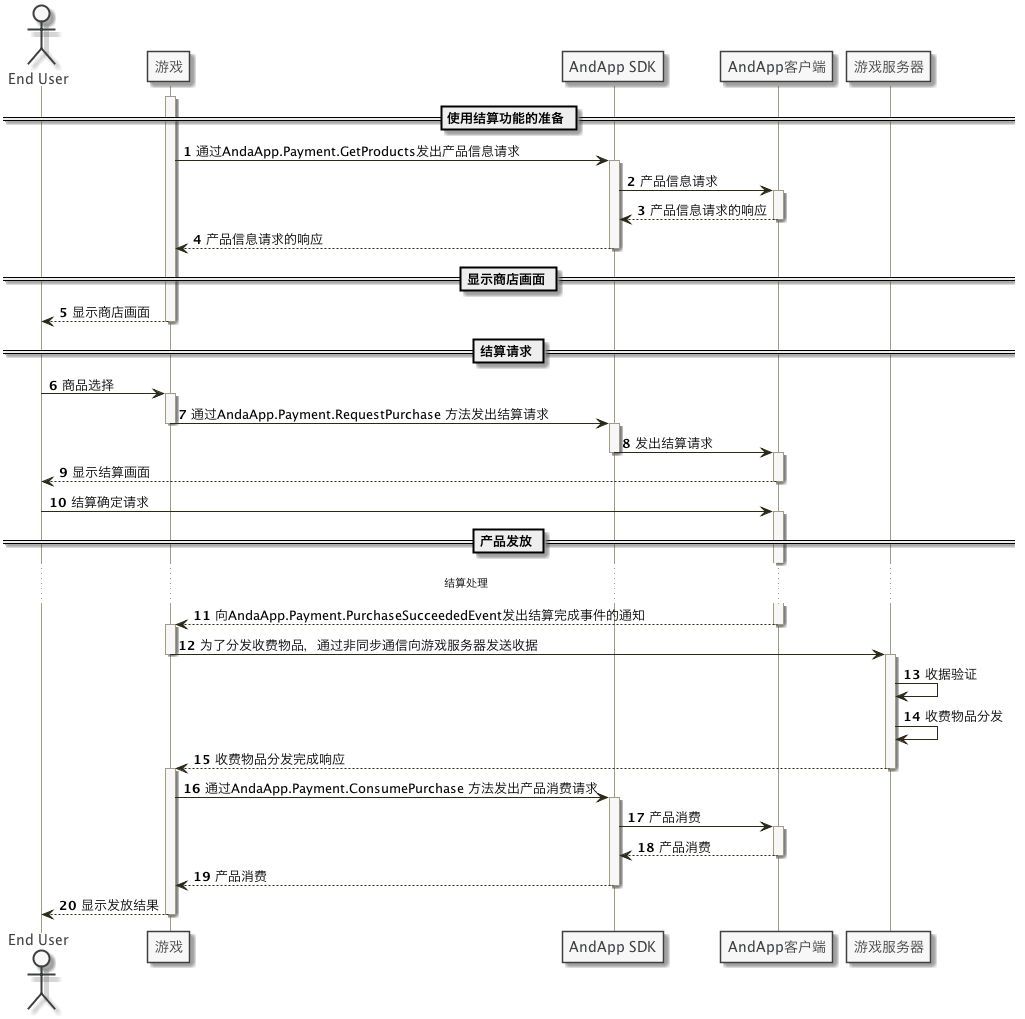
购买流程大致分为以下 6 个进程。
下面介绍各进程的实现方法。
获取产品信息
为了使用In-App Payment 的结算功能,需要进行以下准备。
- 将产品 ID 数组传递至AndApp.Payment.GetProducts() ,获取产品信息。可按 List
型获取产品信息。
string[] productIds = {
   "com.yourdomain.product_id100",
   "com.yourdomain.product_id500",
   "com.yourdomain.product_id1000"
};
AndApp.Payment.GetProducts (productIds,  (error, products, invalidProductIds) => {
    // 从List<Product> products获取产品信息
});
显示商店画面
游戏内商店如有希望显示的产品,游戏需要事先知道这些产品所有的产品 ID 。请通过获取产品信息,获取商店中显示的所有产品信息。
请求结算
按照下述步骤进行用户希望购买的产品的结算请求。
- 进行结算成功时和结算失败时的回调事件注册。
- 在AndApp.Payment.RequestPurchase() 参数中调用 ID 并执行 productId 。
void requestPurchase() {
    AndApp.Payment.PurchaseSucceededEvent += OnPurchaseSucceeded;
    AndApp.Payment.PurchaseFailedEvent += OnPurchaseFailed;
    AndApp.Payment.RequestPurchase (productId);
}
如上所述,执行 AndApp.Payment.RequestPurchase() 后,在AndApp 客户端会显示结算处理画面。然后用户发出结算确定请求以完成结算。
从AndApp SDK 0.2.0 起,可在AndApp.Payment.RequestPurchase 中选择附加 Developer Payload 。 ※ developerPayload 可忽略。
AndApp.Payment.RequestPurchase ( string productId, string developerPayload = null)
收据内含有指定的 developerPayload 。
产品发放
在结算完成的稍后,会向 AndApp.Payment.PurchaseSucceededEvent 中设置的 OnPurchaseSucceeded 发出结算完成的通知。
参数 AndApp.Purchase 中含有购买的产品及其收据信息。通过在游戏服务器端进行该收据信息的验证,游戏端向用户发放产品。
具体按以下步骤进行产品发放。
- 向游戏服务器发送收据
- 在游戏服务器端进行收据验证
- 在游戏服务器端进行产品发放处理
- 在游戏端进行产品消费处理
void OnPurchaseSucceeded (AndApp.Purchase purchase) {
    // 结算确定时
    // 向游戏服务器发送收据信息
    sendReceipt(purchase.Receipt, (error, transactionId) => {
        if(!error){
             // 错误处理
             return;
        }
        // 消费处理
        AndApp.Payment.ConsumePurchase(transactionId, (consumeError) => {
           // 消费处理响应。通常不需要特别处理
        });
    });
}
void OnPurchaseFailed (AndApp.Error error, string productId){
    // 取消、发生错误时
}
游戏服务器端在完成收据验证和产品发放之后,等待游戏服务器端的完成响应,然后按如下所述进行产品消费处理。※ 以上sendReceipt() 是向游戏服务器发送收据的独有方法。
AndApp.Payment.ConsumePurchase(transactionId, (consumeError) => {
    // 消费处理响应。通常不需要特别处理
});
收据验证
在游戏服务器上进行收据验证。
AndApp.Purchase.Receipt 中含有如下所述的收据信息,直接发送至游戏服务器。
eyJhbGciOiJIUzI1NiIsIn.R5cCI6IkpXVCJ9
※ AndApp.Purchase 的成员函数如下所述。
Key | type | Value |
|---|---|---|
| TransactionId | int | 由商店提供的Transaction ID |
| Receipt | string | 存储交易信息的 JWT。developerPayload 等信息也存储在其中。 |
收据信息的验证
收据信息由 JSON Web Token 构成,需要进行验证。
收据信息的验证方法有以下2种。
使用Introspection API
通过向 Introspection API 发送Receipt ,进行收据信息的验证。 Introspection API 的详情请见 这里 。
为了进行收据信息的验证,向 Introspection API 发送如下所述的请求。
HTTPS Request
POST /1.0.0/payment/introspection HTTP/1.1
Host: sb-api.andapp.jp:443
Content-Type: application/json
Authorization: Bearer {access_token}

{
    "transactionToken": "eyj..."
}
为了向Introspection API 发送请求,需要使用通过OAuth 2.0 手续获取的 Access Token 。
Access Token 的获取方法请见 这里 。
如果向Introspection API 发送请求成功且收据信息适当,会如下所述反馈 HTTP Status: 200 OK 和收据内容的响应。
HTTPS Response
HTTP/1.1 200 OK
Content-Type: application/json

{
    "iss": "https://sb-api.andapp.jp/1.0.0/payment",
    "sub": "https://sb-api.andapp.jp/1.0.0/users/6104524",
    "aud": "https://sb-api.andapp.jp/1.0.0/clients/189268204754",
    "typ": "transaction_token",
    "iat": 1464095267,
    "exp": 1464096167,
    "transaction": {
        "id": 1234567890123456,
        "clientId": 189268204754,
        "userId": 1234567890123456,
        "product": {
            "id": "xxx.yyy.zzz.3000",
            "clientId": 189268204754,
            "type": "CONSUMABLE",
            "state": "AVAILABLE",
            "prices": [
                { "value": 3240, "currency": "JPY", "taxRate": 8 }
            ],
            "language": "ja-JP",
            "title": "物品名",
            "description": "物品说明",
            "createdAt": 1463468400,
            "updatedAt": 1463468400
        },
        "quantity": 2,
        "totalPrice": { "value": 6480, "currency": "JPY", "taxRate": 8 },
        "state": "PURCHASED",
        "developerPayload": "",
        "refundTo": null,
        "refundedBy": null,
        "consumedAt": null,
        "purchasedAt": 1463468400,
        "createdAt": 1463468400,
        "updatedAt": 1463468400
    }
}
使用公钥进行JWT解码和验证
关于在游戏服务器进行JWT 验证的方法,请见以下 URL 的“JWT 的验证步骤”。
https://docs.mobage.com/display/JPANDAPP/DevelopmentUnity_JSONWebToken_AndApp
收据确认
收据信息验证完成后,确认收据内容。
请确认购买产品的产品 ID 、价格等信息。
{
    "iss": "https://sb-api.andapp.jp/1.0.0/payment",
    "sub": "https://sb-api.andapp.jp/1.0.0/users/6104524",
    "aud": "https://sb-api.andapp.jp/1.0.0/clients/189268204754",
    "typ": "transaction_token",
    "iat": 1464095267,
    "exp": 1464096167,
    "transaction": {
        "id": 1234567890123456,
        "clientId": 189268204754,
        "userId": 6104524,
        "product": {
            "id": "xxx.yyy.zzz.3000",
            "clientId": 189268204754,
            "type": "CONSUMABLE",
            "state": "AVAILABLE",
            "prices": [
                { "value": 3240, "currency": "JPY", "taxRate": 8.0 }
            ],
            "language": "ja-JP",
            "title": "物品名",
            "description": "物品说明",
            "createdAt": 1463468400,
            "updatedAt": 1463468400
        },
        "quantity": 2,
        "totalPrice": { "value": 6480.00, "currency": "JPY", "taxRate": 8.0 },
        "state": "PURCHASED",
        "developerPayload": "",
        "purchasedAt": 1463468400,
        "createdAt": 1463468400,
        "updatedAt": 1463468400
    }
}
收据中的 transaction 的内容说明如下。
| property | title | type | required | description |
|---|---|---|---|---|
| iss | Issuer 要求 | string | true | 表示发行者的 URI。 根据执行环境,其值如下。 sandbox https://sb-api.andapp.jp/1.0.0/payment
正式环境 https://api.andapp.jp/1.0.0/payment
|
| sub | Subject 要求 | string | true | 表示已支付玩家的URI 。 根据执行环境, URI 格式 (URI Template 格式) 如下。 sandbox https://sb-api.andapp.jp/1.0.0/users{/playerId}
正式环境 https://api.andapp.jp/1.0.0/users{/playerId}
|
| aud | Audience 要求 | string | true | 表示已请求支付的游戏 Client ID 的 URI。 根据执行环境, URI 格式 (URI Template 格式) 如下。 sandbox https://sb-api.andapp.jp/1.0.0/clients{/clientId}
正式环境 https://api.andapp.jp/1.0.0/clients{/clientId}
|
| typ | Token类别 | string | true | transaction_token 的固定值 |
| iat | 发行时间的UNIX 时间戳 | integer | true | 表示transaction_token 发行时间的 UNIX 时间戳值 |
| exp | 失效时间的UNIX 时间戳 | integer | true | 表示transaction_token 失效时间的 UNIX 时间戳值 超过失效时间的 Transaction Token 会失效 |
| transaction | 交易 对象 | object | true |
|
| transaction.id | 交易 ID | integer | true | 最大 16 位 |
| transaction.product | 已购买的产品对象 | object | true | |
| transaction.clientId | 已创建交易对象的 客户端 ID | integer | true | 最大 16 位 |
| transaction.userId | 已创建交易对象的 玩家 ID | integer | true | 最大 16 位 |
| transaction.product.id | 产品对象的 ID | string | true | |
| transaction.product.clientId | 已创建产品对象的客户端 ID | integer | true | 最大 16 位 |
| transaction.product.type | 产品类别 | string | true | CONSUMABLE 的固定值 |
| transaction.product.state | 产品状态 | string | true | AVAILABLE 的固定值 |
| transaction.product.prices | 不同货币的产品含税价格表 | array | true | |
| transaction.product.prices[] | 不同货币的产品含税价格对象 | object | true | |
| transaction.product.prices[].value | 价格 | number | true | |
| transaction.product.prices[].currency | 货币单位 | string | true | JPY 的固定值 |
| transaction.product.prices[].taxRate | 税率(%) | number | true | 0-100 之间的值 |
| transaction.product.language | 语言 | string | true | ja-JP 的固定值 |
| transaction.product.title | 产品名称 | string | true | |
| transaction.product.description | 产品说明语 | string | true | |
| transaction.product.createdAt | 产品创建时间的 UNIX 时间戳 | integer | true | |
| transcation.product.updatedAt | 产品更新时间的 UNIX 时间戳 | integer | true | |
| transaction.quantity | 购买数量 | integer | true | |
| transaction.totalPrice | 含税合计购买价格对象 | object | true | |
| transaction.totalPrice.value | 合计价格 | number | true | |
| transaction.totalPrice.currency | 货币单位 | string | true | JPY 的固定值 |
| transaction.totalPrice.taxRate | 税率(%) | number | true | 0-100 之间的值 |
| transaction.state | 交易状态 | string | true | PURCHASED 的固定值 |
| transaction.developerPayload | 请求支付时由开发者指定的任意有效载荷 | string | true | |
| transaction.refundTo | 退款接收方的交易 ID | integer | true | null的固定值 |
| transaction.refundedBy | 退款方的交易 ID | integer | true | null的固定值 |
| transaction.consumedAt | 产品消费时间的UNIX 时间戳 | integer | true | null的固定值 |
| transaction.purchasedAt | 支付确定时间的UNIX 时间戳 | integer | true | |
| transaction.createdAt | 交易创建时间的UNIX 时间戳 | integer | true | |
| transaction.updatedAt | 交易更新时间的UNIX 时间戳 | integer | true | |
| developerPayload | 开发者可任意输入的搜索框 | string | true | 0-4096 字, 默认带有 "" 。 |
还原处理
为了应对向游戏服务器发出“结算确定请求”或“产品消费请求”失败的情况,需要实现还原处理。
可在AndApp.Payment.GetPurchases 中获取未消费产品列表,重新向游戏服务器发出“结算确定请求”和“产品消费请求”。
向游戏服务器发出结算完成请求后,即使已确定,仍请执行后续的消费请求(AndApp.Payment.ConsumePurchase())。
此外,对于调用还原处理的时间节点,请在游戏端希望还原的时间节点(如: Start() 或 OnApplicationPause() 等)进行调用。
void Start() {
    // 获取已购买但未消费的产品信息
    AndApp.Payment.GetPurchases((AndApp.Error error, List<AndApp.Purchase> purchases) => {
        foreach (AndApp.Purchase purchase in purchases){
            SendReceiptToGameServer(purchase.Receipt);
        }
    });
}
void SendReceiptToGameServer(string receipt){
    // 结算确定请求
    // 向游戏服务器发送收据信息
    sendReceipt(receipt, (error, transactionId) => {
		// 消费处理(即使物品已发放仍需进行)
        AndApp.Payment.ConsumePurchase(transactionId, (consumeError) => {
			// 消费处理的响应。通常不需要特别处理
        });
    });
}
更新履历
- 2017/03/13
- 添加消费前发生错误时的错误处理
- 2017/02/22
- 增补了梦宝谷币导入后结算实现无更改的叙述。
- 2016/12/16
- 原本 AndApp.Payment.GetPurchases() 参数的记载有误,故更正。
- 2016/11/02
- 从AndApp SDK for Unity 1.0.0 起,AndApp.Payment.GetProducts 的 Callback 参数中添加了 invalidProductIds ,故增补
- 2016/10/05
- 收据信息的说明中遗漏了 transaction.clientId 和 transaction.userId 的说明,故增补。
- 2016/08/23
- 已可通过RequestPurchase 添加 developerPayload ,故增补。
- 2016/07/28
- 增补了使用Introspection API 的收据信息验证方法
- 2016/07/26
- 在AndApp.Payment.PurchaseFailedEvent 中设置的回调函数的第二参数添加了 productId ,故增补
- AndApp.Payment.GetPurchases() 的第一参数原有 productIds ,因式样变更而不再需要,故删除
- 2016/07/25
- 更改了AndApp.Payment.RequestPurchase 的参数。删除了UI 关闭时的回调。
-
AndApp.Payment.ConsumePurchase 的第一参数变为 transactionId ,故更正。
- 2016/06/06
- 新建