友達とチャットする
チャットの API を利用して、ゲーム内でユーザー同士がチャットするプログラムを開発していきます。
- 1 ユーザにつき、1 チャットルームを作成し、特定ユーザーのみにメッセージ(ゲームからのお知らせ)を送る行為は禁止されています。
- 1アプリケーションにつき生成できるチャンネルの最大エントリ数は 1,000,000 件 になります。
チャット機能を有効にする
チャット機能を利用するには、Mobage Developers 上でチャット機能を有効化する設定を行う必要があります。
有効化するためには、「SPWeb」タブの下部にチャットのセクションがありますので、ゲームチャットへの導線(Sandbox)で「オン」ボタンをクリックして有効化します。
本番で有効化するためには、ゲームチャットへの導線(本番用)で「オン」ボタンをクリックして下さい。
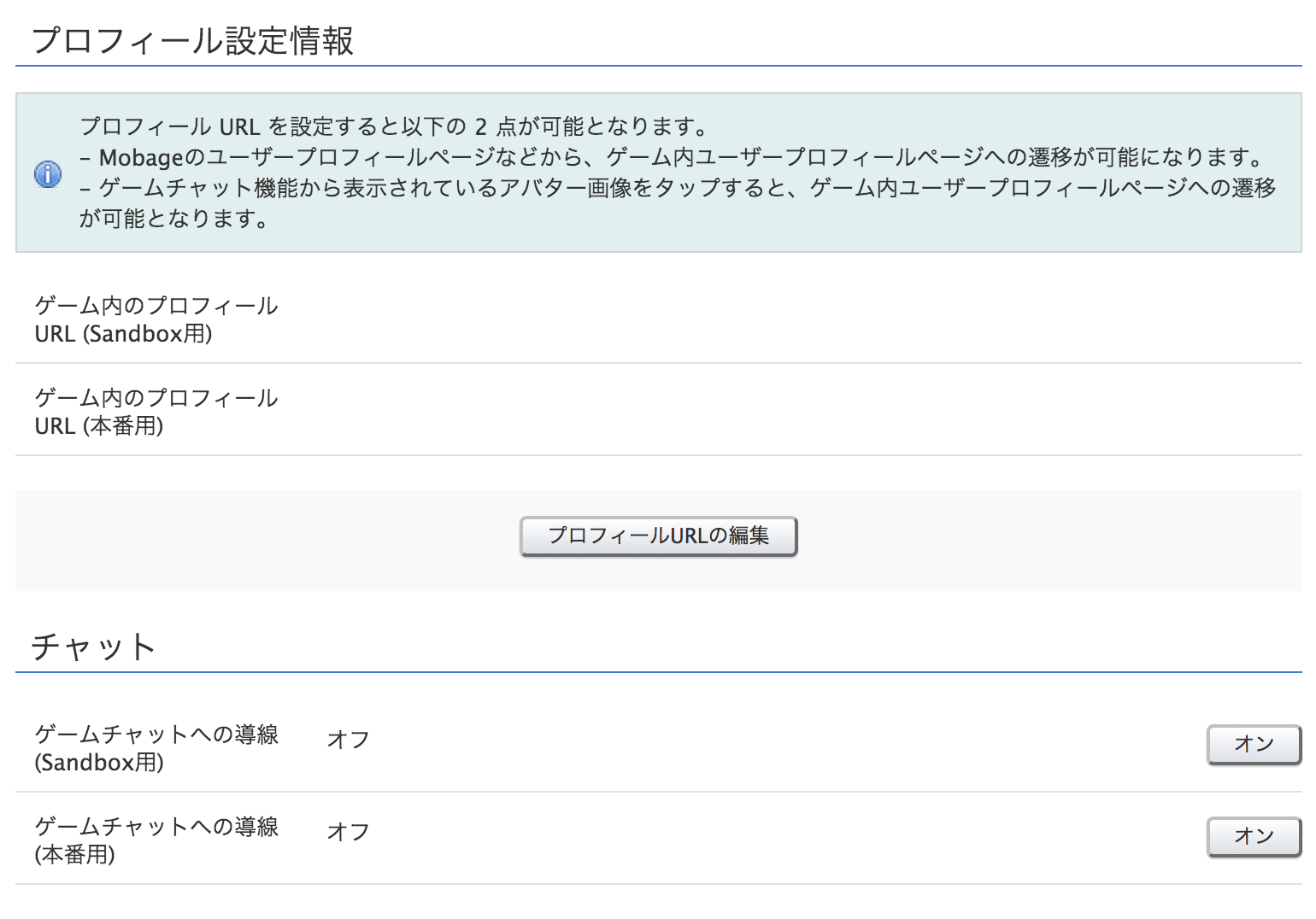
また、上記画面でプロフィール設定情報というセクションがありますが、ゲーム内のチャット画面から各ユーザーのアイコンをタップした際に遷移する URL が設定できます。
何も設定しない場合には、アイコンをタップしてもどこにも遷移しません。上記の「プロフィールURLの編集」ボタンをクリックすると以下の画面が表示されますので、こちらで設定します。
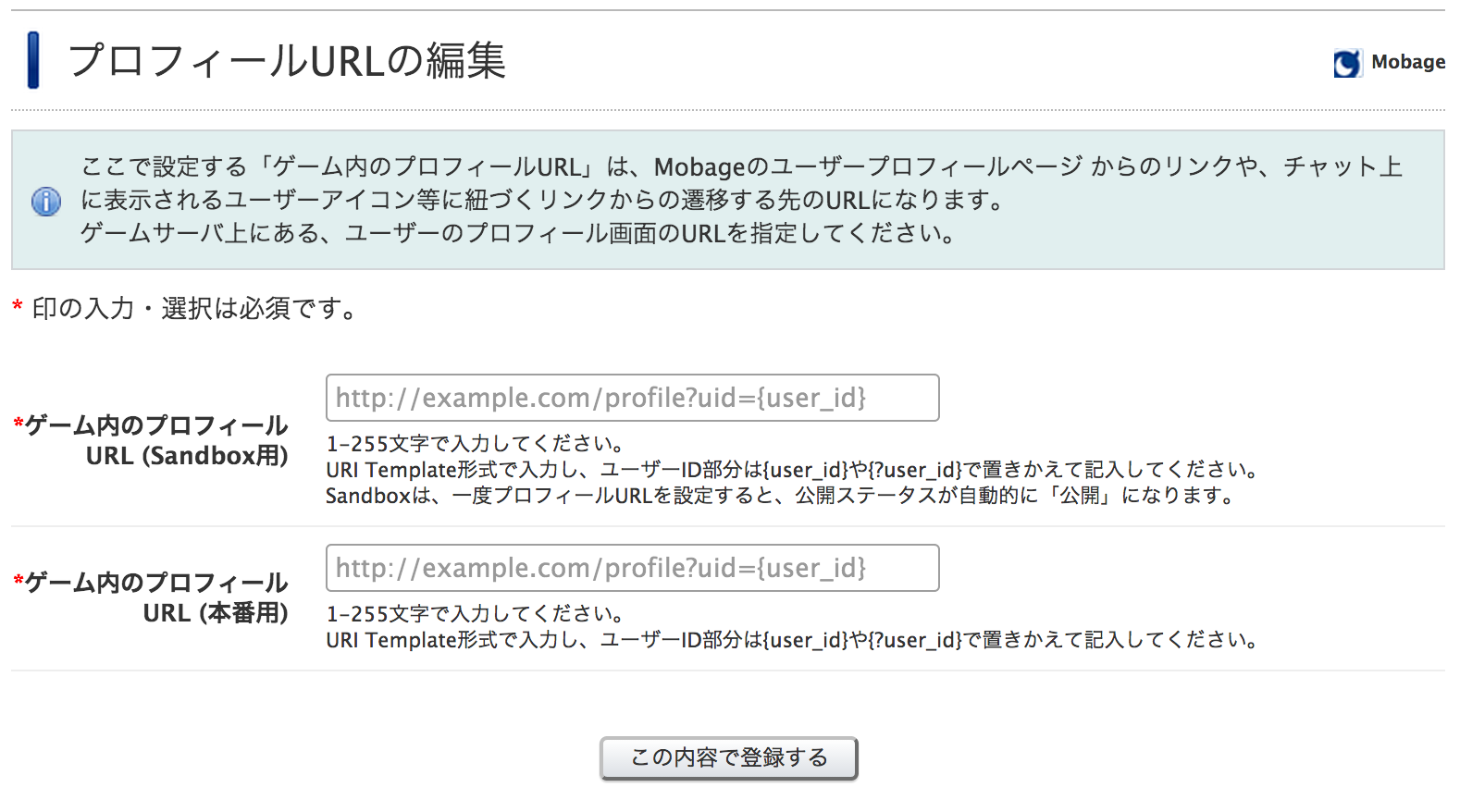
このチュートリアルでは以下のように入力します。
http://dev.gameserver.com/profile.php?user_id={user_id}
このチュートリアルでは、People API でニックネームとサムネイル画像を表示しますが、ゲーム内でのプロフィールを表示するだけでも構いません。
以下のような、profile.php を作成して上記 URL になるようにゲームサーバーへ配置しておきましょう。
<?php
require_once ('OAuth.php');
require_once ('validator.php');

// Validate Request from Gadget Server
$valid = RequestValidator::validate();
if (!$valid) {
	// Respond Error Page
	print('<html><body><p>Invalid Request from Gadget Server</p></body></html>');
	exit ;
}

// User ID
$user_id = $_REQUEST['user_id'];

// Consumer Key from Mobage Developers
$consumer_key = 'YourConsumerKey';
// Consumer Secret from Mobage Developers
$consumer_secret = 'YourConsumerSecret';
// OAuth Consumer
$consumer = new OAuthConsumer($consumer_key, $consumer_secret, NULL);

// Request from Gadget Server
$request_from_gadget = OAuthRequest::from_request(NULL, NULL, NULL);
// opensocial_viewer_id from Gadget Server
$viewer_id = $request_from_gadget -> get_parameter('opensocial_viewer_id');
// Token from Gadget Server
$token_from_gadget = new OAuthToken($request_from_gadget -> get_parameter('oauth_token'), $request_from_gadget -> get_parameter('oauth_token_secret'));

// EndPoint URL for People API
$url = "http://sb.sp.app.mbga.jp/api/restful/v1/people/$user_id/@self?xoauth_requestor_id=$viewer_id";
// HTTP Method
$method = 'GET';
// Parse Parameters
parse_str(parse_url($url, PHP_URL_QUERY), $param);
// Request to API Server
$request_to_API = OAuthRequest::from_consumer_and_token($consumer, $token_from_gadget, $method, $url, $param);
// Generate OAuth Signature
$request_to_API -> sign_request(new OAuthSignatureMethod_HMAC_SHA1(), $consumer, $token_from_gadget);
// Create Authorization Header
$auth_header = $request_to_API -> to_header();

// Execute HTTP Request to API Server
$curl = curl_init($url);
curl_setopt($curl, CURLOPT_RETURNTRANSFER, true);
curl_setopt($curl, CURLOPT_FAILONERROR, false);
curl_setopt($curl, CURLOPT_ENCODING, "gzip");
curl_setopt($curl, CURLOPT_HTTPHEADER, array($auth_header));
$response = curl_exec($curl);
$status_code = curl_getinfo($curl, CURLINFO_HTTP_CODE);
curl_close($curl);

// Check Response from API Server
if ($status_code != 200) {
	// Respond Error Page
	print("<html><body><p>Got an error from API Server ($status_code, $response)</p></body></html>");
	exit ;
}

// Parse JSON in Response
$person = json_decode($response);
$id = $person -> {'person'} -> {'id'};
$nickname = $person -> {'person'} -> {'nickname'};
$thumbnailUrl = $person -> {'person'} -> {'thumbnailUrl'};
$profileUrl = $person -> {'person'} -> {'profileUrl'};
?>
<!DOCTYPE html>
<html>
<head>
<meta http-equiv="Content-Type" content="text/html; charset=UTF-8">
<meta name="viewport" content="width=device-width" />
</head>
<body style="margin: 0; text-align: center;">
	<p>
		<?=$nickname ?>
	</p>
	<a href="<?=$profileUrl ?>"> <img src="<?= $thumbnailUrl ?>">
	</a>
</body>
</html>
ユーザーのチャット一覧を表示する
まずはじめに、ユーザーが参加しているチャット一覧を表示するプログラムを開発します。ユーザーが参加しているチャットのチャンネルの一覧を取得するには、User Chat Channel API を利用します。
以下のような、chat_list.php を開発します。
<?php
require_once ('OAuth.php');
require_once ('validator.php');

// Validate Request from Gadget Server
$valid = RequestValidator::validate();
if (!$valid) {
	// Respond Error Page
	print('<html><body><p>Invalid Request from Gadget Server</p></body></html>');
	exit ;
}

// Application ID from Mobage Developers
$app_id = 'YourApplicationID';
// Consumer Key from Mobage Developers
$consumer_key = 'YourConsumerKey';
// Consumer Secret from Mobage Developers
$consumer_secret = 'YourConsumerSecret';
// OAuth Consumer
$consumer = new OAuthConsumer($consumer_key, $consumer_secret, NULL);

// Request from Gadget Server
$request_from_gadget = OAuthRequest::from_request(NULL, NULL, NULL);
// opensocial_viewer_id from Gadget Server
$viewer_id = $request_from_gadget -> get_parameter('opensocial_viewer_id');
// Token from Gadget Server
$token_from_gadget = new OAuthToken($request_from_gadget -> get_parameter('oauth_token'), $request_from_gadget -> get_parameter('oauth_token_secret'));

// EndPoint URL for User Chat Channel API
$url = "http://sb.sp.app.mbga.jp/social/api/restful/v2/people/@me/@self/channels?xoauth_requestor_id=$viewer_id";
// HTTP Method
$method = "GET";
// Parse Parameters
parse_str(parse_url($url, PHP_URL_QUERY), $param);
// Request to API Server
$request_to_API = OAuthRequest::from_consumer_and_token($consumer, $token_from_gadget, $method, $url, $param);
// Generate OAuth Signature
$request_to_API -> sign_request(new OAuthSignatureMethod_HMAC_SHA1(), $consumer, $token_from_gadget);
// Create Authorization Header
$auth_header = $request_to_API -> to_header();

// Execute HTTP Request to API Server
$curl = curl_init($url);
curl_setopt($curl, CURLOPT_RETURNTRANSFER, true);
curl_setopt($curl, CURLOPT_FAILONERROR, false);
curl_setopt($curl, CURLOPT_ENCODING, 'gzip');
curl_setopt($curl, CURLOPT_HTTPHEADER, array($auth_header));
$response = curl_exec($curl);
$status_code = curl_getinfo($curl, CURLINFO_HTTP_CODE);
curl_close($curl);

// Check Response from API Server
if ($status_code != 200) {
	// Respond Error Page
	print("<html><body><p>Got an error from API Server ($status_code, $response)</p></body></html>");
	exit ;
}

// Parse JSON in Response
$channels = json_decode($response);
$entry = $channels -> {'entry'};
?>
<!DOCTYPE html>
<html>
<head>
<meta http-equiv="Content-Type" content="text/html; charset=UTF-8">
<meta name="viewport" content="width=device-width" />
</head>
<body style="margin: 0; text-align: center;">
	<?php
	for($i =0; $i < count($entry); ++$i){
		$channel_id = $entry[$i] -> {'id'};
		$unread_messages = $entry[$i] -> {'unreadMessages'};
		?>
	<a href="?url=http%3A%2F%2Fdev.gameserver.com%2Fchat.php?channel_id=<?=$channel_id ?>">Chat Room <?=$channel_id ?> (<?=$unread_messages ?>)
	</a>
	<br>
	<br>
	<?php
    }
    ?>
	<a href="?url=http%3A%2F%2Fdev.gameserver.com%2Fchat_create.php">Create New Chat Channel</a>
</body>
</html>
プログラムの流れを説明します。
まず、validator.php を利用して妥当性検証を行います。
require_once ('OAuth.php');
require_once ('validator.php');

// Validate Request from Gadget Server
$valid = RequestValidator::validate();
if (!$valid) {
	// Respond Error Page
	print('<html><body><p>Invalid Request from Gadget Server</p></body></html>');
	exit ;
}
次は、API サーバーへのアクセスの準備をします。まずは、API サーバー OAuth のパラメーターに必要な、Consumer KeyとConsumer Secretを準備します。
// Consumer Key from Mobage Developers
$consumer_key = 'YourConsumerKey';
// Consumer Secret from Mobage Developers
$consumer_secret = 'YourConsumerSecret';
// OAuth Consumer
$consumer = new OAuthConsumer($consumer_key, $consumer_secret, NULL);
User Chat Channel API へのアクセスは Proxy モデル (OAuth のトークンを利用するモデル) を使用しますので、Gadget サーバーから渡される、OAuth のトークンと opensocial_viewer_id (ページを閲覧しているログインユーザーのID) を取得します。
// Request from Gadget Server
$request_from_gadget = OAuthRequest::from_request(NULL, NULL, NULL);
// opensocial_viewer_id from Gadget Server
$viewer_id = $request_from_gadget -> get_parameter('opensocial_viewer_id');
// Token from Gadget Server
$token_from_gadget = new OAuthToken($request_from_gadget -> get_parameter('oauth_token'), $request_from_gadget -> get_parameter('oauth_token_secret'));
User Chat Channel API へ GET リクエストするために、エンドポイント URL と認証のための Authorization を生成します。
// EndPoint URL for User Chat Channel API
$url = "http://sb.sp.app.mbga.jp/social/api/restful/v2/people/@me/@self/channels?xoauth_requestor_id=$viewer_id";
// HTTP Method
$method = "GET";
// Parse Parameters
parse_str(parse_url($url, PHP_URL_QUERY), $param);
// Request to API Server
$request_to_API = OAuthRequest::from_consumer_and_token($consumer, $token_from_gadget, $method, $url, $param);
// Generate OAuth Signature
$request_to_API -> sign_request(new OAuthSignatureMethod_HMAC_SHA1(), $consumer, $token_from_gadget);
// Create Authorization Header
$auth_header = $request_to_API -> to_header();
上記で生成された OAuthの Authorization ヘッダーを利用して API サーバーへのリクエストを実行します。API サーバーからのレスポンスが 200 以外の場合は、エラーとします。
// Execute HTTP Request to API Server
$curl = curl_init($url);
curl_setopt($curl, CURLOPT_RETURNTRANSFER, true);
curl_setopt($curl, CURLOPT_FAILONERROR, false);
curl_setopt($curl, CURLOPT_ENCODING, 'gzip');
curl_setopt($curl, CURLOPT_HTTPHEADER, array($auth_header));
$response = curl_exec($curl);
$status_code = curl_getinfo($curl, CURLINFO_HTTP_CODE);
curl_close($curl);

// Check Response from API Server
if ($status_code != 200) {
	// Respond Error Page
	print("<html><body><p>Got an error from API Server ($status_code, $response)</p></body></html>");
	exit ;
}
API サーバーのレスポンス内にある JSON を解析して User Chat Channel オブジェクトの配列を取得し、for 文で件数分のチャット画面へのリンクを生成します。次に開発する chat.php へのリンクにリクエストパラメーターとしてチャンネル ID が渡るようにしておきます。また、チャットを新規に生成する機能して、最下部に、chat_create.php へのリンクも追加しておきましょう。
// Parse JSON in Response
$channels = json_decode($response);
$entry = $channels -> {'entry'};
?>
<!DOCTYPE html>
<html>
<head>
<meta http-equiv="Content-Type" content="text/html; charset=UTF-8">
<meta name="viewport" content="width=device-width" />
</head>
<body style="margin: 0; text-align: center;">
	<?php
	for($i =0; $i < count($entry); ++$i){
		$channel_id = $entry[$i] -> {'id'};
		$unread_messages = $entry[$i] -> {'unreadMessages'};
		?>
	<a href="?url=http%3A%2F%2Fdev.gameserver.com%2Fchat.php?channel_id=<?=$channel_id ?>">Chat Room <?=$channel_id ?> (<?=$unread_messages ?>)
	</a>
	<br>
	<br>
	<?php
    }
    ?>
	<a href="?url=http%3A%2F%2Fdev.gameserver.com%2Fchat_create.php">Create New Chat Channel</a>
</body>
</html>
チャット画面を表示する
次にチャットを実際に表示する画面を開発します。リクエストパラメーターから、チャンネルIDを取得し、Chat Channel API を利用してチャンネル名を取得し、チャットのサービスタグに設定することでチャット画面を表示します。
<?php
require_once ('OAuth.php');
require_once ('validator.php');

// Validate Request from Gadget Server
$valid = RequestValidator::validate();
if (!$valid) {
	// Respond Error Page
	print('<html><body><p>Invalid Request from Gadget Server</p></body></html>');
	exit ;
}

// Get the Channel ID to display
$channel_id = $_REQUEST['channel_id'];

// Application ID from Mobage Developers
$app_id = 'YourApplicationID';
// Consumer Key from Mobage Developers
$consumer_key = 'YourConsumerKey';
// Consumer Secret Mobage Developers
$consumer_secret = 'YourConsumerSecret';
// OAuth Consumer
$consumer = new OAuthConsumer($consumer_key, $consumer_secret, NULL);

/** Get the Chat Channel using Trusted Mode **/
// EndPoint URL for Chat Channel API
$url = "http://sb.sp.app.mbga.jp/social/api/restful/v2/chat/@app/channels/$channel_id?xoauth_requestor_id=$app_id";
// HTTP Method
$method = 'GET';
// Parse Parameters
parse_str(parse_url($url, PHP_URL_QUERY), $param);
// Request to API Server
$request_to_API = OAuthRequest::from_consumer_and_token($consumer, NULL, $method, $url, $param);
// Generate OAuth Signature
$request_to_API -> sign_request(new OAuthSignatureMethod_HMAC_SHA1(), $consumer, NULL);
// Create Authorization Header
$auth_header = $request_to_API -> to_header();

// Execute HTTP Request to API Server
$curl = curl_init($url);
curl_setopt($curl, CURLOPT_RETURNTRANSFER, true);
curl_setopt($curl, CURLOPT_FAILONERROR, false);
curl_setopt($curl, CURLOPT_ENCODING , "gzip");
curl_setopt($curl, CURLOPT_HTTPHEADER, array($auth_header));
$response = curl_exec($curl);
$status_code = curl_getinfo($curl, CURLINFO_HTTP_CODE);
curl_close($curl);

// Check Response from API Server
if ($status_code != 200) {
	// Respond Error Page
	print("<html><body><p>Got an error from API Server ($status_code, $response)</p></body></html>");
	exit ;
}

// Parse JSON in Response
$channel = json_decode($response);
$name = $channel -> {'name'};
?>
<!DOCTYPE html>
<html>
<head>
<meta http-equiv="Content-Type" content="text/html; charset=UTF-8">
<meta name="viewport" content="width=device-width" />
</head>
<body style="margin: 0; text-align: center;">
	<mobage:embedChat data-plugins-type="mbga-game-chat" data-talk-id="<?=$channel_id ?>" data-product-name="<?=$name ?>"></mobage:embedChat>
</body>
</html>
プログラムの流れを説明します。
まず、リクエストパラメーターから表示するチャットのチャンネル ID を取得します。
// Get the Channel ID to display
$channel_id = $_REQUEST['channel_id'];
次は、API サーバーへのアクセスの準備をします。まずは、API サーバー OAuth のパラメーターに必要な、Consumer KeyとConsumer Secretを準備します。Chat Channel API へのアクセスは Trusted モデル (OAuth のトークンを利用しないモデル) を使用しますので、アプリケーション ID も用意します。
// Application ID from Mobage Developers
$app_id = 'YourApplicationID';
// Consumer Key from Mobage Developers
$consumer_key = 'YourConsumerKey';
// Consumer Secret Mobage Developers
$consumer_secret = 'YourConsumerSecret';
// OAuth Consumer
$consumer = new OAuthConsumer($consumer_key, $consumer_secret, NULL);
Chat Channel API へ GET リクエストするために、エンドポイント URL と認証のための Authorization を生成します。Trusted モデルため、OAuth トークン部分は NULL になっていることに注意してください。
/** Get the Chat Channel using Trusted Mode **/
// EndPoint URL for Chat Channel API
$url = "http://sb.sp.app.mbga.jp/social/api/restful/v2/chat/@app/channels/$channel_id?xoauth_requestor_id=$app_id";
// HTTP Method
$method = 'GET';
// Parse Parameters
parse_str(parse_url($url, PHP_URL_QUERY), $param);
// Request to API Server
$request_to_API = OAuthRequest::from_consumer_and_token($consumer, NULL, $method, $url, $param);
// Generate OAuth Signature
$request_to_API -> sign_request(new OAuthSignatureMethod_HMAC_SHA1(), $consumer, NULL);
// Create Authorization Header
$auth_header = $request_to_API -> to_header();
上記で生成された OAuthの Authorization ヘッダーを利用して API サーバーへのリクエストを実行します。API サーバーからのレスポンスが 200 以外の場合はエラーとします。
// Execute HTTP Request to API Server
$curl = curl_init($url);
curl_setopt($curl, CURLOPT_RETURNTRANSFER, true);
curl_setopt($curl, CURLOPT_FAILONERROR, false);
curl_setopt($curl, CURLOPT_ENCODING , "gzip");
curl_setopt($curl, CURLOPT_HTTPHEADER, array($auth_header));
$response = curl_exec($curl);
$status_code = curl_getinfo($curl, CURLINFO_HTTP_CODE);
curl_close($curl);

// Check Response from API Server
if ($status_code != 200) {
	// Respond Error Page
	print("<html><body><p>Got an error from API Server ($status_code, $response)</p></body></html>");
	exit ;
}
最後に、取得したチャンネル ID と チャンネル名をチャットサービスタグへ埋め込みます。
// Parse JSON in Response
$channel = json_decode($response);
$name = $channel -> {'name'};
?>
<!DOCTYPE html>
<html>
<head>
<meta http-equiv="Content-Type" content="text/html; charset=UTF-8">
<meta name="viewport" content="width=device-width" />
</head>
<body style="margin: 0; text-align: center;">
	<mobage:embedChat data-plugins-type="mbga-game-chat" data-talk-id="<?=$channel_id ?>" data-product-name="<?=$name ?>"></mobage:embedChat>
</body>
</html>
チャットのチャンネルを生成する
ここまででチャットを表示することが可能になりましたが、チャットのチャンネルがないと何も表示できませんので、チャンネルを生成するプログラムを開発します。
今回は、以下のような処理をするプログラムを chat_create.php として開発することにします。
- Chat Channel API に POST して空のチャンネルを生成する
- People API を利用して友達のユーザー ID のリストを取得する
- Chat Member API に POST してログインしているユーザーとその友達をチャンネルに追加する
- Chat Message API に POST して、アプリケーションから最初のメッセージを投稿する
<?php
require_once ('OAuth.php');
require_once ('validator.php');

// Validate Request from Gadget Server
$valid = RequestValidator::validate();
if (!$valid) {
	// Respond Error Page
	print('<html><body><p>Invalid Request from Gadget Server</p></body></html>');
	exit ;
}

// Application ID from Mobage Developers
$app_id = 'YourApplicationID';
// Consumer Key from Mobage Developers
$consumer_key = 'YourConsumerKet';
// Consumer Secret from Mobage Developers
$consumer_secret = 'YourConsumerSecret';
// OAuth Consumer
$consumer = new OAuthConsumer($consumer_key, $consumer_secret, NULL);

// Request from Gadget Server
$request_from_gadget = OAuthRequest::from_request(NULL, NULL, NULL);
// opensocial_viewer_id from Gadget Server
$viewer_id = $request_from_gadget -> get_parameter('opensocial_viewer_id');
// Token from Gadget Server
$token_from_gadget = new OAuthToken($request_from_gadget -> get_parameter('oauth_token'), $request_from_gadget -> get_parameter('oauth_token_secret'));

/** Create Blank Chat Channel using Trusted Mode **/
// EndPoint URL for Chat Channel API
$url = "http://sb.sp.app.mbga.jp/social/api/restful/v2/chat/@app/channels?xoauth_requestor_id=$app_id";
// HTTP Method
$method = 'POST';
// Parse Parameters
parse_str(parse_url($url, PHP_URL_QUERY), $param);
// Request to API Server
$request_to_API = OAuthRequest::from_consumer_and_token($consumer, NULL, $method, $url, $param);
// Generate OAuth Signature
$request_to_API -> sign_request(new OAuthSignatureMethod_HMAC_SHA1(), $consumer, NULL);
// Create Authorization Header
$auth_header = $request_to_API -> to_header();

// POST Body with Chat Channel Data
$channel_data = array(
		'name' => 'Some Chat Room',
		'shortName' => 'SCR'
);
$body = json_encode($channel_data);

// Execute HTTP Request to API Server
$curl = curl_init($url);
curl_setopt($curl, CURLOPT_POST, true);
curl_setopt($curl, CURLOPT_POSTFIELDS, $body);
curl_setopt($curl, CURLOPT_RETURNTRANSFER, true);
curl_setopt($curl, CURLOPT_FAILONERROR, false);
curl_setopt($curl, CURLOPT_ENCODING , "gzip");
curl_setopt($curl, CURLOPT_HTTPHEADER, array($auth_header));
$response = curl_exec($curl);
$status_code = curl_getinfo($curl, CURLINFO_HTTP_CODE);
curl_close($curl);

// Check Response from API Server
if ($status_code != 201) {
	// Respond Error Page
	print("<html><body><p>Got an error from API Server ($status_code, $response)</p></body></html>");
	exit ;
}

// Parse JSON in Response
$channel = json_decode($response);
$channel_id = $channel -> {'id'};

/** Get Friends using Proxy Mode **/
// EndPoint URL for People API
$url = "http://sb.sp.app.mbga.jp/api/restful/v1/people/@me/@friends?xoauth_requestor_id=$viewer_id";
// HTTP Method
$method = 'GET';
// Parse Parameters
parse_str(parse_url($url, PHP_URL_QUERY), $param);
// Request to API Server
$request_to_API = OAuthRequest::from_consumer_and_token($consumer, $token_from_gadget, $method, $url, $param);
// Generate OAuth Signature
$request_to_API -> sign_request(new OAuthSignatureMethod_HMAC_SHA1(), $consumer, $token_from_gadget);
// Create Authorization Header
$auth_header = $request_to_API -> to_header();

// Execute HTTP Request to API Server
$curl = curl_init($url);
curl_setopt($curl, CURLOPT_RETURNTRANSFER, true);
curl_setopt($curl, CURLOPT_FAILONERROR, false);
curl_setopt($curl, CURLOPT_ENCODING, "gzip");
curl_setopt($curl, CURLOPT_HTTPHEADER, array($auth_header));
$response = curl_exec($curl);
$status_code = curl_getinfo($curl, CURLINFO_HTTP_CODE);
curl_close($curl);

// Check Response from API Server
if ($status_code != 200) {
	// Respond Error Page
	print("<html><body><p>Got an error from API Server ($status_code, $response)</p></body></html>");
	exit ;
}

// Parse JSON in Response
$friends = json_decode($response);
$entry = $friends -> {'entry'};

// Create Chat Members Data
$chat_members = array();
for($i = 0; $i < count($entry); ++$i) {
	$global_id = $entry[$i] -> {'id'};
	$local_id = substr($global_id, strpos($global_id, ':') + 1); // remove prefix
	$member = array(
			'objectType' => 'person',
			'localId' => $local_id);
	array_push($chat_members, $member);
}
$viewer = array(
		'objectType' => 'person',
		'localId' => $viewer_id
);
array_push($chat_members, $viewer);

/** Add Memebers to Chat Channel using Trusted Mode **/
// EndPoint URL for Chat Member API
$url = "http://sb.sp.app.mbga.jp/social/api/restful/v2/chat/@app/channels/$channel_id/members?xoauth_requestor_id=$app_id";
// HTTP Method
$method = 'POST';
// Parse Parameters
parse_str(parse_url($url, PHP_URL_QUERY), $param);
// Request to API Server
$request_to_API = OAuthRequest::from_consumer_and_token($consumer, NULL, $method, $url, $param);
// Generate OAuth Signature
$request_to_API -> sign_request(new OAuthSignatureMethod_HMAC_SHA1(), $consumer, NULL);
// Create Authorization Header
$auth_header = $request_to_API -> to_header();

// POST Body with Chat Members
$body = json_encode($chat_members);

// Execute HTTP Request to API Server
$curl = curl_init($url);
curl_setopt($curl, CURLOPT_POST, true);
curl_setopt($curl, CURLOPT_POSTFIELDS, $body);
curl_setopt($curl, CURLOPT_RETURNTRANSFER, true);
curl_setopt($curl, CURLOPT_FAILONERROR, false);
curl_setopt($curl, CURLOPT_ENCODING , "gzip");
curl_setopt($curl, CURLOPT_HTTPHEADER, array($auth_header));
$response = curl_exec($curl);
$status_code = curl_getinfo($curl, CURLINFO_HTTP_CODE);
curl_close($curl);

// Check Response from API Server
if ($status_code != 201 && $status_code != 207) {
	// Respond Error Page
	print("<html><body><p>Got an error from API Server ($status_code, $response)</p></body></html>");
	exit ;
}

/** Post Chat Message using Trusted Mode **/
// EndPoint URL for Chat Channel API
$url = "http://sb.sp.app.mbga.jp/social/api/restful/v2/chat/@app/channels/$channel_id/messages?xoauth_requestor_id=$app_id";
// HTTP Method
$method = 'POST';
// Parse Parameters
parse_str(parse_url($url, PHP_URL_QUERY), $param);
// Request to API Server
$request_to_API = OAuthRequest::from_consumer_and_token($consumer, NULL, $method, $url, $param);
// Generate OAuth Signature
$request_to_API -> sign_request(new OAuthSignatureMethod_HMAC_SHA1(), $consumer, NULL);
// Create Authorization Header
$auth_header = $request_to_API -> to_header();

// POST Body with Chat Message Data
$message_data = array(
		'actor' => array(
				'objectType' => 'application',
				'localId' => $app_id
		),
		'payload' => array(
				'message' => 'This is the first message from application!'
		)
);
$body = json_encode($message_data);

// Execute HTTP Request to API Server
$curl = curl_init($url);
curl_setopt($curl, CURLOPT_POST, true);
curl_setopt($curl, CURLOPT_POSTFIELDS, $body);
curl_setopt($curl, CURLOPT_RETURNTRANSFER, true);
curl_setopt($curl, CURLOPT_FAILONERROR, false);
curl_setopt($curl, CURLOPT_ENCODING , "gzip");
curl_setopt($curl, CURLOPT_HTTPHEADER, array($auth_header));
$response = curl_exec($curl);
$status_code = curl_getinfo($curl, CURLINFO_HTTP_CODE);
curl_close($curl);

// Check Response from API Server
if ($status_code != 201) {
	// Respond Error Page
	print("<html><body><p>Got an error from API Server ($status_code, $response)</p></body></html>");
	exit ;
}

header("Location: http://dev.gameserver.com/chat.php?channel_id=$channel_id");
?>
プログラムの流れを説明します。
空のチャットのチャンネルを生成する
まず、Chat Channel API に POST して空のチャンネルを生成します。Trusted モードでアクセスします。
/** Create Blank Chat Channel using Trusted Mode **/
// EndPoint URL for Chat Channel API
$url = "http://sb.sp.app.mbga.jp/social/api/restful/v2/chat/@app/channels?xoauth_requestor_id=$app_id";
// HTTP Method
$method = 'POST';
// Parse Parameters
parse_str(parse_url($url, PHP_URL_QUERY), $param);
// Request to API Server
$request_to_API = OAuthRequest::from_consumer_and_token($consumer, NULL, $method, $url, $param);
// Generate OAuth Signature
$request_to_API -> sign_request(new OAuthSignatureMethod_HMAC_SHA1(), $consumer, NULL);
// Create Authorization Header
$auth_header = $request_to_API -> to_header();

// POST Body with Chat Channel Data
$channel_data = array(
		'name' => 'Some Chat Room',
		'shortName' => 'SCR'
);
$body = json_encode($channel_data);

// Execute HTTP Request to API Server
$curl = curl_init($url);
curl_setopt($curl, CURLOPT_POST, true);
curl_setopt($curl, CURLOPT_POSTFIELDS, $body);
curl_setopt($curl, CURLOPT_RETURNTRANSFER, true);
curl_setopt($curl, CURLOPT_FAILONERROR, false);
curl_setopt($curl, CURLOPT_ENCODING , "gzip");
curl_setopt($curl, CURLOPT_HTTPHEADER, array($auth_header));
$response = curl_exec($curl);
$status_code = curl_getinfo($curl, CURLINFO_HTTP_CODE);
curl_close($curl);

// Check Response from API Server
if ($status_code != 201) {
	// Respond Error Page
	print("<html><body><p>Got an error from API Server ($status_code, $response)</p></body></html>");
	exit ;
}
レスポンスからチャンネル ID を取得しておきます。
// Parse JSON in Response
$channel = json_decode($response);
$channel_id = $channel -> {'id'};
友達のユーザー ID を取得する
次に、People API にアクセスして、ログインユーザーの友達のユーザー ID のリストを取得します。Proxy モードでアクセスします。
/** Get Friends using Proxy Mode **/
// EndPoint URL for People API
$url = "http://sb.sp.app.mbga.jp/api/restful/v1/people/@me/@friends?xoauth_requestor_id=$viewer_id";
// HTTP Method
$method = 'GET';
// Parse Parameters
parse_str(parse_url($url, PHP_URL_QUERY), $param);
// Request to API Server
$request_to_API = OAuthRequest::from_consumer_and_token($consumer, $token_from_gadget, $method, $url, $param);
// Generate OAuth Signature
$request_to_API -> sign_request(new OAuthSignatureMethod_HMAC_SHA1(), $consumer, $token_from_gadget);
// Create Authorization Header
$auth_header = $request_to_API -> to_header();

// Execute HTTP Request to API Server
$curl = curl_init($url);
curl_setopt($curl, CURLOPT_RETURNTRANSFER, true);
curl_setopt($curl, CURLOPT_FAILONERROR, false);
curl_setopt($curl, CURLOPT_ENCODING, "gzip");
curl_setopt($curl, CURLOPT_HTTPHEADER, array($auth_header));
$response = curl_exec($curl);
$status_code = curl_getinfo($curl, CURLINFO_HTTP_CODE);
curl_close($curl);

// Check Response from API Server
if ($status_code != 200) {
	// Respond Error Page
	print("<html><body><p>Got an error from API Server ($status_code, $response)</p></body></html>");
	exit ;
}
次の Chat Members API へ POST するデータを組み立てます。People API で取得できるユーザー ID には、ドメインの接頭辞が付いていますので、substring します。
// Parse JSON in Response
$friends = json_decode($response);
$entry = $friends -> {'entry'};

// Create Chat Members Data
$chat_members = array();
for($i = 0; $i < count($entry); ++$i) {
	$global_id = $entry[$i] -> {'id'};
	$local_id = substr($global_id, strpos($global_id, ':') + 1); // remove prefix
	$member = array(
			'objectType' => 'person',
			'localId' => $local_id);
	array_push($chat_members, $member);
}
$viewer = array(
		'objectType' => 'person',
		'localId' => $viewer_id
);
array_push($chat_members, $viewer);
チャンネルにメンバーを追加する
次に、Chat Member API に POST してログインしているユーザーとその友達をチャットに追加します。友達がいて複数ユーザーを追加した場合は、HTTP ステータスが 207 になりますので考慮しておきます。今回は特にレスポンスの中身までは確認しません。
/** Add Memebers to Chat Channel using Trusted Mode **/
// EndPoint URL for Chat Member API
$url = "http://sb.sp.app.mbga.jp/social/api/restful/v2/chat/@app/channels/$channel_id/members?xoauth_requestor_id=$app_id";
// HTTP Method
$method = 'POST';
// Parse Parameters
parse_str(parse_url($url, PHP_URL_QUERY), $param);
// Request to API Server
$request_to_API = OAuthRequest::from_consumer_and_token($consumer, NULL, $method, $url, $param);
// Generate OAuth Signature
$request_to_API -> sign_request(new OAuthSignatureMethod_HMAC_SHA1(), $consumer, NULL);
// Create Authorization Header
$auth_header = $request_to_API -> to_header();

// POST Body with Chat Members
$body = json_encode($chat_members);

// Execute HTTP Request to API Server
$curl = curl_init($url);
curl_setopt($curl, CURLOPT_POST, true);
curl_setopt($curl, CURLOPT_POSTFIELDS, $body);
curl_setopt($curl, CURLOPT_RETURNTRANSFER, true);
curl_setopt($curl, CURLOPT_FAILONERROR, false);
curl_setopt($curl, CURLOPT_ENCODING , "gzip");
curl_setopt($curl, CURLOPT_HTTPHEADER, array($auth_header));
$response = curl_exec($curl);
$status_code = curl_getinfo($curl, CURLINFO_HTTP_CODE);
curl_close($curl);

// Check Response from API Server
if ($status_code != 201 && $status_code != 207) {
	// Respond Error Page
	print("<html><body><p>Got an error from API Server ($status_code, $response)</p></body></html>");
	exit ;
}
チャンネルにメッセージを投稿する
次に、Chat Message API に POST して、アプリケーションから最初のメッセージを投稿します。Trusted モードでアクセスします。
/** Post Chat Message using Trusted Mode **/
// EndPoint URL for Chat Channel API
$url = "http://sb.sp.app.mbga.jp/social/api/restful/v2/chat/@app/channels/$channel_id/messages?xoauth_requestor_id=$app_id";
// HTTP Method
$method = 'POST';
// Parse Parameters
parse_str(parse_url($url, PHP_URL_QUERY), $param);
// Request to API Server
$request_to_API = OAuthRequest::from_consumer_and_token($consumer, NULL, $method, $url, $param);
// Generate OAuth Signature
$request_to_API -> sign_request(new OAuthSignatureMethod_HMAC_SHA1(), $consumer, NULL);
// Create Authorization Header
$auth_header = $request_to_API -> to_header();

// POST Body with Chat Message Data
$message_data = array(
		'actor' => array(
				'objectType' => 'application',
				'localId' => $app_id
		),
		'payload' => array(
				'message' => 'This is the first message from application!'
		)
);
$body = json_encode($message_data);

// Execute HTTP Request to API Server
$curl = curl_init($url);
curl_setopt($curl, CURLOPT_POST, true);
curl_setopt($curl, CURLOPT_POSTFIELDS, $body);
curl_setopt($curl, CURLOPT_RETURNTRANSFER, true);
curl_setopt($curl, CURLOPT_FAILONERROR, false);
curl_setopt($curl, CURLOPT_ENCODING , "gzip");
curl_setopt($curl, CURLOPT_HTTPHEADER, array($auth_header));
$response = curl_exec($curl);
$status_code = curl_getinfo($curl, CURLINFO_HTTP_CODE);
curl_close($curl);

// Check Response from API Server
if ($status_code != 201) {
	// Respond Error Page
	print("<html><body><p>Got an error from API Server ($status_code, $response)</p></body></html>");
	exit ;
}
チャット画面を開く
最後に、先ほど作成した chat.php へリダイレクトして作成したチャットの画面を表示します。
header("Location: http://dev.gameserver.com/chat.php?channel_id=$channel_id");
これでひと通りの機能の実装が完了しました。
端末で確認する
チャットの動作確認なので、TestUser1 と TestUser2 の2つのアカウントを用意しておきます。また、今回の実装では、友達同士でチャットを作成するようにしているため、TestUser1 と TestUser2 を友達関係にしておきます。
- チャットに参加できるメンバーは、対象のゲームをインストールしておく必要があるので、TestUser1 と TestUser2 がゲームをインストールしている状態にしておいてください。
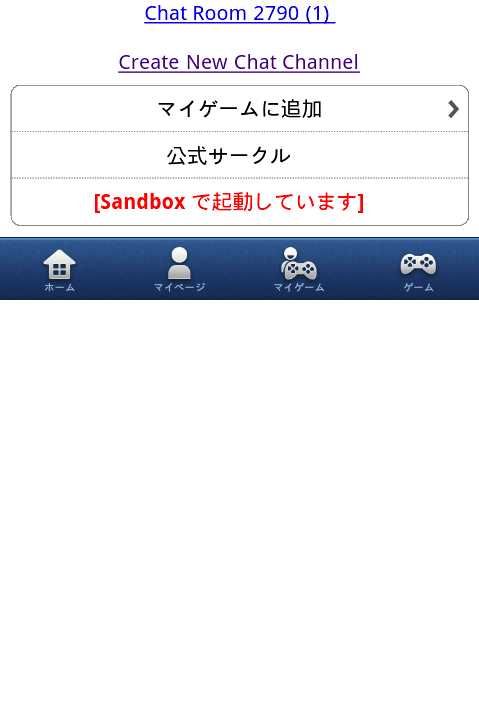
index.html にリンクなどを追加して、TestUser1 でログインし、端末から Gadget サーバー経由で chat_list.php にアクセスしてみましょう。
まだチャンネルを作成していないため、以下のような画面が表示されるはずです。
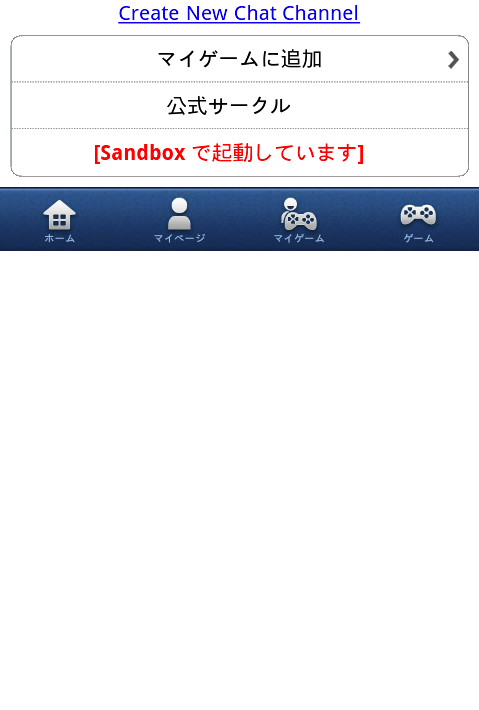
「Create New Chat Channel」のリンクをタップすると、チャット画面が表示され、ゲームからの最初のメッセージが表示されているはずです。
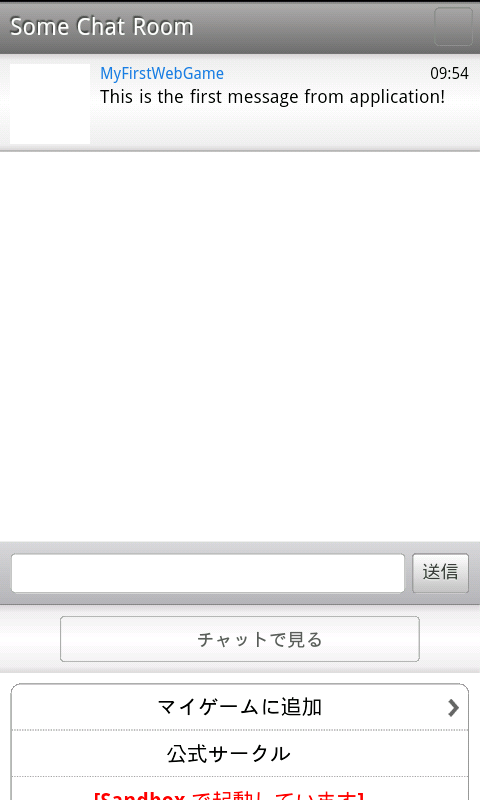
ここで、TestUser1 から適当なメッセージを書き込んでおきましょう。
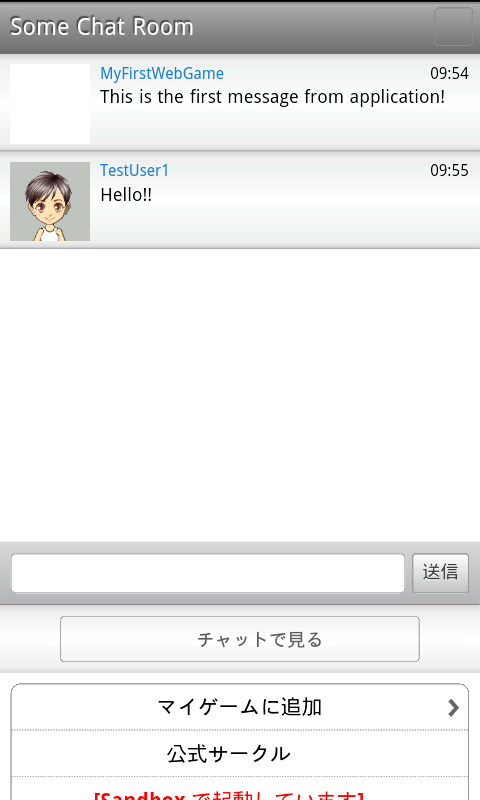
次に TestUser2 で chat_list.php を表示してみます。先ほど TestUser1 によって作成されたチャンネルが表示され、未読メッセージが 1 件ある状態になります。
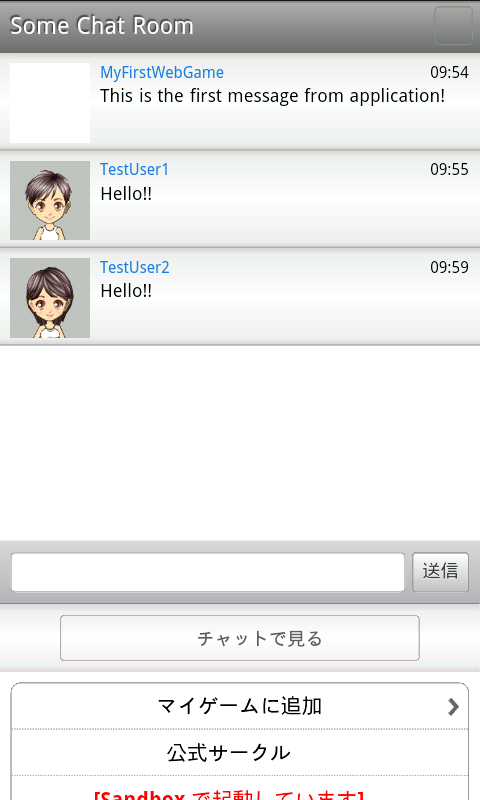
TestUser2 でもメッセージを投稿してみましょう。TestUser1 側にもメッセージが表示されるはずです。
以上で、友達とチャットするチュートリアルは完了です。
参考資料
- People API の詳細はこちらを参照してください。
- User Chat Channel API の詳細はこちらを参照してください。
- Chat Channel API の詳細はこちらを参照してください。
- Chat Member API の詳細はこちらを参照してください。
- Chat Message API の詳細はこちらを参照してください。
- チャットサービスの詳細はこちらを参照してください。
注意事項
-
1アプリケーションにつき生成できるチャンネル数には上限がありますのでゲーム内イベント終了などにあわせて削除リクエストを適宜おこなって下さい。
変更履歴
-
2013/11/27
- チャンネル生成の上限数と削除リクエストに関する記述を追加しました。
-
2013/06/18
- チャットの投稿に電話番号認証は不要になったため手順を削除
-
2013/04/25
- 新規作成