ログイン画面等における画像の変更方法
はじめに
Mobage Native/Unity SDK 1.4.6 よりゲーム開発時に起動時の
- スプラッシュ画面
- ログイン画面
- ニックネーム登録画面
に任意の画像を設定できるようになりました。
画像の入れ替えを行わない場合、公開が行えない場合がございます。
入れ替えの必要な画像ファイルの名前と対象の画面は下記のようになっています。
画像ファイルのパス
| Android | ${Mobage SDK}/android/MobageNativeAndroid/res/drawable |
| iOS | ${Mobage SDK}/ios/MobageSDK/images |
Android の場合、アプリプロジェクト直下の res/drawable に画像ファイルを入れても、ログイン画面やスプラッシュスクリーンに反映されます。その際は Mobage Native SDK 側のプロジェクトに画像ファイルが含まれていても無視されます。
最低限必要な画像ファイル
Android
下記をクリックすると詳細が展開されます。
Portrait アプリケーションの場合
| 画像ファイル名 | 画像サイズ |
|---|---|
| mobage_custom_splash.png | 640x960 |
| mobage_custom_button_game_start_tablet.png | 920x200 |
| mobage_custom_button_game_start.png | 460x100 |
| mobage_custom_login_img_tablet.png | 1120x1760 |
| mobage_custom_login_img.png | 560x880 |
(ニックネーム登録 API を使用する場合)
| 画像ファイル名 | 画像サイズ |
|---|---|
| mobage_custom_nickname_img_tablet.png | 1120x1760 |
| mobage_custom_nickname_img.png | 560x880 |
Landscape アプリケーションの場合
| 画像ファイル名 | 画像サイズ |
|---|---|
| mobage_custom_splash_landscape.png | 960x640 |
| mobage_custom_button_game_start_tablet.png | 920x200 |
| mobage_custom_button_game_start.png | 460x100 |
| mobage_custom_login_img_tablet_landscape.png | 1760x1120 |
| mobage_custom_login_img_landscape.png | 880x560 |
(ニックネーム登録 API を使用する場合)
| 画像ファイル名 | 画像サイズ |
|---|---|
| mobage_custom_nickname_img_tablet_landscape.png | 1760x1120 |
| mobage_custom_nickname_img_landscape.png | 880x560 |
iOS
下記をクリックすると詳細が展開されます。
Universal Portrait アプリケーションの場合
| 画像ファイル名 | 画像サイズ |
|---|---|
| Default.png | 320x480 |
| Default@2x.png | 640x960 |
| Default-568h@2x.png | 640x1136 |
| Default-Portrait.png | 768x1004 |
| Default-Portrait@2x.png | 1536x2008 |
| mobage_custom_button_game_start_tablet.png | 920x200 |
| mobage_custom_button_game_start.png | 460x100 |
| mobage_custom_login_img_tablet.png | 1120x1760 |
| mobage_custom_login_img.png | 560x880 |
(ニックネーム登録 API を使用する場合)
| 画像ファイル名 | 画像サイズ |
|---|---|
| mobage_custom_nickname_img_tablet.png | 1120x1760 |
| mobage_custom_nickname_img.png | 560x880 |
Universal Landscape アプリケーションの場合
| 画像ファイル名 | 画像サイズ |
|---|---|
| Default.png | 320x480 |
| Default@2x.png | 640x960 |
| Default-568h@2x.png | 640x1136 |
| Default-Landscape.png | 1024x748 |
| Default-Landscape@2x.png | 2048x1496 |
| mobage_custom_button_game_start_tablet.png | 920x200 |
| mobage_custom_button_game_start.png | 460x100 |
| mobage_custom_login_img_tablet_landscape.png | 1760x1120 |
| mobage_custom_login_img_landscape.png | 880x560 |
(ニックネーム登録 API を使用する場合)
| 画像ファイル名 | 画像サイズ |
|---|---|
| mobage_custom_nickname_img_tablet_landscape.png | 1760x1120 |
| mobage_custom_nickname_img_landscape.png | 880x560 |
iPhone Portrait アプリケーションの場合
| 画像ファイル名 | 画像サイズ |
|---|---|
| Default.png | 320x480 |
| Default@2x.png | 640x960 |
| Default-568h@2x.png | 640x1136 |
| mobage_custom_button_game_start.png | 460x100 |
| mobage_custom_login_img.png | 560x880 |
(ニックネーム登録 API を使用する場合)
| 画像ファイル名 | 画像サイズ |
|---|---|
| mobage_custom_nickname_img.png | 560x880 |
iPhone Landscape アプリケーションの場合
| 画像ファイル名 | 画像サイズ |
|---|---|
| Default.png | 320x480 |
| Default@2x.png | 640x960 |
| Default-568h@2x.png | 640x1136 |
| mobage_custom_button_game_start.png | 460x100 |
| mobage_custom_login_img_landscape.png | 880x560 |
(ニックネーム登録 API を使用する場合)
| 画像ファイル名 | 画像サイズ |
|---|---|
| mobage_custom_nickname_img_landscape.png | 880x560 |
iPad Portrait アプリケーションの場合
| 画像ファイル名 | 画像サイズ |
|---|---|
| Default-Portrait.png | 768x1004 |
| Default-Portrait@2x.png | 1536x2008 |
| mobage_custom_button_game_start_tablet.png | 920x200 |
| mobage_custom_login_img_tablet.png | 1120x1760 |
(ニックネーム登録 API を使用する場合)
| 画像ファイル名 | 画像サイズ |
|---|---|
| mobage_custom_nickname_img_tablet.png | 1120x1760 |
iPad Landscape アプリケーションの場合
| 画像ファイル名 | 画像サイズ |
|---|---|
| Default-Landscape.png | 1024x748 |
| Default-Landscape@2x.png | 2048x1496 |
| mobage_custom_button_game_start_tablet.png | 920x200 |
| mobage_custom_login_img_tablet_landscape.png | 1760x1120 |
(ニックネーム登録 API を使用する場合)
| 画像ファイル名 | 画像サイズ |
|---|---|
| mobage_custom_nickname_img_tablet_landscape.png | 1760x1120 |
スプラッシュ画面(Android)
アプリケーション起動時に全画面表示されます。SDK に下記画像が同梱されていますので任意の画像に入れ替えてお使いください。
| 画像ファイル | 補足 |
|---|---|
| mobage_custom_splash.png | 縦画面アプリケション用 |
| mobage_custom_splash_landscape.png | 横画面アプリケーション用 |
スプラッシュ画面(iOS)
アプリケーション起動時に全画面表示されます。SDK には下記画像は同梱されていませんので、下記ファイル名の画像をアプリケーション内に追加してください。
iPhone でアプリケーションを動作させた際に "Default-568h@2x.png" がない場合、3.5インチ端末としてアプリケーションが動作致しますのでご注意ください。
| 画像ファイル | 補足 |
|---|---|
| Default.png | 3.5インチ non Retina 用 |
| Default@2x.png | 3.5インチ Retina 用 |
| Default-568h@2x.png | 4インチ Retina 用 |
| Default-Landscape.png | iPad(non Retina) 横画面アプリケーション用 |
| Default-Landscape@2x.png | iPad(Retina) 横画面アプリケーション用 |
| Default-Portrait.png | iPad(non Retina) 縦画面アプリケーション用 |
| Default-Portrait@2x.png | iPad(Retina) 縦画面アプリケーション用 |
ログインダイアログ
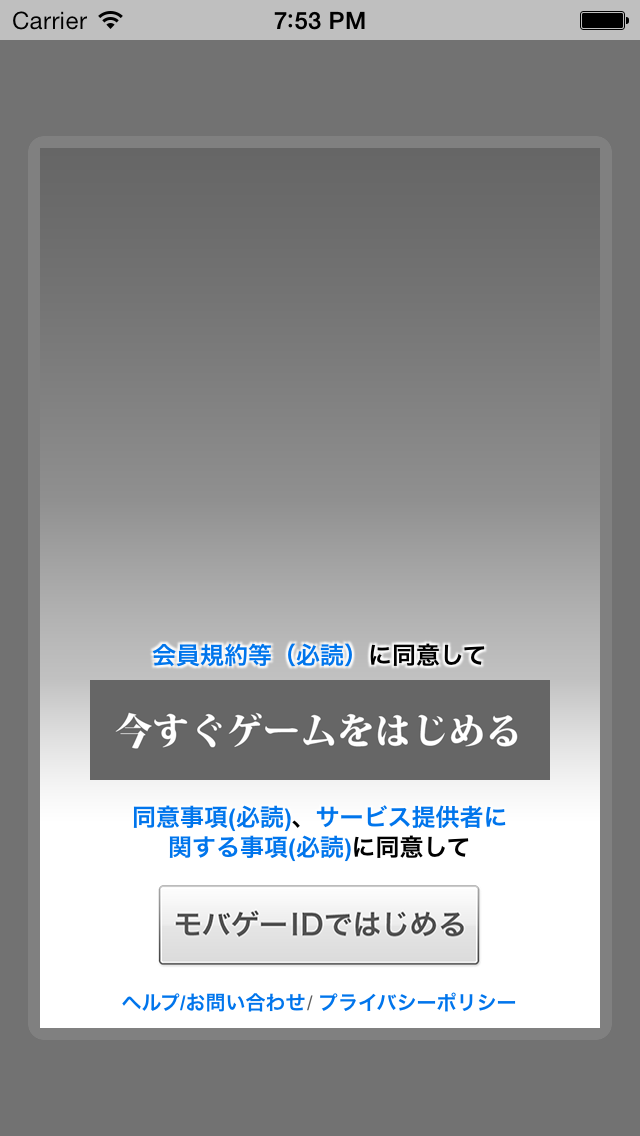
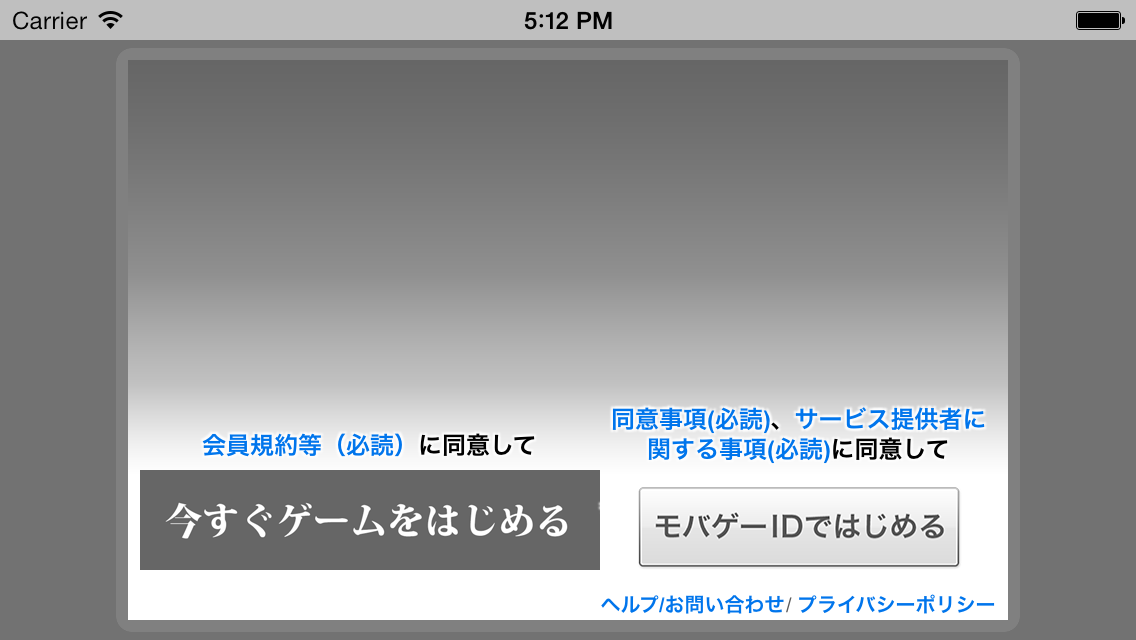
ログインダイアログに表示される画像となります。下記画像の背景とゲームスタートボタンが対象となります。
| 表示箇所 | 画像ファイル | 補足 |
|---|---|---|
| ゲームスタートボタン | mobage_custom_button_game_start.png | スマートフォン用 |
| ゲームスタートボタン | mobage_custom_button_game_start_tablet.png | タブレット用 |
| 背景 | mobage_custom_login_img.png | スマートフォン縦画面アプリケーション用 |
| 背景 | mobage_custom_login_img_landscape.png | スマートフォン横画面アプリケーション用 |
| 背景 | mobage_custom_login_img_tablet.png | タブレット縦画面アプリケーション用 |
| 背景 | mobage_custom_login_img_tablet_landscape.png | タブレット横画面アプリケーション用 |
また、ダイアログ下部には規約・ボタン等を表示する為の領域を確保して頂く必要があります。
規約・ボタン等は下記、"規約・ボタン表示エリア" よりも下に表示されます。
| 画像ファイル | 画像サイズ(px) | 規約・ボタン表示エリアの開始位置 |
|---|---|---|
| mobage_custom_login_img.png | 560x880 | 縦490px開始 |
| mobage_custom_login_img_landscape.png | 880x560 | 縦340px開始 |
| mobage_custom_login_img_tablet.png | 1120x1760 | 縦980px開始 |
| mobage_custom_login_img_tablet_landscape.png | 1760x1120 | 縦680px開始 |
指定の位置からグラデーションをかける等を行い、可読性を損なわない画像を準備してください。
ニックネーム登録ダイアログ
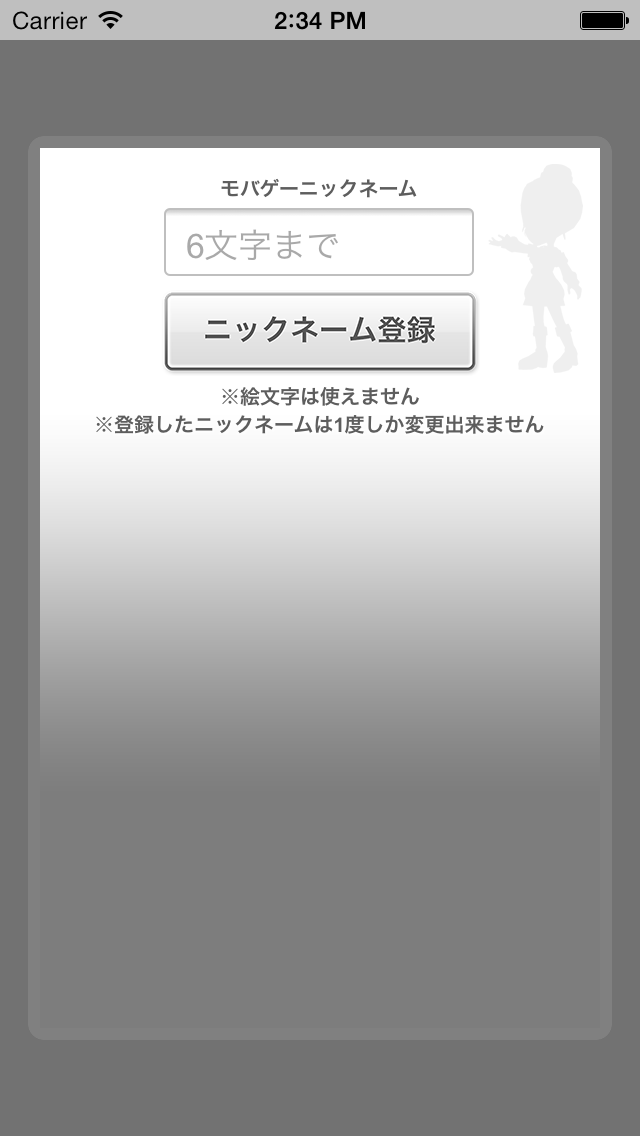
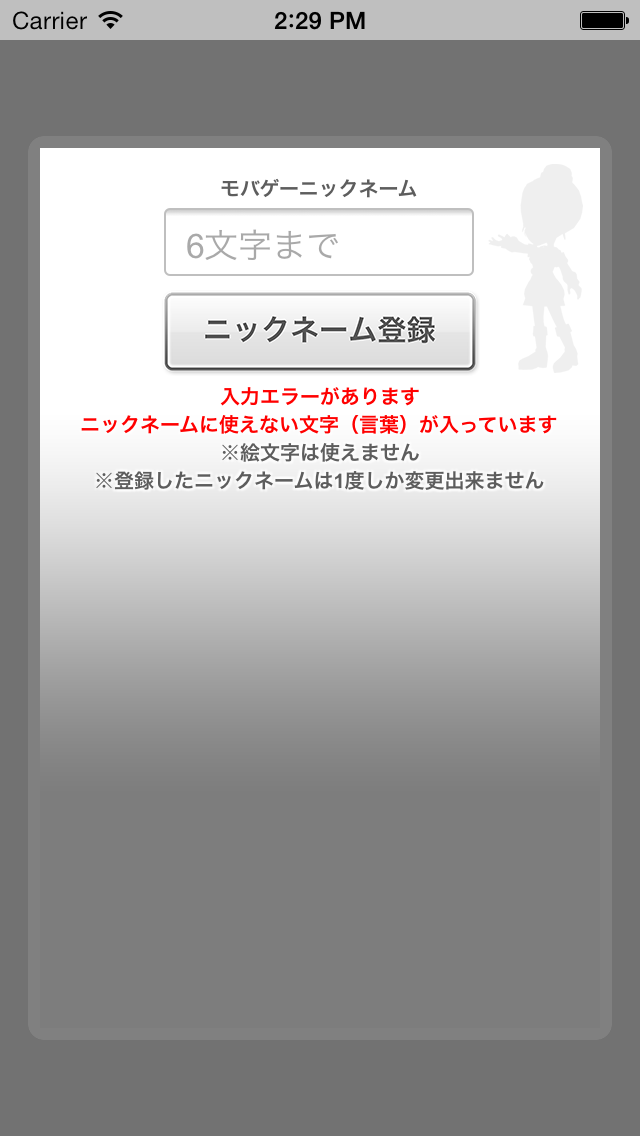
NicknameRegistrationDialog API の背景画像が対象となります。
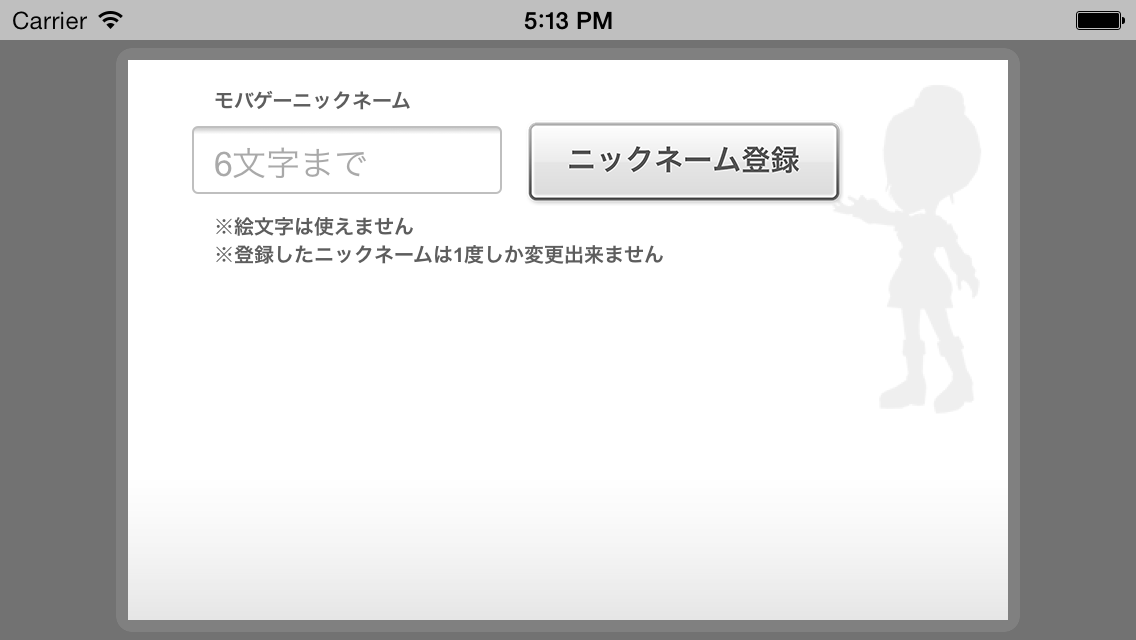
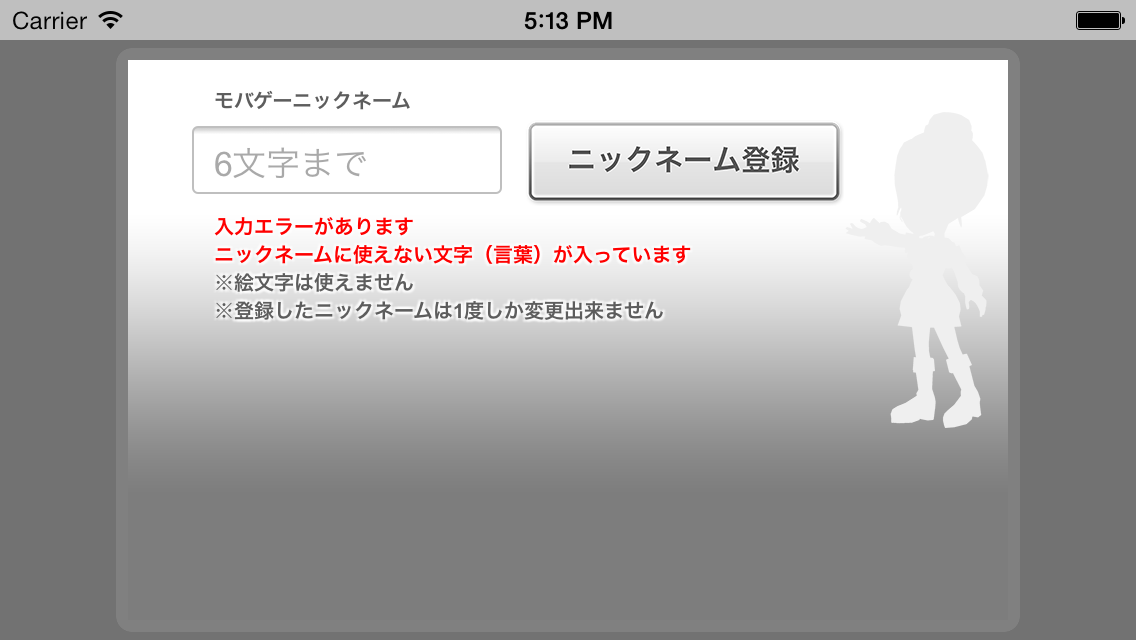
| 表示箇所 | 画像ファイル | 補足 |
|---|---|---|
| 背景 | mobage_custom_nickname_img.png | スマートフォン縦画面アプリケーション用 |
| 背景 | mobage_custom_nickname_img_landscape.png | スマートフォン横画面アプリケーション用 |
| 背景 | mobage_custom_nickname_img_tablet.png | タブレット縦画面アプリケーション用 |
| 背景 | mobage_custom_nickname_img_tablet_landscape.png | タブレット横画面アプリケーション用 |
Android 端末のタブレット判定は画面サイズで行われる為、一部タブレットとして判定されない端末もございます。
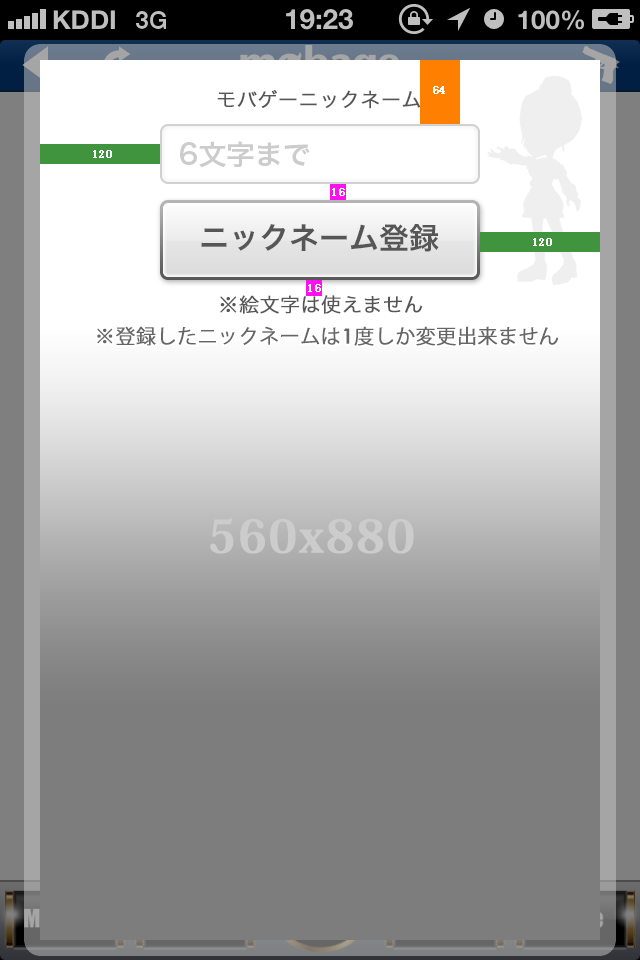
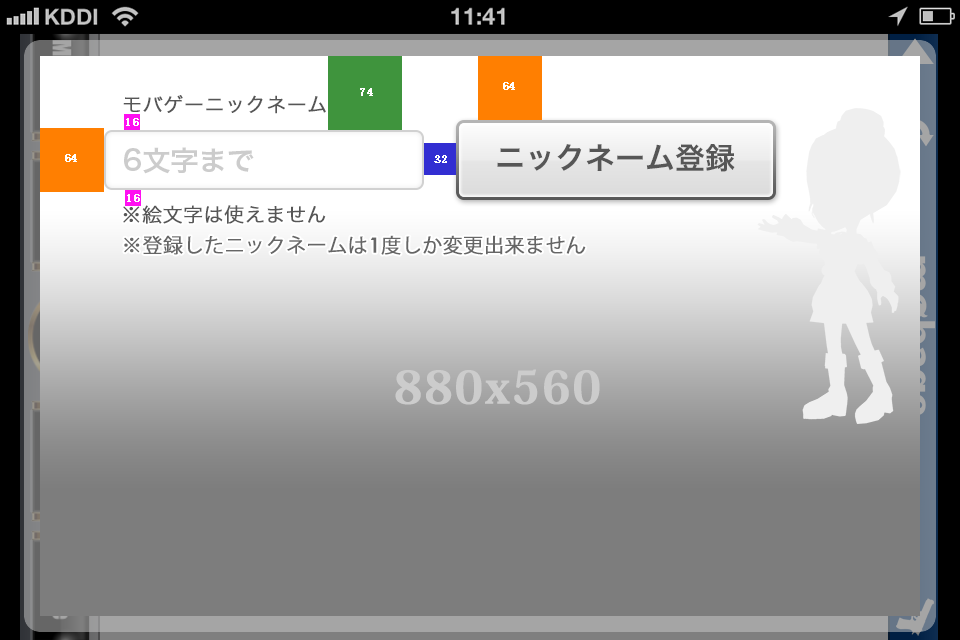
背景画像を作成する際は下記内容と画像をご参考ください。
- 色のついた帯の中に記載されている数値がピクセル数 (px) になります。
- タブレットの場合は、倍のピクセル数となります。
- エディットボックスの下の文字列は 2 行がデフォルトで表示されますので、考慮した画像を配置して下さい。
- エラーが発生した場合には、デフォルトの 2 行に加えてエラーメッセージとして 6 行表示されることがあります。
【Portrait の場合】(クリックすると拡大します)
【Landscape の場合】(クリックすると拡大します)
更新履歴
- 2014/03/04
- 各画像ファイルのサイズを追記
- 2013/12/25
- 最低限必要な画像ファイルの項目を追記
- 2013/12/24
- 初版作成