How to change custome images
Introduction
From Mobage Native/Unity SDK 1.4.6, you can now change the images displayed on the following screens at app launch to custom images during game development:
- Splash screen
- Login screen
- Nickname registration screen
If you do not replace images, your app may not be published.
The names of the image files that need to be replaced and the applicable screens are as below:
Image File Path
| Android | ${Unity Project}/Assets/Plugin/Android/res/drawable |
| iOS | ${Unity Project}/Assets/Plugin/iOS |
Minimum Necessary Images Files
Android
Click below to expand
For Portrait Applications
| file name | image size |
|---|---|
| mobage_custom_button_game_start_tablet.png | 920x200 |
| mobage_custom_button_game_start.png | 460x100 |
| mobage_custom_login_img_tablet.png | 1120x1760 |
| mobage_custom_login_img.png | 560x880 |
(When using Nickname Registration API)
| file name | image size |
|---|---|
| mobage_custom_nickname_img_tablet.png | 1120x1760 |
| mobage_custom_nickname_img.png | 560x880 |
For Landscape Applications
| file name | image size |
|---|---|
| mobage_custom_button_game_start_tablet.png | 920x200 |
| mobage_custom_button_game_start.png | 460x100 |
| mobage_custom_login_img_tablet_landscape.png | 1760x1120 |
| mobage_custom_login_img_landscape.png | 880x560 |
(When using Nickname Registration API)
| file name | image size |
|---|---|
| mobage_custom_nickname_img_tablet_landscape.png | 1760x1120 |
| mobage_custom_nickname_img_landscape.png | 880x560 |
iOS
Click below to expand
For Universal Portrait Applications
| file name | image size |
|---|---|
| Default.png | 320x480 |
| Default@2x.png | 640x960 |
| Default-568h@2x.png | 640x1136 |
| Default-Portrait.png | 768x1004 |
| Default-Portrait@2x.png | 1536x2008 |
| mobage_custom_button_game_start_tablet.png | 920x200 |
| mobage_custom_button_game_start.png | 460x100 |
| mobage_custom_login_img_tablet.png | 1120x1760 |
| mobage_custom_login_img.png | 560x880 |
(When using Nickname Registration API)
| file name | image size |
|---|---|
| mobage_custom_nickname_img_tablet.png | 1120x1760 |
| mobage_custom_nickname_img.png | 560x880 |
For Universal Landscape Applications
| file name | image size |
|---|---|
| Default.png | 320x480 |
| Default@2x.png | 640x960 |
| Default-568h@2x.png | 640x1136 |
| Default-Landscape.png | 1024x748 |
| Default-Landscape@2x.png | 2048x1496 |
| mobage_custom_button_game_start_tablet.png | 920x200 |
| mobage_custom_button_game_start.png | 460x100 |
| mobage_custom_login_img_tablet_landscape.png | 1760x1120 |
| mobage_custom_login_img_landscape.png | 880x560 |
(When using Nickname Registration API)
| file name | image size |
|---|---|
| mobage_custom_nickname_img_tablet_landscape.png | 1760x1120 |
| mobage_custom_nickname_img_landscape.png | 880x560 |
For iPhone Portrait Applications
| file name | image size |
|---|---|
| Default.png | 320x480 |
| Default@2x.png | 640x960 |
| Default-568h@2x.png | 640x1136 |
| mobage_custom_button_game_start.png | 460x100 |
| mobage_custom_login_img.png | 560x880 |
(When using Nickname Registration API)
| file name | image size |
|---|---|
| mobage_custom_nickname_img.png | 560x880 |
For iPhone Landscape Applications
| file name | image size |
|---|---|
| Default.png | 320x480 |
| Default@2x.png | 640x960 |
| Default-568h@2x.png | 640x1136 |
| mobage_custom_button_game_start.png | 460x100 |
| mobage_custom_login_img_landscape.png | 880x560 |
(When using Nickname Registration API)
| file name | image size |
|---|---|
| mobage_custom_nickname_img_landscape.png | 880x560 |
For iPad Portrait Applications
| file name | image size |
|---|---|
| Default-Portrait.png | 768x1004 |
| Default-Portrait@2x.png | 1536x2008 |
| mobage_custom_button_game_start_tablet.png | 920x200 |
| mobage_custom_login_img_tablet.png | 1120x1760 |
(When using Nickname Registration API)
| file name | image size |
|---|---|
| mobage_custom_nickname_img_tablet.png | 1120x1760 |
For iPad Landscape Applications
| file name | image size |
|---|---|
| Default-Landscape.png | 1024x748 |
| Default-Landscape@2x.png | 2048x1496 |
| mobage_custom_button_game_start_tablet.png | 920x200 |
| mobage_custom_login_img_tablet_landscape.png | 1760x1120 |
(When using Nickname Registration API)
| file name | image size |
|---|---|
| mobage_custom_nickname_img_tablet_landscape.png | 1760x1120 |
Splash Screen(Android)
This is shown in full screen at application launch. The following images are bundled with the SDK, so please replace them with your own images.
| Image File | Notes |
|---|---|
| mobage_custom_splash.png | For portrait applications |
| mobage_custom_splash_landscape.png | For landscape applications |
Splash Screen(iOS)
This is shown in full screen at application launch. The following images are not bundled in the SDK, so please add images with the following file names to the application.
Take note that if “Default-568h@2x.png@ is missing at application launch on an iPhone, the application runs as it would on a 3.5-inch device.
| Image File | Notes |
|---|---|
| Default.png | 3.5-inch for non Retina |
| Default@2x.png | 3.5-inch for Retina |
| Default-568h@2x.png | 4-inch for Retina |
| Default-Landscape.png | iPad(non Retina) for landscape applications |
| Default-Landscape@2x.png | iPad(Retina) for landscape applications |
| Default-Portrait.png | iPad(non Retina) for portrait applications |
| Default-Portrait@2x.png | iPad(Retina) for portrait applications |
Login Dialog
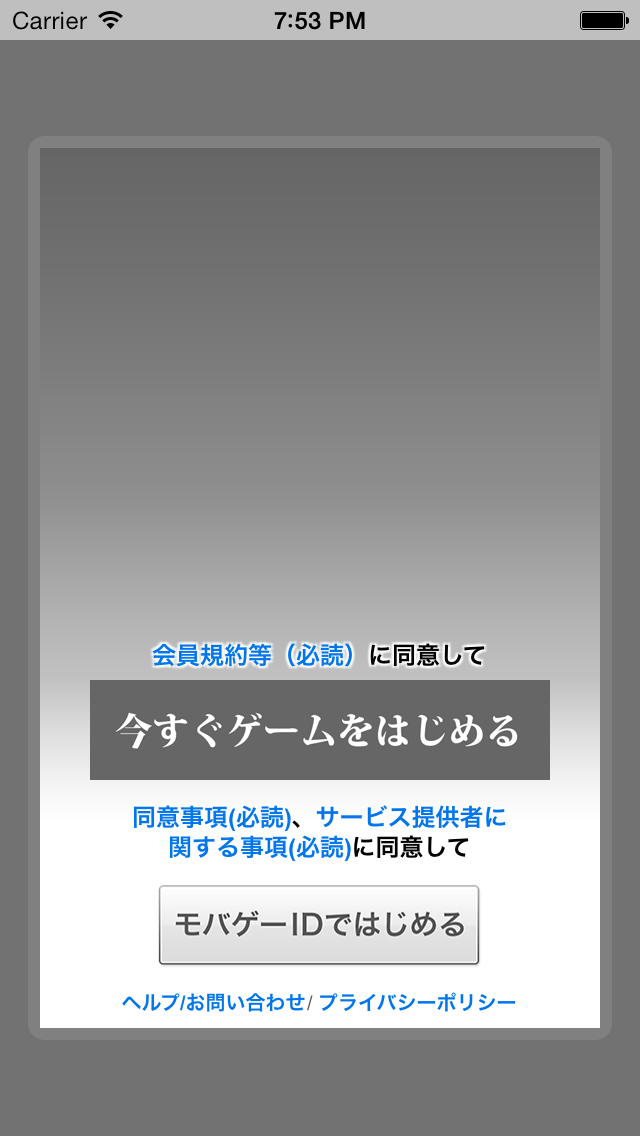
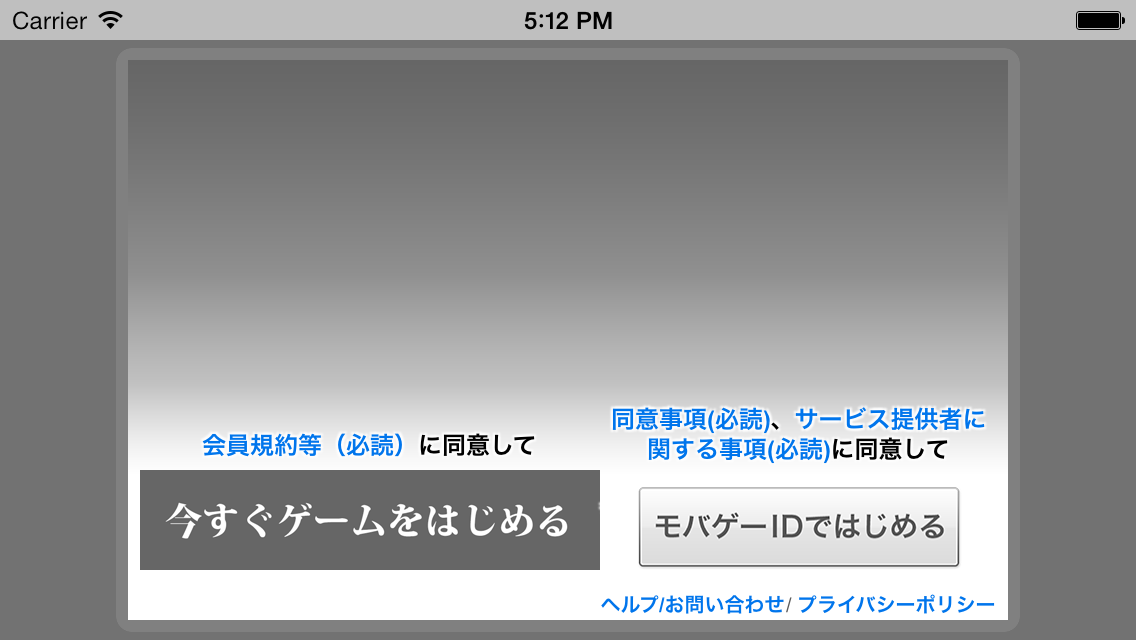
These are the images shown in the login dialog, such as the background in the image below and the game start button.
| Display location | Image File | Notes |
|---|---|---|
| Game start button | mobage_custom_button_game_start.png | For smartphones |
| Game start button | mobage_custom_button_game_start_tablet.png | For tablets |
| Background | mobage_custom_login_img.png | For portrait smartphones applications |
| Background | mobage_custom_login_img_landscape.png | For landscape smartphone applications |
| Background | mobage_custom_login_img_tablet.png | For portrait tablet applications |
| Background | mobage_custom_login_img_tablet_landscape.png | For landscape tablet applications |
Additionally, it is necessary to leave a space in the lower part of the dialogue for displaying the regulation and buttons, etc.
The rules and buttons, etc. are displayed below the “starting position of regulation and buttons display area” described below.
| Image File | Image Size(px) | Starting position of regulation and buttons display area |
|---|---|---|
| mobage_custom_login_img.png | 560x880 | From vertical position of 490px |
| mobage_custom_login_img_landscape.png | 880x560 | From vertical position of 340px |
| mobage_custom_login_img_tablet.png | 1120x1760 | From vertical position of 980px |
| mobage_custom_login_img_tablet_landscape.png | 1760x1120 | From vertical position of 680px |
Please prepare images with good readability, for example, by gradating the images from a specified position.
Nickname Registration Dialog
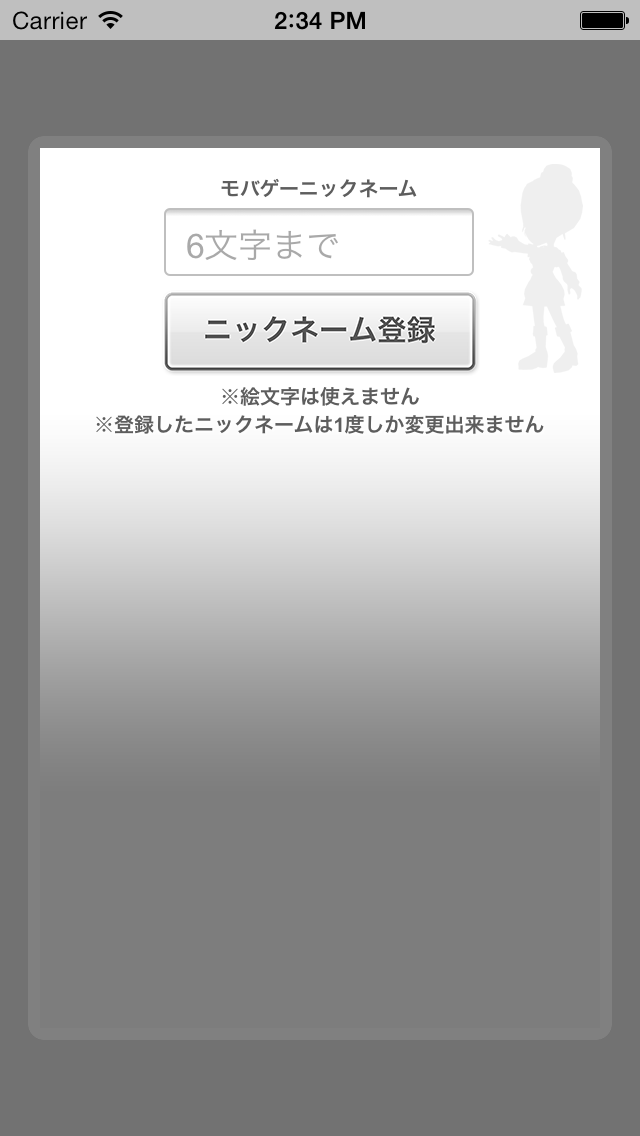
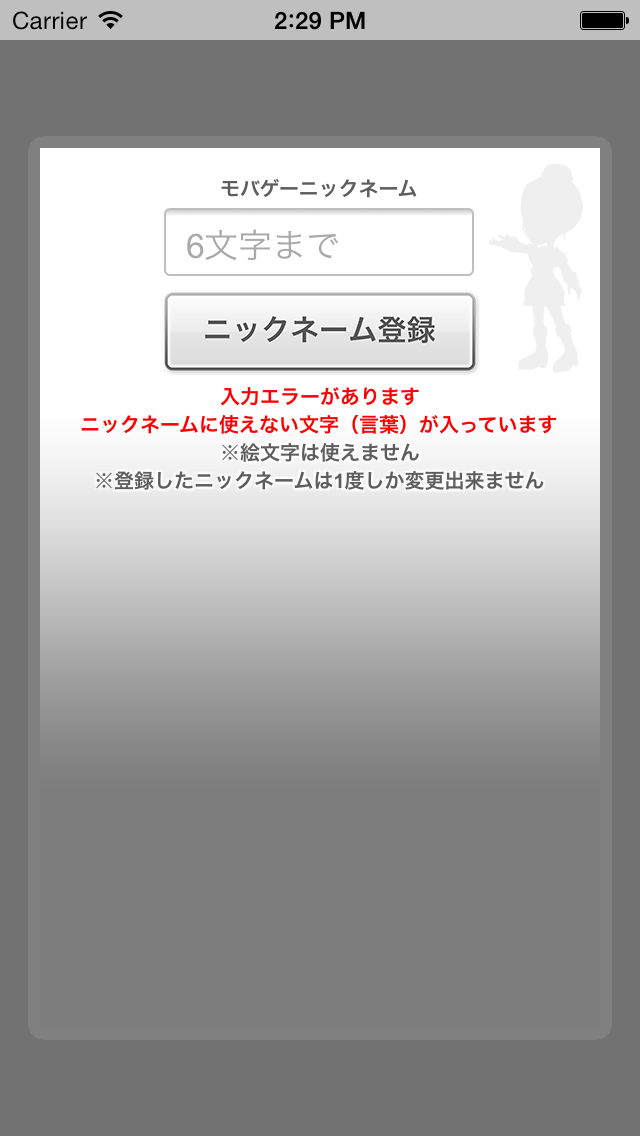
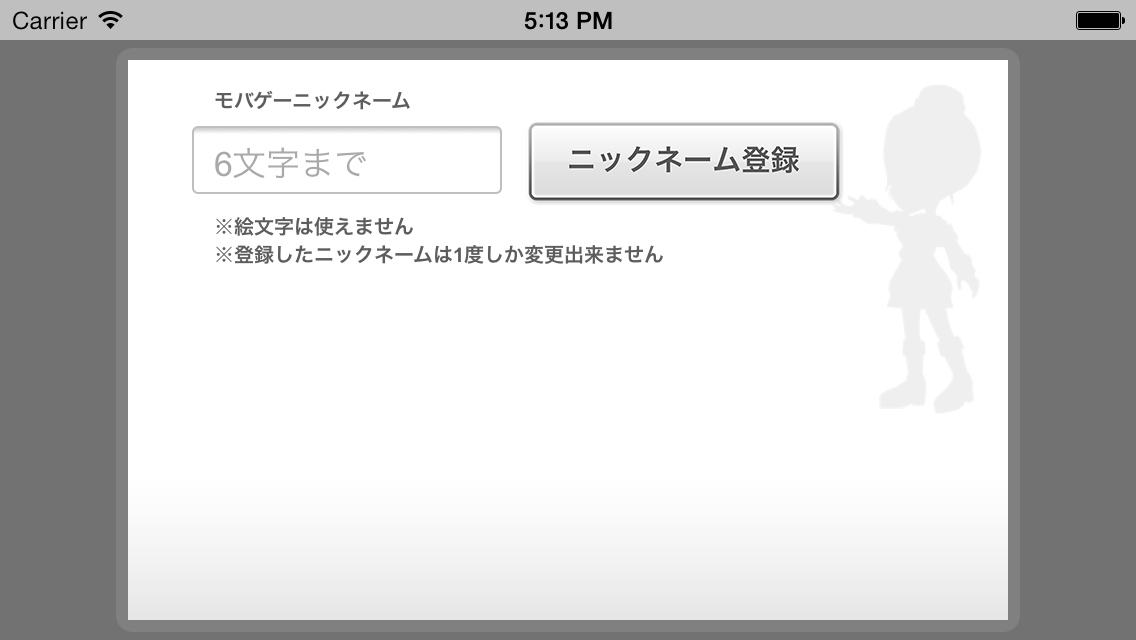
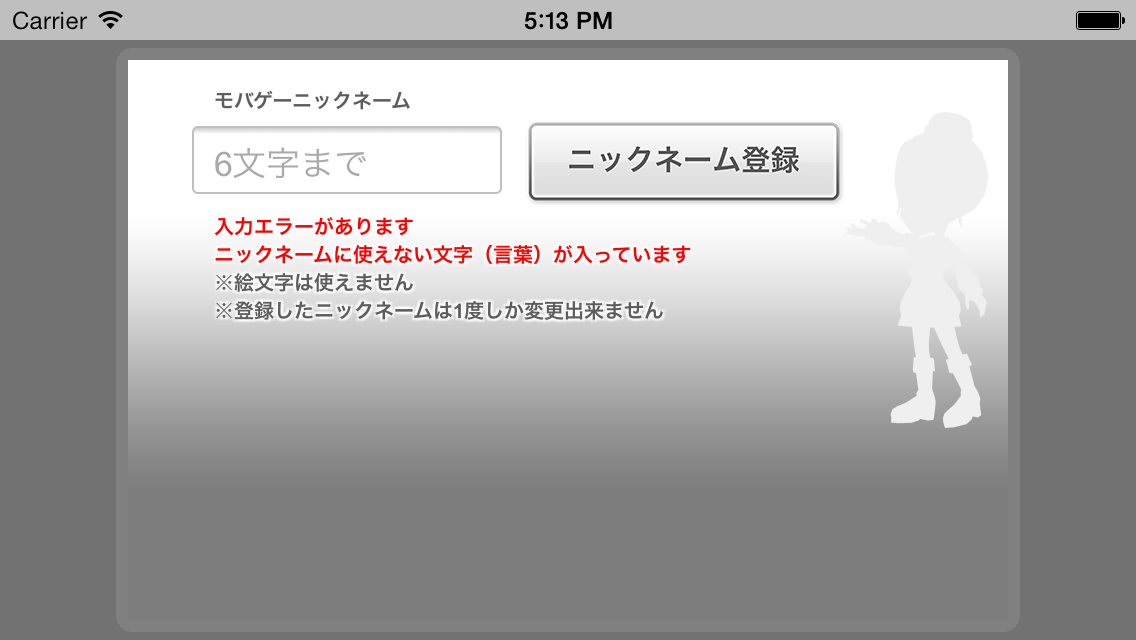
These are the images for the background of NicknameRegistrationDialog API
| Place to show | Image File | Notes |
|---|---|---|
| Background | mobage_custom_nickname_img.png | For portrait smartphones applications |
| Background | mobage_custom_nickname_img_landscape.png | For landscape smartphone applications |
| Background | mobage_custom_nickname_img_tablet.png | For portrait tablet applications |
| Background | mobage_custom_nickname_img_tablet_landscape.png | For landscape tablet applications |
Android tablets are identified as tablets based on screen size. However, some Android tablets are not determined to be tablets.
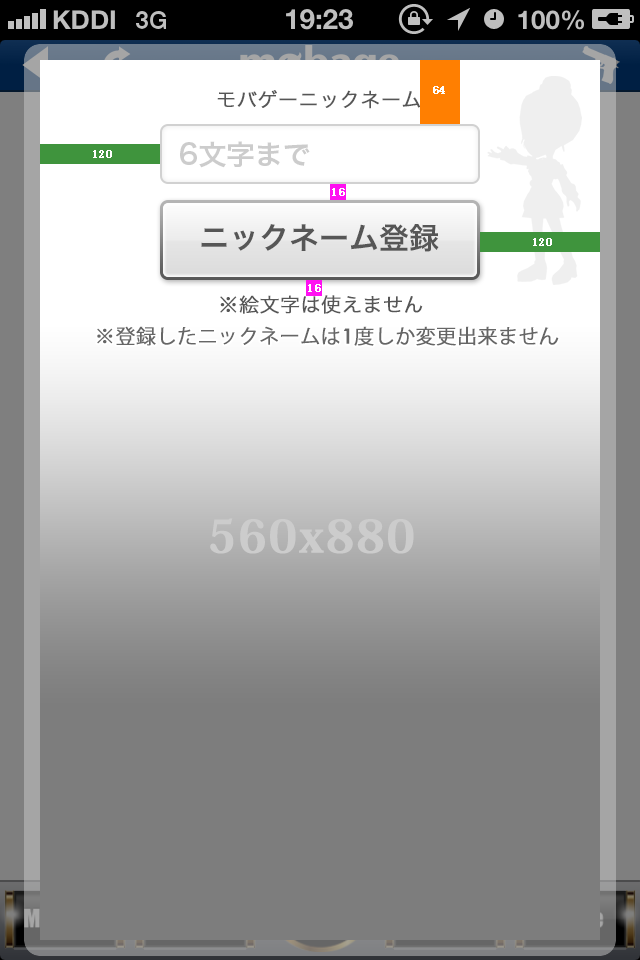
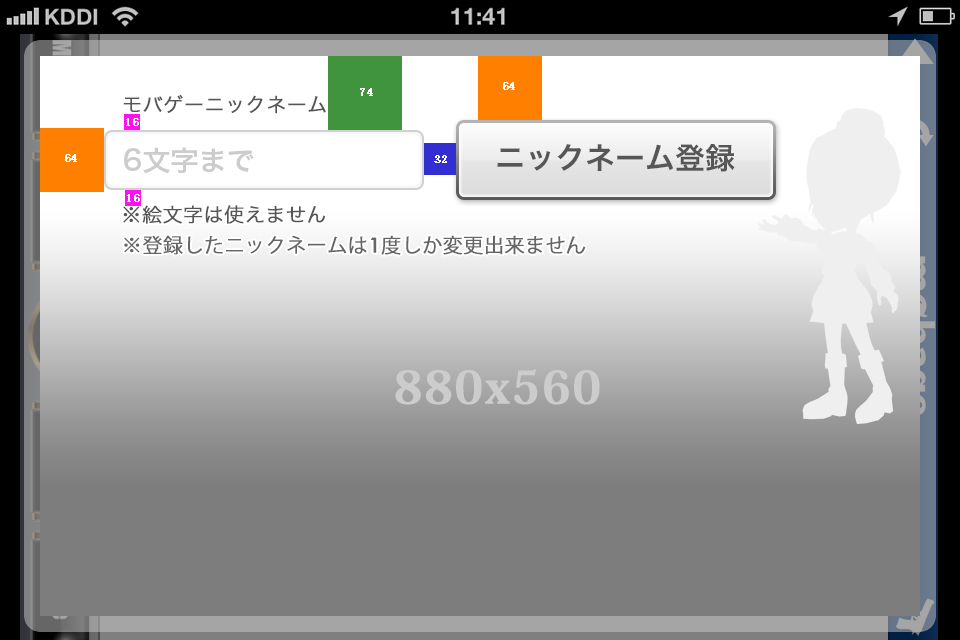
When creating a background image, please refer to the following.
- The figure described in the colored band is the number of pixels (px).
- The figure (the number of pixels) doubles in case of tablets.
- When you place an image, please consider that test strings are shown in two lines under the edit box by default.
- When an error occurs, an error message may be shown in six lines, in addition to the two lines shown by default.
【Portrait 】(Click to expand)
【Landscape】(Click to expand)
Revision History
- 03/04/2014
- Added every image size on "Minimum Necessary Images Files"
- 02/26/2014
- The first version was created.