Mobage Unity SDK ( Android ) 1.7.0 以降でリモート通知を利用する場合
Mobage Unity SDK (Android) 1.7.0 未満から、 Mobage Unity SDK (Android) 1.7.0 以降へ変更する場合、かつリモート通知を利用する際には本ページに記載する内容の変更が必要になります。
また、Mobage Unity SDK 1.7.0 以降へバージョンアップした場合、ビルドが通らないことがありますので、その場合には Unity のメニューバーより、「MobageSDK」 -> 「Clean Old SDK」を選択してください。
- Plugins/Android/AndroidManifest.xml の変更
- ライブラリのインポート
- Native Android で音や振動を鳴らす場合に使用する RemoteNotificationClient クラスの変更
- Unity Android で音や振動を鳴らしたい場合 (Mobage Unity SDK 1.4.7 以降)
- Proguard 設定の変更
- 引き続き設定が必要な項目
Plugins/Android/AndroidManifest.xml の変更
タグの外に記載されている以下の要素を削除します。
<!-- Only this application can receive the messages and registration result -->
<permission android:name="{TODO: replace with your package name}.permission.C2D_MESSAGE" android:protectionLevel="signature" />
<uses-permission android:name="{TODO: replace with your package name}.permission.C2D_MESSAGE" />
<!-- This app has permission to register and receive message -->
<uses-permission android:name="com.google.android.c2dm.permission.RECEIVE" />
<uses-permission android:name="android.permission.WAKE_LOCK" />
タグの外の以下の要素は必要ですので削除しないでください。
<uses-permission android:name="android.permission.INTERNET" />
タグ内に記載された以下の項目をすべて削除してください。
 <receiver
    android:name="com.mobage.android.C2DMBaseReceiver"
    android:permission="com.google.android.c2dm.permission.SEND" >
    <!-- Receive the actual message -->
    <intent-filter>
        <action android:name="com.google.android.c2dm.intent.RECEIVE" />
        <category android:name="jp.mbga.a${YourApplicationId}" />
    </intent-filter>
    <!-- Receive the registration id -->
    <intent-filter>
        <action android:name="com.google.android.c2dm.intent.REGISTRATION" />
        <category android:name="jp.mbga.a${YourApplicationId}" />
    </intent-filter>
</receiver>


<receiver
    android:name="com.google.android.gms.gcm.GcmReceiver"
    android:exported="true"
    android:permission="com.google.android.c2dm.permission.SEND" >
    <intent-filter>
        <action android:name="com.google.android.c2dm.intent.RECEIVE" />
        <category android:name="jp.mbga.a${YourApplicationId}" />
    </intent-filter>
</receiver>
<service
    android:name="com.mobage.android.gcm.MessageListenerService"
    android:exported="false">
    <intent-filter>
        <action android:name="com.google.android.c2dm.intent.RECEIVE" />
    </intent-filter>
</service>
<service
    android:name="com.mobage.android.gcm.IIDListenerService"
    android:exported="false">
    <intent-filter>
        <action android:name="com.google.android.gms.iid.InstanceID" />
    </intent-filter>
</service>
タグに xmlns:tools="http://schemas.android.com/tools" を追記してください。
<manifest xmlns:android="http://schemas.android.com/apk/res/android"
    xmlns:tools="http://schemas.android.com/tools">
タグ内に以下を記載してください。
<provider
   android:name="com.google.firebase.provider.FirebaseInitProvider"
   android:authorities="${applicationId}.firebaseinitprovider"
    tools:node="remove"/>

<service
   android:name="com.mobage.android.fcm.MessageListenerService"
   android:exported="false">
   <intent-filter>
      <action android:name="com.google.firebase.MESSAGING_EVENT" />
   </intent-filter>
</service>
<service android:name="com.mobage.android.fcm.RemoteNotificationController$FcmMobageJobService"
   android:exported="false">
   <intent-filter>
      <action android:name="com.firebase.jobdispatcher.ACTION_EXECUTE"/>
   </intent-filter>
</service>
リモート通知には、 rn_icon.png を通知アイコンとして使用されます。Plugins/Android/res/drawable の下に rn_icon.png を設置してください。
drawable/rn_icon.png が設置されていないとリモート通知が通知されません。
AndroidManifest.xml の
- android:launchMode="standard" 又は android:launchMode="singleTop"
ライブラリのインポート
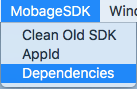
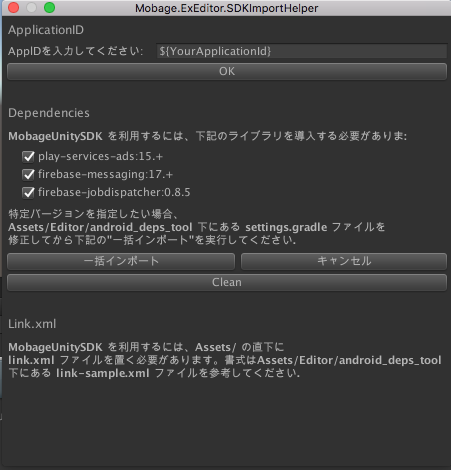
メニューから Mobage SDK -> Dependencies を選択してください。 Dependencies ダイアログが開きます。
- リモート通知を使用する場合には、 play-services-ads に加えて、 firebase-messaging および firebase-jobdispatcher もインポートしてください。
FCM 初期化について
MobagePlatform.initialize() を呼び出したあと、必ず MobagePlatform.registerForRemoteNotification を呼び出してください。(ただし、Firebase をパートナー様においてもご利用される場合は、設定が異なります)
void Awake() {
    MobageCallback.AddCallback(true);
    // add RemoteNotification Receiver.
    addRemoteNotificationReceiver();
    // Login Mobage
    MobagePlatform.Initialize(Config.region, Config.serverMode, Config.consumerKey, Config.consumerSecret, Config.appId);
    MobagePlatform.registerForRemoteNotification(); // 追加してください
    MobageManager.checkLoginStatus();
    MobagePlatform.addLoginListener((userID) => {
            showMessage("LoginComplete:{0}", userID);
            currentUserId = userID;
        }, () => {
            showMessage("LoginRequired");
            MobagePlatform.showLoginDialog();
        }, () => {
            showMessage("LoginCancel");
        },  error => showMessage("LoginError:" + error)
    );
    // 初期化処理等
}
Firebase の機能をアプリ内で利用する場合
Mobage Native / Unity SDK 以外で、アプリ内で Firebase (Realtime Database 等含む) を利用される場合、MobagePlatform.registerForRemoteNotification() に与える引数が異なることがあります。
アプリ側で Firebase の初期化 ([DEFAULT] での初期化)を Mobage.registerForRemoteNotification() 呼び出しよりも前に行う場合
- MobagePlatform.registerForRemoteNotification(true) を呼び出します。
アプリ側で Firebase の初期化を MobagePlatform.registerForRemoteNotification() 呼び出しよりも後に行う場合
- MobagePlatform.registerForRemoteNotification() を呼び出します。
- こちらのリンクに従い、 FirebaseApp.initializeApp での初期化時の第三引数に、アプリ側で決定したインスタンス名を指定して初期化してください。
Native Android で音や振動を鳴らす場合に使用する RemoteNotificationClient クラスの変更
リモート通知の使い方 に記載されている「Native Android で音や振動を鳴らしたい場合 (Mobage Native SDK 1.4.7 以降)」について行う場合、RemoteNotificationClient が以下のように変更になりましたので注意が必要です。
public boolean handleRegistration(Context context, Intent intent) {
↓修正
public boolean handleRegistration(Context context, String registrationId) {
public static class RemoteNotificationClient {
  /**
   * Give the host application a chance to take over the control when a registration id is about to be received in the application.
   * If the host application wants to handle the registration id, return true, otherwise return false.
     * @param context The Context in which the remote notification receiver is running.
     * @param registrationId The String  being received.
   * @return True if the host application wants to handle the registration intent itself, otherwise return false.
   */
  public boolean handleRegistration(Context context, String registrationId) {
    return false;
  }

  /**
   * Give the host application a chance to take over the control when a remote notification message intent is about to be received in the application.
     *  If the host application wants to handle the message intent and display notification, return true, otherwise return false.
     * @param context The Context in which the remote notification receiver is running.
     * @param intent The Intent being received.
   * @return True if the host application wants to handle the message intent itself, otherwise return false.
   */
    public boolean handleMessage(Context context, Intent intent) {
      return false;
    }

  /**
   * Give the host application a chance to tweak the Notification instance before the notification is displayed by the SDK.
     * @param notification The Notification instance that is created and will be display by the SDK.
     * @param context The Context in which the remote notification receiver is running.
     * @param intent The Intent being received.
   */
    public void tweakNotification(Notification notification, Context context, Intent intent) {
      return;
    }
}
Unity Android で音や振動を鳴らしたい場合 (Mobage Unity SDK 1.4.7 以降)
Mobage Unity SDK 1.4.7 以降のパッケージの samples/RemoteNotificationClient/README.txt をご確認ください。上記、リモート通知の挙動をカスタマイズすることができます。
Proguard 設定の変更
Proguard を利用する場合、以下の項目を proguard.cfg や proguard-android.txt へ設定してください。
-keep class com.mobage.android.** { *; }
-keep class jp.dena.mobage.android.** { *; }
-keep class com.android.vending.billing.** { *; }
-keep class android.support.v4.** { *; }
-keep class com.google.android.gms.** { *; }
-keep class jp.dena.android.http.util.SerializableCookie { *; }

-keep class * extends java.util.ListResourceBundle {
    protected Object[][] getContents();
}
-keep public class com.google.android.gms.common.internal.safeparcel.SafeParcelable {
    public static final *** NULL;
}
-keepnames @com.google.android.gms.common.annotation.KeepName class *
-keepclassmembernames class * {
    @com.google.android.gms.common.annotation.KeepName *;
}
-keepnames class * implements android.os.Parcelable {
    public static final ** CREATOR;
}

-keep class com.firebase.jobdispatcher.** { *; }
-keep class com.google.firebase.** { *; }
引き続き設定が必要な項目
以下の項目については、削除せずにそのまま残してください。(以前からある項目です)
Awake() 等で MobagePlatform.initialize() を行う前に、以下のようにリスナーを登録します。
void Awake () {
    MobageSocialRemoteNotification.Instance.Receive += (sender, payload) => {
        string debug = "message" + payload.message;
        print (debug);
    };
    MobagePlatform.Initialize(........);
}
リモート通知の受信設定を有効にするために、Client API の setRemoteNotificationsEnabled() に true が設定されている必要があります。また、setRemoteNotification() はログイン後に呼び出さないと効果がありません。実装例は以下のようになります。
MobageSocialRemoteNotification.setRemoteNotificationsEnabled(true, onSuccess, onError);

private void onSuccess ()
{
    /* flag was set properly */
}
private void onError (MobageError error)
{
    /* An error occurred in setting this value */
}
Build 時の注意
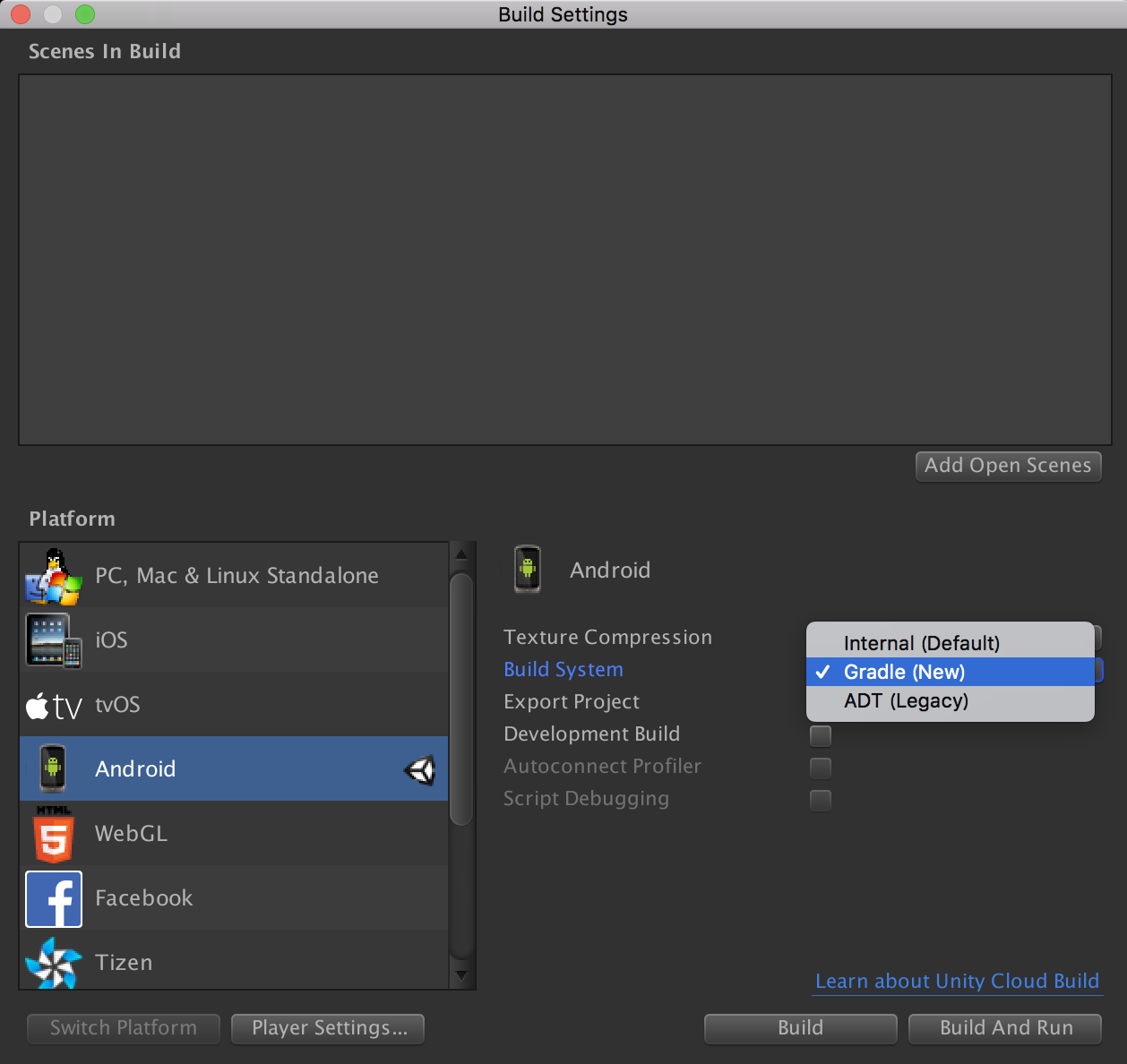
Unity Android のビルド時の Build Settings の設定で、Build System に Gradle を選択する必要があります。
Release Build 時の Keystore について
- Release Build を行う際には Keystore の設定を求められますので、適当な Keystore を設定し Build を行ってください。
- デベロッパーサイトに apk ファイルをアップロードした際に、自動的に正式な Keystore で再署名が行われます。
更新履歴
2019/03/05
- Release Buid 時の Keystore についての説明を追記
2018/11/14
- 新規作成