Layout XML Schema
The coordinates specified for the top, left, bottom, right, height, and width attributes in the layout XML are logical locations. They have a width of 640 pixels when the mobile device is in portrait mode.
Since the aspect ratio is different for every mobile device, the height in WebView will vary accordingly.
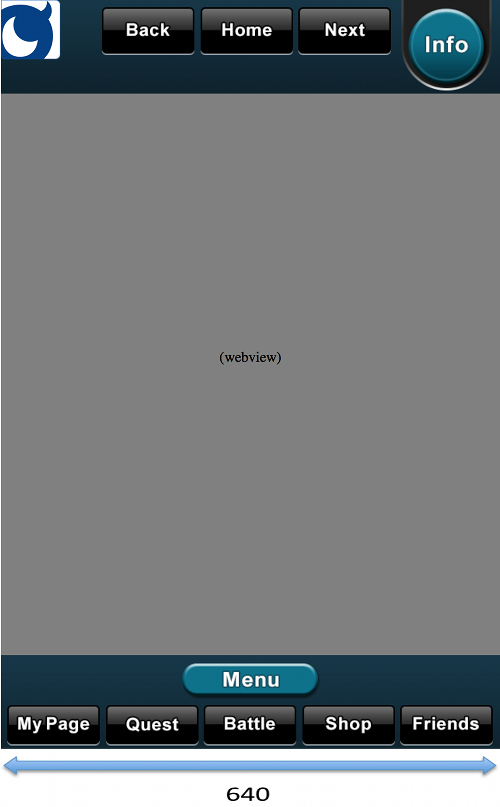
layout Element
This forms the root element of the layout settings file.
communityButton Element (deprecated)
As of July 22, 2014, this method has been deprecated. Further on, we recommend the usage of showCommunityUI which is explained in the next section.
Please add to the layout XML the following elements, If you want to display a standard community button.
<!-- Community button -->
<communityButton gravity="TopLeft" />
| Attribute | Value | Required |
|---|---|---|
| gravity | Community button display position. (One of the following: TopLeft / TopRight / BottomLeft / BottomRight) | Yes |
| theme | Community button display position. (One of the following: basic / gray / blue / dark) | Optional |
The default theme will be basic if not defined
Implements of showCommunityUI (recommended)
Deleting the following element will remove the community button from displaying.
<!-- Community button -->
<communityButton gravity="TopLeft" />
Instead of showing community button, you will need to implement your own link to display Mobage Community within two taps from the main or top screen.
To show Mobage community, call mobage.shellapp.Service.showCommunityUI method.
Please refer to the document below to find more details.
webview Element
The webview element is used for specifying WebView layout information. It is a child element of the layout element. It is a required element (1..1).
| Attribute | Value | Required |
|---|---|---|
| top | Top position of Webview. (numerical value) | Yes |
| left | Left position of Webview. (numerical value) | Yes |
| bottom | Bottom position of Webview. (numerical value) | Yes |
| right | Right position of Webview. (numerical value) | Yes |
| scalesToFit | Flag indicating whether to enable a viewport. The default value is false. (true/false) | Optional |
| backkeyToExit | Flag indicating whether to immediately end the application when the Android's Back key is pressed. The default value is false. When backkeyToExit is true, a dialog asking the user to confirm ending the application is displayed when the Back key is pressed. When backkeyToExit is false, the behavior of the Back key will be that of the WebView browser's back button. If there is no screen to go back to, then the dialog asking the user to confirm ending the application will be displayed. | Optional |
header Element
The header element is used for specifying layout information for the header. It is a child element of the layout element. Zero or more header elements can be defined.
- The header element specifies the layout of the header that is displayed when the application is launched. If there is more than one header element, the "default" attribute must be set to true for one of the elements.
- Operation is not guaranteed if the default attribute is true for more than one header element.
- If you do not need the header, you should not define the header element.
| Attribute | Value | Required |
|---|---|---|
| name | Header name. (any arbitrary string; ex: "main", "battle", etc.) | Yes |
| default | Indicates that this is the default header when the application is launched. The default value is false. (true/false) | Optional |
| background | Filename of the image used in the header. (string such as "header_base.png") | Yes |
| top | The top position of the header. (numerical value) | Yes |
| left | The left position of the header. (numerical value) | Yes |
| height | The height of the header. (numerical value) | Yes |
| width | The width of the header. (numerical value) | Yes |
button Element (for the header)
The button element is used for specifying layout information for a button. It is a child element of the header element. Zero or more button elements can be defined.
| Attribute | Value | Required |
|---|---|---|
| normal | The image file used when the button is in its normal state. (string such as "header_button1.png") | Yes |
| over | The image file used when the button is tapped. If no value is defined, the button will keep its normal image even when it is tapped. (string such as "header_button_over1.png") | Optional |
| top | The top position of the button. (numerical value) | Yes |
| left | The left position of the button. (numerical value) | Yes |
| height | The height of the button. (numerical value) | Yes |
| width | The width of the button. (numerical value) | Yes |
| href | Defines the behavior of the button. (See the values listed below for href) | Yes |
| hrefSandbox | Defines the behavior of the button. (For Sandbox) (See the values listed below for href) | Optional |
| soundeffect | The sound file to play when the button is tapped. (string such as "select.ogg") | Optional |
- If the hrefSandbox attribute is omitted, the href attribute will still be valid even in the Sandbox environment.
Values that can be defined for href
| Value | Function |
|---|---|
| top | Go to the startUrl of gadget.xml |
| back | Go to the previous page |
| reload | Reload the current page |
| forward | Go to the next page |
| showBankUI | Display the MobaCoin purchase screen as a dialog |
| (Javascript) | javascript: func(); Format can be specified |
| (URL) | Target URL of any game server. (The Gadget server URL is not included so no need to URL-encode) |
footer Element
The footer element is used for specifying layout information for the footer. It is a child element of the layout element. Zero or more footer elements can be defined.
- The footer element specifies the layout of the footer that is displayed when the application is launched. If there is more than one footer element, the "default" attribute must be set to true for one of the elements.
- Operation is not guaranteed if the default attribute is true for more than one footer element.
- If you do not need the footer, you should not define the footer element.
| Attribute | Value | Required |
|---|---|---|
| name | Footer name. (any arbitrary string; ex: "main", "battle", etc.) | Yes |
| default | Indicates that this is the default footer when the application is launched. The default value is false. (true/false) | Optional |
| background | Filename of the image used in the footer. (string such as "header_base.png") | Yes |
| bottom | The bottom position of the footer. (numerical value) | Yes |
| left | The left position of the footer. (numerical value) | Yes |
| height | The height of the footer. (numerical value) | Yes |
| width | The width of the footer. (numerical value) | Yes |
button Element (for the footer)
The button element is used for specifying layout information for a button. It is a child element of the footer element. Zero or more button elements can be defined.
| Attribute | Value | Required |
|---|---|---|
| normal | The image file used when the button is in its normal state. (string such as "header_button1.png") | Yes |
| over | The image file used when the button is tapped. If no value is defined, the button will keep its normal image even when it is tapped. (string such as "header_button_over1.png") | Optional |
| bottom | The bottom position of the button. (numerical value) | Yes |
| left | The left position of the button. (numerical value) | Yes |
| height | The height of the button. (numerical value) | Yes |
| width | The width of the button. (numerical value) | Yes |
| href | Defines the behavior of the button. (See the values listed below for href) | Yes |
| hrefSandbox | Defines the behavior of the button. (For Sandbox) (See the values listed below for href) | Optional |
| soundeffect | The sound file to play when the button is tapped. (string such as "select.ogg") | Optional |
- If the hrefSandbox attribute is omitted, the href attribute will still be valid even in the Sandbox environment.
Values that can be defined for href
| Value | Function |
|---|---|
| top | Go to the startUrl of gadget.xml |
| back | Go to the previous page |
| reload | Reload the current page |
| forward | Go to the next page |
| showBankUI | Display the MobaCoin purchase screen as a dialog |
| (Javascript) | javascript: func(); Format can be specified |
| (URL) | Target URL of any game server. (The Gadget server URL is not included so no need to URL-encode) |
Sample Layout Settings File
A sample layout settings XML file is shown below.
<layout>
	<!-- Community button -->
	<communityButton gravity="TopLeft" />
	<!-- WebView layout -->
	<webview
		bottom="120"
		left="0"
		right="0"
		scalesToFit="true"
		backkeyToExit="true"
		top="120" />
	<!-- Header 1 -->
	<header
		name="main"
		background="ui_black_header_base.png"
		default="true"
		height="120"
		left="0"
		top="0"
		width="640" >
		<button
			height="62"
			href="back"
			left="130"
			normal="ui_black_header_back.png"
			over="ui_black_header_back_on.png"
			soundeffect="select.ogg"
			top="10"
			width="119" />
		<button
			height="62"
			href="top"
			left="256"
			normal="ui_black_header_home.png"
			over="ui_black_header_home_on.png"
			soundeffect="start.ogg"
			top="10"
			width="119" />
		<button
			height="62"
			href="forward"
			left="382"
			normal="ui_black_header_next.png"
			over="ui_black_header_next_on.png"
			soundeffect="select.ogg"
			top="10"
			width="119" />
		<button
			height="116"
			href="showBankUI"
			left="514"
			normal="ui_black_header_info.png"
			over="ui_black_header_info_on.png"
			soundeffect="select.ogg"
			top="0"
			width="116" />
	</header>
	<!-- Header 2 -->
	<header
		name="header2"
		background="ui_beige_header_base.png"
		default="false"
		height="120"
		left="0"
		top="0"
		width="640" >
		<button
			height="62"
			href="back"
			left="130"
			normal="ui_beige_header_back.png"
			over="ui_beige_header_back_on.png"
			soundeffect="select.ogg"
			top="10"
			width="119" />
		<button
			height="62"
			href="top"
			left="256"
			normal="ui_beige_header_home.png"
			over="ui_beige_header_home_on.png"
			soundeffect="start.ogg"
			top="10"
			width="119" />
		<button
			height="62"
			href="forward"
			left="382"
			normal="ui_beige_header_next.png"
			over="ui_beige_header_next_on.png"
			soundeffect="select.ogg"
			top="10"
			width="119" />
		<button
			height="116"
			href="showBankUI"
			left="514"
			normal="ui_beige_header_info.png"
			over="ui_beige_header_info_on.png"
			soundeffect="select.ogg"
			top="0"
			width="116" />
	</header>
	<!-- Footer 1 -->
	<footer
		name="main"
		background="ui_black_footer_base.png"
		bottom="0"
		default="true"
		height="120"
		left="0"
		width="640" >
		<button
			height="53"
			href="http://gameserver.com/mypage.php"
			hrefSandbox="http://dev.gameserver.com/mypage.php"
			left="9"
			normal="ui_black_footer_icon1.png"
			over="ui_black_footer_icon1_on.png"
			soundeffect="select.ogg"
			bottom="5"
			width="119" />
		<button
			height="53"
			href="http://gameserver.com/quest.php"
			hrefSandbox="http://dev.gameserver.com/quest.php"
			left="135"
			normal="ui_black_footer_icon2.png"
			over="ui_black_footer_icon2_on.png"
			soundeffect="select.ogg"
			bottom="5"
			width="119" />
		<button
			height="53"
			href="http://gameserver.com/battle.php"
			hrefSandbox="http://dev.gameserver.com/battle.php"
			left="261"
			normal="ui_black_footer_icon3.png"
			over="ui_beige_footer_icon3_on.png"
			soundeffect="select.ogg"
			bottom="5"
			width="119" />
		<button
			height="53"
			href="http://gameserver.com/shop.php"
			hrefSandbox="http://dev.gameserver.com/shop.php"
			left="387"
			normal="ui_black_footer_icon4.png"
			over="ui_black_footer_icon4_on.png"
			soundeffect="select.ogg"
			bottom="5"
			width="119" />
		<button
			height="53"
			href="http://gameserver.com/friends.php"
			hrefSandbox="http://dev.gameserver.com/friends.php"
			left="513"
			normal="ui_black_footer_icon5.png"
			over="ui_black_footer_icon5_on.png"
			soundeffect="select.ogg"
			bottom="5"
			width="119" />
		<button
			height="42"
			href="javascript:openMenu();"
			left="233"
			normal="ui_black_footer_menu.png"
			over="ui_black_footer?menu_on.png"
			soundeffect="start.ogg"
			bottom="68"
			width="175" />
	</footer>
	<!-- Footer 2 -->
	<footer
		name="footer2"
		background="ui_beige_footer_base.png"
		bottom="0"
		default="false"
		height="120"
		left="0"
		width="640" >
		<button
			height="53"
			href="http://gameserver.com/mypage.php"
			hrefSandbox="http://dev.gameserver.com/mypage.php"
			left="9"
			normal="ui_beige_footer_icon1.png"
			over="ui_beige_footer_icon1_on.png"
			soundeffect="select.ogg"
			bottom="5"
			width="119" />
		<button
			height="53"
			href="http://gameserver.com/quest.php"
			hrefSandbox="http://dev.gameserver.com/quest.php"
			left="135"
			normal="ui_beige_footer_icon2.png"
			over="ui_beige_footer_icon2_on.png"
			soundeffect="select.ogg"
			bottom="5"
			width="119" />
		<button
			height="53"
			href="http://gameserver.com/battle.php"
			hrefSandbox="http://dev.gameserver.com/battle.php"
			left="261"
			normal="ui_beige_footer_icon3.png"
			over="ui_beige_footer_icon3_on.png"
			soundeffect="select.ogg"
			bottom="5"
			width="119" />
		<button
			height="53"
			href="http://gameserver.com/shop.php"
			hrefSandbox="http://dev.gameserver.com/shop.php"
			left="387"
			normal="ui_beige_footer_icon4.png"
			over="ui_beige_footer_icon4_on.png"
			soundeffect="select.ogg"
			bottom="5"
			width="119" />
		<button
			height="53"
			href="http://gameserver.com/friends.php"
			hrefSandbox="http://dev.gameserver.com/friends.php"
			left="513"
			normal="ui_beige_footer_icon5.png"
			over="ui_beige_footer_icon5_on.png"
			soundeffect="select.ogg"
			bottom="5"
			width="119" />
		<button
			height="42"
			href="javascript:openMenu();"
			left="233"
			normal="ui_beige_footer_menu.png"
			over="ui_beige_footer_menu_on.png"
			soundeffect="start.ogg"
			bottom="68"
			width="175" />
	</footer>
</layout>
Revision History
- 12/11/2012
- Initial release.