Using AndApp SecureLib for C++
This page explains how to use the AndApp SecureLib for C++.
For details of the API provided by AndApp SecureLib for C++, see the document included in the AndApp SecureLib for C++.
Form of SDK
The AndApp SecureLib for C++ is provided in a static link library form.
Depending on the version of Visual Studio and the items set in [Configuration Property]->[C/C++] -> [Code Generation] -> [Runtime Library], the library to be used is different.
- Visual Studio 2013
- Multi Thread (/MT)
- ./lib/VS2013/Release/x86/AndAppSecureLib_MT.lib
- Multi Thread Debug (/MTd)
- ./lib/VS2013/Debug/x86/AndAppSecureLib_MT.lib
- Multi Thread DLL (/MD)
- ./lib/VS2013/Release/x86/AndAppSecureLib_MD.lib
- Multi Thread Debug DLL (/MDd)
- ./lib/VS2013/Debug/x86/AndAppSecureLib_MD.lib
- Multi Thread (/MT)
- Visual Studio 2015
- Multi Thread (/MT)
- ./lib/VS2015/Release/x86/AndAppSecureLib_MT.lib
- Multi Thread Debug (/MTd)
- ./lib/VS2015/Debug/x86/AndAppSecureLib_MT.lib
- Multi Thread DLL (/MD)
- ./lib/VS2015/Release/x86/AndAppSecureLib_MD.lib
- Multi Thread Debug DLL (/MDd)
- ./lib/VS2015/Debug/x86/AndAppSecureLib_MD.lib
- Multi Thread (/MT)
How to Use
Import the SDK. To import SDK, follow these steps.
- Copy the AndAppSecureLib folder to the appropriate place of the project.
- Set the include folder for the project property.
- Add the include folder in the included AndAppSecureLib folder to [Configuration Property] -> [C/C++] -> [General] -> [Include Directory to Add].
- When the AndAppSecureLib folder is placed in the same place as the project file, it is $(ProjectDir)AndAppSecureLib\include.
- Add the include folder in the included AndAppSecureLib folder to [Configuration Property] -> [C/C++] -> [General] -> [Include Directory to Add].
- Set the library for the project property.
- Add .\lib\VS2013\Debug\x86 in the included AndAppSecureLib folder to [Configuration Property] -> [Library Directory to Add]. (Depending on the version of Visual Studio and Debug/Release setting, it is different.)
1. When the AndAppSDK folder is placed in the same place as the project file, it is $(ProjectDir)AndAppSecureLib\lib\VS2013\Debug\x86. - Add AndAppSecureLib_MT.lib to [Configuration Property] -> [Linker] -> [Input] -> [Dependent File to Add]. (The file name is different depending on runtime library settings of the project.)
- Add .\lib\VS2013\Debug\x86 in the included AndAppSecureLib folder to [Configuration Property] -> [Library Directory to Add]. (Depending on the version of Visual Studio and Debug/Release setting, it is different.)
- Include and use AndAppSecureLib.h. After you have made the above settings, you can include it by #include "AndAppSecureLib.h."
-
- Be sure to set [Configuration Property] -> [Linker] -> [Debug] -> [Debug Information Generation] to “No.” .
If “No” is not assigned to 5. [Configuration Property] -> [Linker] -> [Debug] -> [Debug Information Generation], SecureLib will lose its efficiency, because symbol names of AndApp SecureLib can be seen. Be sure to assign it.
If you want to suppress the warnings shown at build time, copy the pdb file in the same folder as the target lib file to the folder in which the execution file is located.
After above steps, you can call the functions of AndApp SecureLib.
Function Overview
AndApp SecureLib for C++ 1.0.0 has the following functions.
- AndApp::SecureLib::SecureClass
- Inheriting this class, you can encrypt the whole class.
- AndApp::SecureLib::SecureFile
- You can encrypt a file.
- AndApp::SecureLib::SecurePrefs
- This class can be stored to the local storage in the encrypted state (in the form of Key/Value).
- AndApp::SecureLib::HTTPClient
- Using HTTP Public Key Pinning, this makes communication with invalid certificate impossible.
Function Description
- AndApp::SecureLib::SecureClass
- AndApp::SecureLib::SecureFile
- AndApp::SecureLib::SecurePrefs
- AndApp::SecureLib::HTTPClient
AndApp::SecureLib::SecureClass
To protect the data in memory, the whole class can be encrypted. As shown below, inherit from AndApp::SecureLib::SecureClass for use.
class Test : public AndApp::SecureLib::SecureClass {
public:
    Test() : x(0), y(1), z(2) {}
    virtual ~Test() {}
    int x;
    int y;
    int z;

protected:

private:

};
Encryption of a class is executed by the member function Encrypt of AndApp::SecureLib::SecureClass.
Test *test = new Test();
test->Encrypt(sizeof(Test));
Decryption of a class is executed by the member function Decrypt of AndApp::SecureLib::SecureClass.
test->Decrypt(sizeof(Test));
To delete a class inherited from AndApp::SecureLib::SecureClass, it must be decrypted before deleting.
test->Decrypt(sizeof(Test));
delete test;
AndApp::SecureLib::SecureFile
You can encrypt a file. As shown below, writing is done by passing a byte array of std::vector
std::string strValue = "AAAAABBBBBBBBBBAAAAAAAAAAAACCCCCCC";
const std::vector<u8> saltBytes = { 0x00, 0x01, 0x02, 0x03 };
const std::vector<u8> data(strValue.begin(), strValue.end());
AndApp::SecureLib::Error err = AndApp::SecureLib::SecureFile::Write("c:¥¥Users¥¥XXXX¥¥cpp_test.txt, saltBytes, data);
Reading can be done as shown below.
const std::vector<u8> saltBytes = { 0x00, 0x01, 0x02, 0x03 };
std::vector<u8> data2;
AndApp::SecureLib::Error err = AndApp::SecureLib::SecureFile::Read("c:¥¥Users¥¥XXXX¥¥cpp_test.txt", saltBytes, data2);
std::string str(data2.begin(), data.2end());
printf("%s", str.c_str());
AndApp::SecureLib::SecurePrefs
This is an encrypted Key / Value class which can be stored in local storage. Data can be stored as shown below. You can pass the attached data used at encryption time to “salt.” (For the type which can be specified to “value,“ see the document included in SDK.)
const std::vector<u8> saltBytes = { 0x00, 0x01, 0x02, 0x03 };
AndApp::SecureLib::SecurePrefs *prefs;
prefs = new AndApp::SecureLib::SecurePrefs();
AndApp::SecureLib::Error err = prefs->Init("c:¥¥Users¥¥XXXX¥¥cpp_test_prefs.txt, saltBytes);

u32 value = 102804;
AndApp::SecureLib::Error err = prefs->Write("num1", value);
Reading can be done as shown below.
u32 value;
AndApp::SecureLib::Error err = prefs->Read("num1", value);
printf("%lu", value);
When you free the prefs object, delete it.
delete prefs;
AndApp::SecureLib::HTTPClient
Using HTTP Public Key Pinning, in order to prevent a man-in-the-middle attack by invalid SSL certificate, this function makes communication with invalid certificate impossible. A Public Key is embedded in a client, and the client can communicate with only a server that agrees with the embedded Public Key.
How to Use
- Obtaining a Public Key and transforming it to a byte type array
- Sending the transformed byte type Public Key to AndApp.SecureLib and Communicating
Obtaining a Public Key and transforming it to a byte type array
First, obtain the Public Key of the server that performs HTTPS communication using Public Key Pinning, and transform the obtained Public Key to a byte type array.
The method to obtain a Public Key and to transform it to a byte type array is as follows:
- The method to obtain a Public Key using Google Chrome
- The method to obtain a Public Key using the openssl command
The method to obtain a Public Key using Google Chrome
On Google Chrome, access the server from which you obtain a Public Key, and click the “Padlock” mark in the address bar.
After the panel has opened, click the “Details” link in the panel.
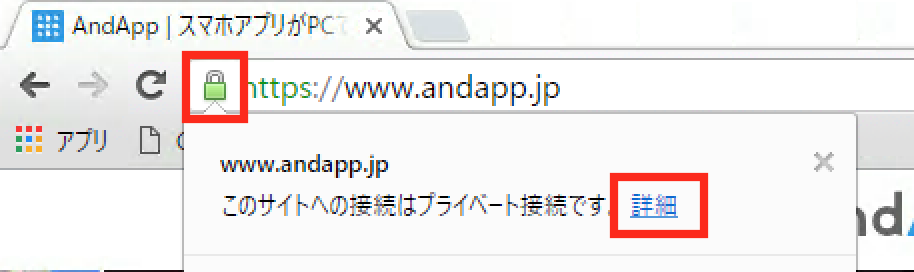
When you click the “Details” link, “Security OverView” appears.
Select the domain for which you want to obtain a Public Key, and click the “View certificate” button.
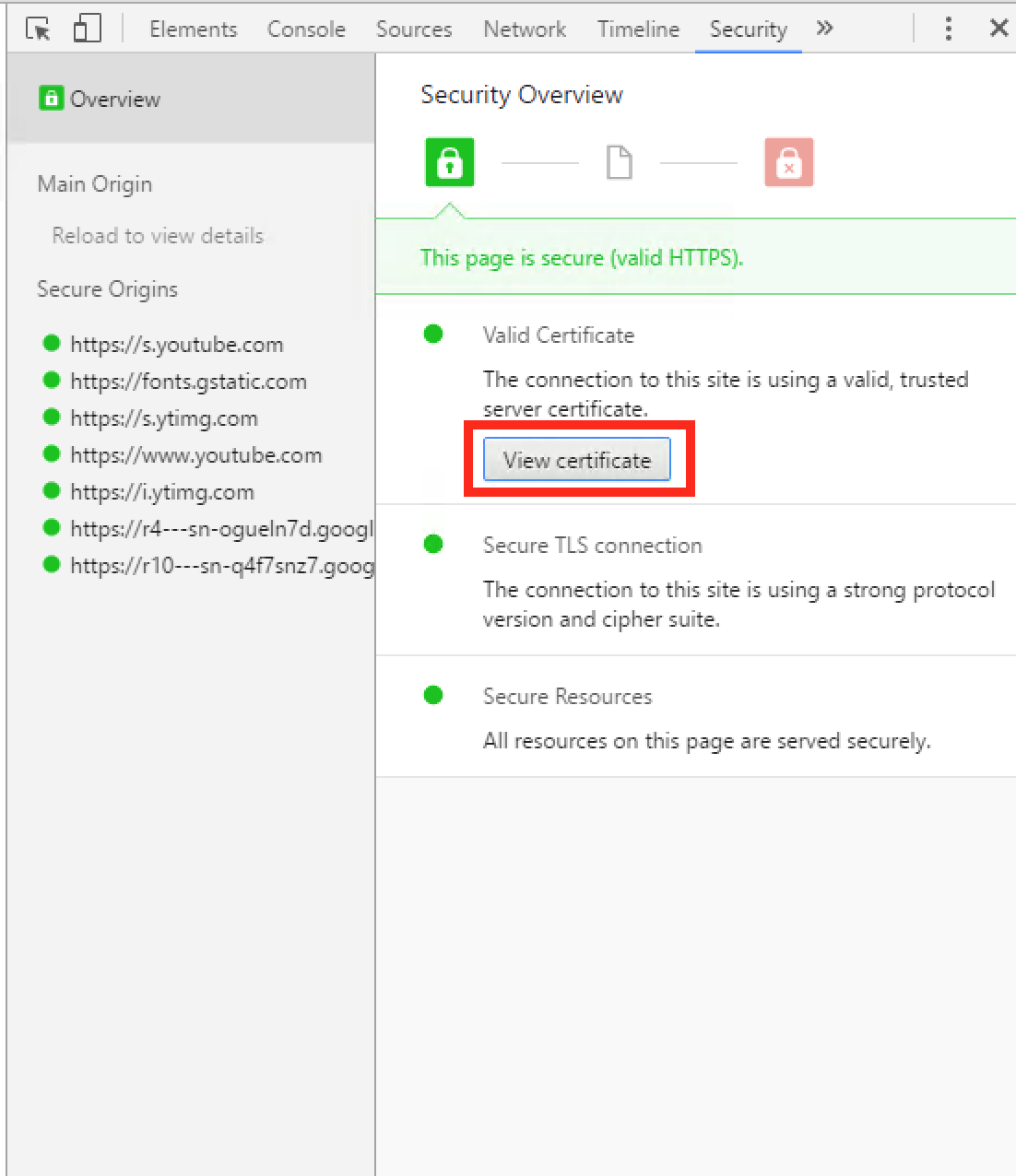
Select the “Details” tab in the certificate panel which opens when you click the “View certificate” button, and select “Public Key” from the field.
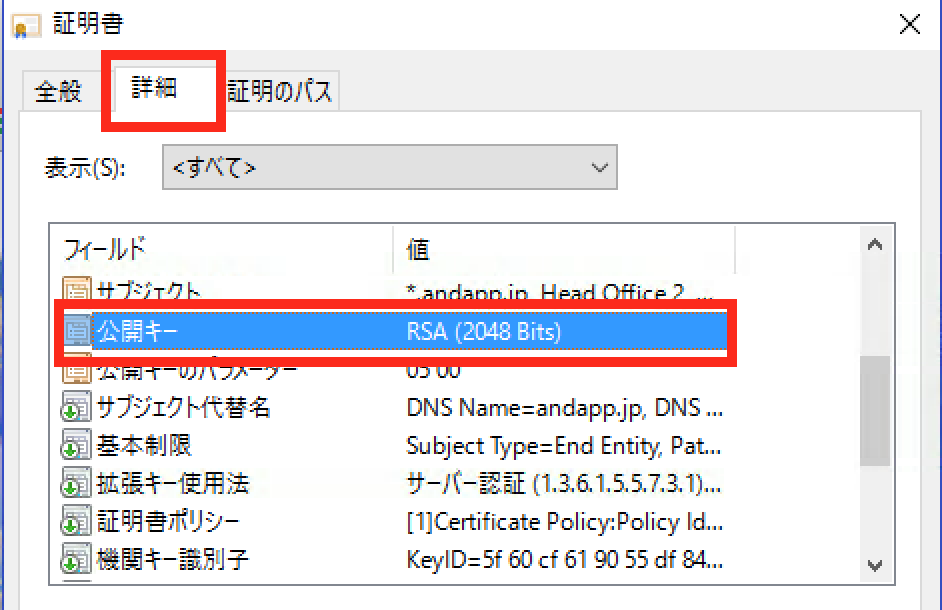
When you select “Public Key,” the string of the Public Key is displayed. Store the string and transform the obtained string of the Public Key to the array of std::vector
Note: However, encryption using AndApp::SecureLib::SecureClass is recommended so that the public key is not visible. This is illustrated in the communication part of the example below.
std::string strPublicKey = "A6 83 CD ...";
std::vector<u8> publicKey;
std::stringstream ss(strPublicKey);
std::string item;
publicKey.clear();
int nBuff;
u8 u8Buff;
char strBuff[20];
while (getline(ss, item, ' ')) {
    if (!item.empty()) {
        sprintf_s(strBuff, "%s", item.c_str());
        sscanf_s(strBuff, "%x", &nBuff);
        u8Buff = (u8)nBuff;
        publicKey.push_back(u8Buff);
    }
}
ss.clear(); // Clear unnecessary publicKey
The method to obtain a Public Key using the openssl command
By entering the following command, obtain a Public Key of the hexadecimal string.
# To obtain the Public Key of www.andapp.jp
openssl s_client -servername www.andapp.jp -connect www.andapp.jp:443 < /dev/null | openssl x509 -outform PEM | openssl x509 -pubkey -noout | sed '/^-/d' | awk '{printf "%s", $1}' | base64 --decode | tail -c +25 | xxd -i
If an encryption method other than RSA is used for SSL certificate of communication destination, the method to obtain a Public Key may differ. In that case, please contact us.
When you enter the above command, the following result will be returned.
0x30, 0x82, 0x01, 0x0a, 0x02, 0x82 ...
Bring the hexadecimal string obtained by the openssl command into the variable as a byte array.
const u8 bytePublicKey[] = {
   0x30, 0x82, 0x01, 0x0a, 0x02, 0x82...
}
std::vector<u8> publicKey(bytePublicKey, bytePublicKey + sizeof(bytePublicKey));
Sending the transformed byte type Public Key to AndApp.SecureLib and Communicating
Next, pass the host of the URL which executes HTPS transmission and the array of std::vector
AndApp::SecureLib::HTTPClient client;
AndApp::SecureLib::Error err = client.Init();
if(err.GetCode() == 0) {
    err = client.PinPublicKey("www.google.com", publicKey);
    if(err.GetCode() == 0) {
        int statusCode = 0;
        std::string finalURI;
        std::map<std::string, std::string> requestHeaders, responseHeaders;
        std::vector<u8> requestBody, responseBody;

        err = client.SendSyncRequest(AALS_HTTP_METHOD_GET, "`https://www.google.com",` requestHeaders, requestBody, finalURI, statusCode, responseHeaders, responseBody);

        if(err.GetCode() == 0) {
            printf("Successfully sent a request");
        }
    }
}
As shown in the example below, if you use the AndApp::SecureLib::SecureClass, you can protect the information such as the Public Key etc. (However, for the HTTPClient::SendASyncRequest, it is not supported because of difficulties with Encrypt timing.)
// Protected with classes inherited by SecureClass
class SecureHTTPClient : public AndApp::SecureLib::SecureClass {
public:
    SecureHTTPClient() {};
    AndApp::SecureLib::Error Init(std::string url, std::vector<u8> publicKey, std::string field, std::string value);
    AndApp::SecureLib::Error SendSyncRequest(AALS_HTTP_METHOD method,
        const std::string& uri,
        const std::map<std::string, std::string>& requestHeaders,
        const std::vector<u8>& requestBody,
        std::string& finalUri,
        int& statusCode,
        std::map<std::string, std::string>& responseHeaders,
        std::vector<u8>& responseBody);
private:
    AndApp::SecureLib::HTTPClient _client;
};
AndApp::SecureLib::Error SecureHTTPClient::Init(std::string url, std::vector<u8> publicKey, std::string field, std::string value) {
    AndApp::SecureLib::Error err;
    err = _client.Init();
    if (err.GetCode() == 0) {
        err = _client.PinPublicKey(url, publicKey);
    }
    else {
        return err;
    }
    if (err.GetCode() == 0 && field.size() > 0) {
        err = _client.SetHeader(field, value);
    }
    else {
        return err;
    }
    return err;
}
AndApp::SecureLib::Error SecureHTTPClient::SendSyncRequest(AALS_HTTP_METHOD method,
    const std::string& uri,
    const std::map<std::string, std::string>& requestHeaders,
    const std::vector<u8>& requestBody,
    std::string& finalUri,
    int& statusCode,
    std::map<std::string, std::string>& responseHeaders,
    std::vector<u8>& responseBody) {
    return _client.SendSyncRequest(method, uri, requestHeaders, requestBody, finalUri, statusCode, responseHeaders, responseBody);
}
// actual implementation part ==============================
SecureHTTPClient *secureClient = new SecureHTTPClient();
AndApp::SecureLib::Error err = secureClient->Init("www.google.com", publicKey, "", "");
secureClient->Encrypt(sizeof(SecureHTTPClient)); // Please encrypt once
publicKey.clear();
if (err.GetCode() == 0) {
    int statusCode = 0;
    std::string finalURI;
    std::map<std::string, std::string> requestHeaders, responseHeaders;
    std::vector<u8> requestBody, responseBody;
    secureClient->Decrypt(sizeof(SecureHTTPClient)); // Decrypt before using
    err = secureClient->SendSyncRequest(AALS_HTTP_METHOD_GET, "`https://www.google.com",` requestHeaders, requestBody, finalURI, statusCode, responseHeaders, responseBody);
    if (err.GetCode() == 0) {
        secureClient->Encrypt(sizeof(SecureHTTPClient)); // Encryption when finished
        requestHeaders.clear();  // Keep it clean just in case
        requestBody.clear();  // Keep it clean just in case
        printf("Successfully sent a request");
    }
}
Update History
- September 23, 2016
- Newly created