Development Flow
Application Development Flow
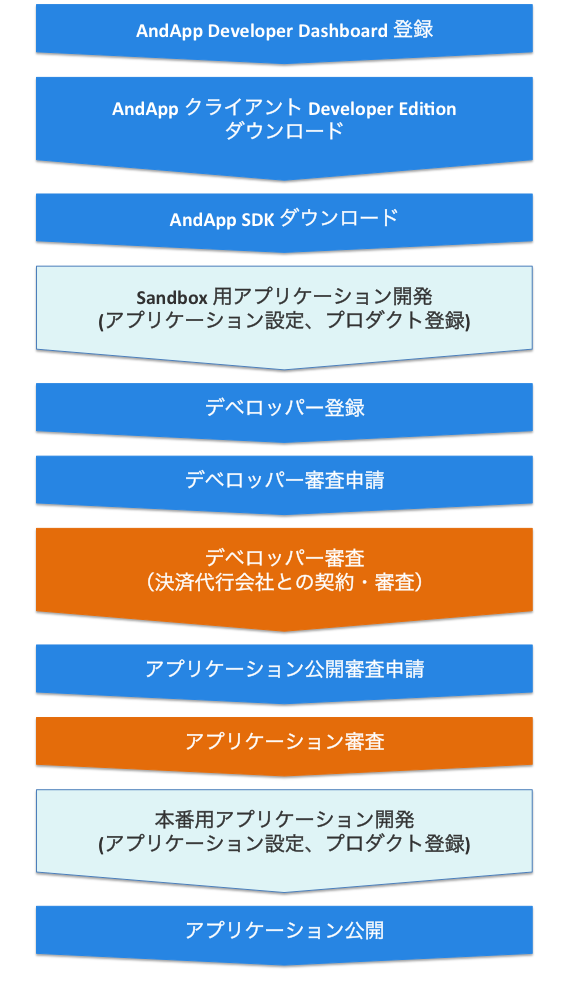
Registering to AndApp Developer Dashboard
You must register an application to the AndApp Developer Dashboard (Dashboard) to release applications for end users.
The sandbox environment can be utilized after registering to Dashboard.
Developing Application
Downloading AndApp Client Developer Edition
Download AndApp Client Developer Edition from the following links:
Downloading AndApp SDK
Download AndApp SDK from the following link. SDKs of two types for Unity and C++ are provided. (Both of them are provided for Windows only.)
Developing Application for Sandbox
You can develop applications under the Sandbox environment.
Note on development
- At this time, AndApp Windows version is compatible with 32-bit apps only. AndApp operates under WOW64 in Windows 64-bit environment.
- AndApp Mac version is compatible with 64-bit apps only.
- An installer cannot be included in an application.
- Zip file packaged by an AndApp client can be unzipped in a certain place.
- An app must be developed to operate even if it is unzipped in any installation place.
Applying for Application Release
You are required to apply to us for an application public review when you complete the development. The public review can be applied under the Sandbox environment. Therefore, upload the binary file developed under the Sandbox environment through AndApp Developer Dashboard.
Developing Application for Production
Set an application using a production environment.
Releasing Application
You can register the application for production and then release it to AndApp at any time. Also, it is necessary to package the application for production before uploading.
Update History
-
November 28, 2018
- Added about Mac version.
-
May 9, 2017
-
- Some revisions and additions provided.
-
October 7, 2016
-
- Details of Releasing flow added.
-
July 28, 2016
-
- Newly created