Confirmation of Player Authentication Implementation
You must check whether the player authentication function is incorporated and implemented appropriately before the app review. Then, send the result to andapp-developer@dena.com .
How to check
- Downloading Excel Sheet
- Sheet Selection
- Entering Information
- Checking Implementation of Player Authentication
Downloading Excel Sheet
Download the Excel sheet below, and check the app according to the instructions in the sheet.
Player authentication sheet forSandbox_20180202.xlsx
Sheet Selection
If there is a “Takeover on the way” with new player authentication, select the Excel sheet for “Takeover on the way”. Otherwise, select the sheet for “No takeover on the way”.

Entering Information
Enter information in the fields of the sheet, as shown below.
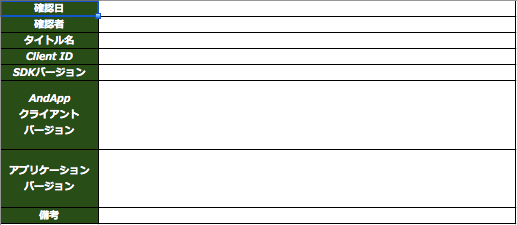
- Check Date
- Date that the check is performed.
- Checker
- The name of the checker. Input is optional.
- Title
- Title that is to be released.
- Client ID
- Client ID of the title.
- SDK version
- AndApp SDK version used in the title.
- AndApp Client Version
- The AndApp client version that you are using.
- Application Version
- The version added to the application.
- Remarks
- Enter the fields if you have other important matters.
Checking Implementation of Player Authentication

Enter information in “Status” field in the sheet while checking the field other than the gray field filled in.
Perform the procedure according to “Overview of Procedure”, and put OK in “Status” if no problems are found.
If any problems are found, modify the implementation on the game side. * Basically, the sheet should be submitted under the condition where all statuses are OK.
Submission of Excel Sheet
After check the implementation, attach the completed sheet to an e-mail, and send it to andapp-developer@dena.com with the following title. * Enter the applicable name into “Title”.
Subject: (Title) Player authentication check
Update History
-
April 11, 2017
-
- Newly created