Implementing Unity IAP Flow
Even if a new payment method is added, the way to install the payment function does not change.
This page describes the payment flow of the Unity IAP Flow.
The Unity IAP Flow is the function provided from AndApp SDK for Unity 0.2.0.
The Unity IAP Flow is the payment flow using Unity IAP which has been provided by Unity 5.3.
- Regarding Unity IAP Version
- Importing the Unity IAP function
- Product
- Implementing the Unity IAP payment flow
Regarding Unity IAP Version
As of October 7, 2025, the available version is Unity IAP v4 series, version 4.13.0 or higher.
Importing the Unity IAP function
On the condition that
(1) you are using Unity 5.3 or later,
(2) you have enabled UnityIAP by Window->Unity Services on the Unity editor, and
(3) you have imported AndAppSDK.unitypackage in advance,
you need to import AndAppUnityIAP.unitypackage to Unity Project.
After the above conditions are satisfied, import AndAppUnityIAP.unitypackage, which is included in AndApp SDK for Unity.
Product
A product is content that a game using In-App Payment sells in the game. The game should prepare, in advance, the product for Sandbox on the AndApp Developer Dashboard.
You can specify a product type for a product. At present, AndApp supports the following product types.
Consumable Products
- A consumable product is a product that can be consumed in a game. This product type is applied to the virtual content that is consumed when it is used; for example, a virtual currency in a game or recovering agent.
In the future, product types other than consumable products will be provided.
To create a product, you need to enter the following attributes on the AndApp Developer Dashboard. For example, if you sell a virtual currency, register multiple products for virtual currencies for each selling price range (100 points, 200 points, etc.).
attribute | Description |
|---|---|
Product ID | Product ID is an identifier of a product. You need to specify a unique character string among all the games. The first letter must be a lowercase alphabetic character. After the first character, you can enter lowercase alphanumeric, underscore (_), or dot (.). The length of string must be from 1 to 128 bytes. |
Product Type | You can select only a consumable product. |
Name | Enter the product name. You can enter a string of length 1–64. |
Description | The description of this product (optional). You can enter a string of length 0–256. |
Price | Enter the price in Japanese yen. Specify the price a user actually pays. |
After you have registered a product in Sandbox and embedded it in the product list using In-App Payment, you can newly register the product for Production. On this occasion, the product can be copied from Sandbox to Production.
Implementing the Unity IAP payment flow
From here, we describe the Unity IAP payment flow.
用語説明
Game
- AndApp SDK-implemented game
AndApp SDK
- AndApp Development Kit
AndApp Client
- AndApp specialized application
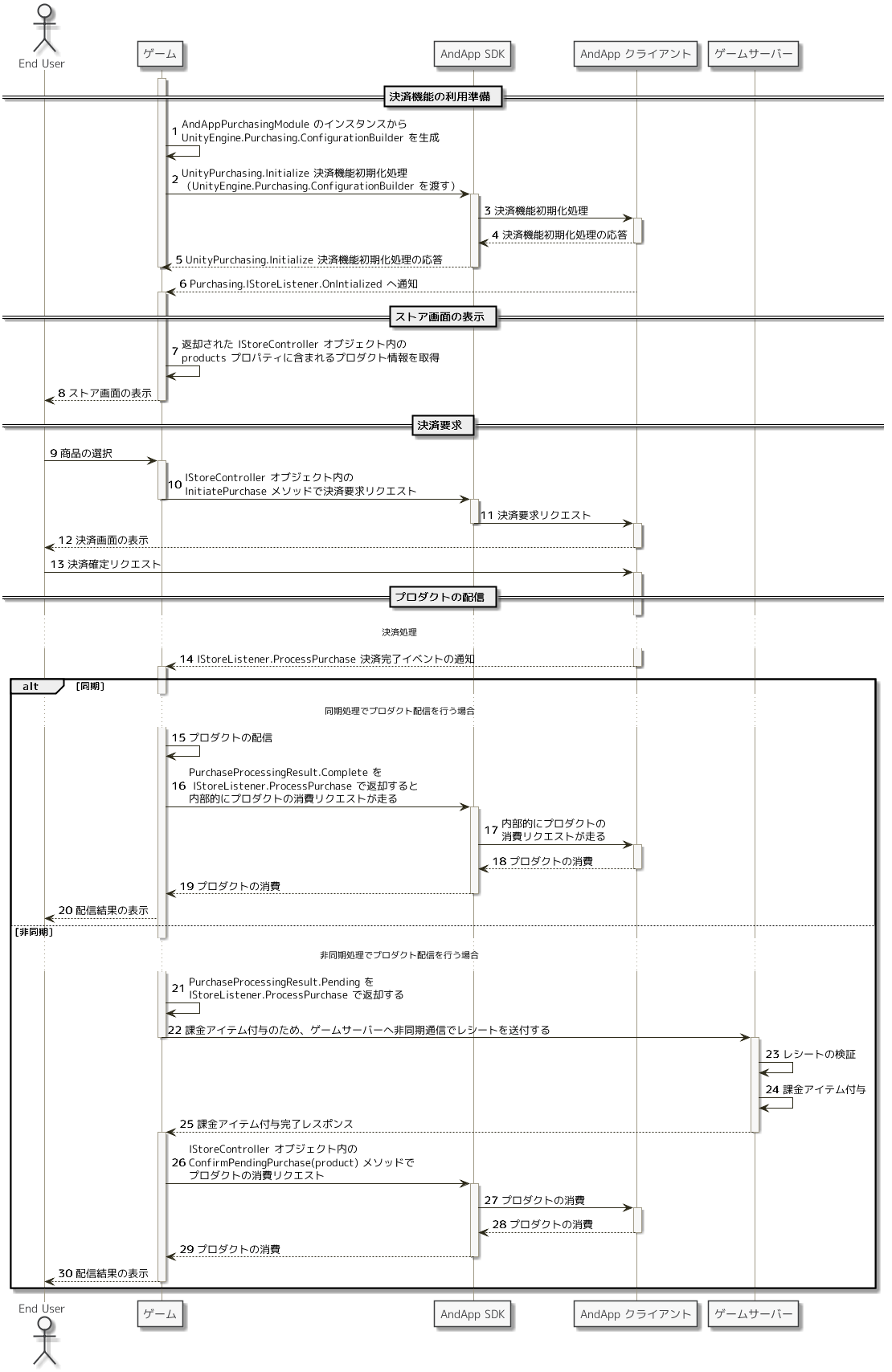
The payment flow is roughly divided into the following 6 processes:
- Preparation for use of the payment function
- Display of the product list page
- Payment Requirement
- Verification of receipt
- Recovery Processing
The methods to implement these processes are as follows:
Preparation for use of the payment function
To use the payment function of In-App Payment, the following preparations are required.
- Make the class which implements IStoreListener.
- Create a ConfigurationBuilder instance by passing the instance of AndApp.UnityIAP.PurchasingModule to UnityEngine.Purchasing.ConfigurationBuilder.Instance().
- Pass a ConfigurationBuilder instance to UnityPurchasing.Initialize.
When initialization is completed, IStoreListener.OnInitialized will be called. Retain the StoreController object which is to be passed as the argument of OnInitialized.
csharp Public class Purchaser: MonoBehaviour, IStoreListener { Private static IStoreController storeController; Public void Start () { Var builder = ConfigurationBuilder.Instance (new AndApp.UnityIAP.PurchasingModule ()); UnityPurchasing.Initialize (this, builder); } // // - IStoreListener // Public void OnInitialized (IStoreController controller, IExtensionProvider extensions) { storeController = controller; storeExtensionProvider = extensions; } Public void OnInitializeFailed (InitializationFailureReason error) { Debug.Log ("OnInitializeFailed InitializationFailureReason:" + error); // If settlement function not available, OnInitializeFailed will be called } } |
|---|
Display of the product list page
If you want to display a product on the product list page in a game, the game need to know, in advance, the product IDs of all such products.
When you prepare use of the payment function as stated above, by passing product ID information at the time of ConfigurationBuilderinstance creation, you can inquire information about the product to which the specified product ID corresponds.
Because UnityIAP supports the implementation of the common code for purchasing in each store, you need to decide the common ID for every store (hereinafter referred to as “Cross-Store ID”). If registered IDs differ by store, you can pass the mapping between Cross-Store ID and each store ID at initialization.
csharp Var builder = ConfigurationBuilder.Instance (new AndApp.UnityIAP.PurchasingModule ()); Builder.AddProduct ("10_red_potions", ProductType.Consumable, new IDs () { {"Yourprefix.10_red_potions.ios", AppleAppStore.Name}, {"Yourprefix.10_red_potions.android", GooglePlay.Name}, {"Yourprefix.10_red_potions.andapp", AndApp.UnityIAP.Store.Name} }); UnityPurchasing.Initialize (this, builder); |
|---|
After mapping Cross-Store IDs to store-specific IDs and acquiring the IStoreController via the IStoreListener.OnInitialized callback Product instances can be retrieved by passing the Cross-Store ID to IStoreController.products.WithID().
csharp Product product = storeController.products.WithID (productId); |
|---|
Payment Requirement
Payment Requirement for a product which a user wants to buy is done using the following steps.
Obtain the relevant product information.
Check the state of the product to see whether it can be purchased.
By passing the product information, execute storeController.InitiatePurchase( ).
| csharp Void BuyProduct (string productId) { Try { // Obtain Product information Product product = storeController.products.WithID (productId); // Check available purchase status If (product == null ||! Product.availableToPurchase) { // If the target item can not be purchased Return; } // Start purchasing process StoreController.InitiatePurchase (product); } Catch (Exception e) { Debug.Log ("BuyProduct: FAIL. Exception during purchase." + E); } } |
| --- |
As above, when storeController.InitiatePurchase() is executed, the payment page will be displayed on the AndApp client side. Then, when the user sends Payment Establishment Request, the payment will be completed.
| From AndApp SDK 0.2.0, Developer Payload can be optionally specified to storeController.InitiatePurchase. Note: developerPayload is optional. storeController.InitiatePurchase( Purchasing.Product product, string developerPayload ) Specified developerPayload will be included in the receipt. |
|---|
Distribution of a product
A short time after the payment has been established, the notice of payment established will be sent to ProcessPurcase method of IStoreListener class. The argument PurchaseEventArgs contains the purchased product and corresponding receipt information. By verifying this receipt information, the game side distributes the product to the user.
In the case of synchronous processing
csharp Public PurchaseProcessingResult ProcessPurchase (PurchaseEventArgs args) { // Confirm that the productID matches what you requested If (String.Equals (args.purchasedProduct.definition.id, productID, StringComparison.Ordinal)) { Debug.Log (string.Format ("ProcessPurchase: PASS. Product: '{0}'", args.purchasedProduct.definition.id)); // Perform Product Grant Processing in Game Score + = 100; } Else { Debug.Log (string.Format ("ProcessPurchase: FAIL. Unrecognized product: '{0}'", args.purchasedProduct.definition.id)); } // When Complete is returned, product consumption processing is done. Return PurchaseProcessingResult.Comlete; } Public void OnPurchaseFailed (Product product, PurchaseFailureReason failureReason) { // If purchase processing did not succeed } |
|---|
When product granting process is done in the game, it is done synchronously. When ProcessPurchase method returns PurchaseProcessingResult.Complete, product consumption processing is done automatically.
In the case of asynchronous processing
csharp Public PurchaseProcessingResult ProcessPurchase (PurchaseEventArgs args) { // Confirm that the productID matches what you requested If (String.Equals (args.purchasedProduct.definition.id, productID, StringComparison.Ordinal)) { Debug.Log (string.Format ("ProcessPurchase: PASS. Product: '{0}'", args.purchasedProduct.definition.id)); // Send the settlement completion request asynchronously to the game server with receipt ※ The receipt information is args.purchasedProduct.receipt. // We will grant the product on the game server } Else { Debug.Log (string.Format ("ProcessPurchase: FAIL. Unrecognized product: '{0}'", args.purchasedProduct.definition.id)); } // Return Pending Return PurchaseProcessingResult.Pending; } Public void OnPurchaseFailed (Product product, PurchaseFailureReason failureReason) { // If purchase processing did not succeed } |
|---|
When you are doing the product granting process not on the server, but rather in the game, use asynchronous processing. When ProcessPurchase method returns PurchaseProcessingResult.Pending, product consumption processing is not executed. Therefore, after receipt verification and product distribution on the game server side has completed, and after waiting for completion response from the game server side, execute the product consumption processing as follows.
csharp Public void ConfirmPendingPurchase (String productId) { Product product = m_StoreController.products.WithID (productId); If (product! = Null) { StoreController.ConfirmPendingPurchase (product); } } |
|---|
Verification of receipt
A receipt is verified on the game server side.
args.purchasedProduct.receipt contains the following information. Send the information directly to the game server.
{
 "Store": "AndApp",
 "TransactionID": 12345677,
 "Payload": "eyJhbGciOiJIUzI1NiIsIn.R5cCI6IkpXVCJ9"
}
※ Details of each element is as follows.
Key | type | Value |
|---|---|---|
Store | string | Name of store : "AndApp" |
TransactionID | int | Transaction ID provided by the store |
Payload | string | JWT in which transaction information is stored. The information such as developerPayload is included in it. |
Verification of receipt information
The receipt information consists of JSON Web Tokens, and needs to be verified.
The receipt information can be verified using the following two methods.
Using the Introspection API
When Payload is sent to the Introspection API, the receipt information is verified. For details of the Introspection API, see here.
To verify the receipt information, send the following request to the Introspection API.
HTTPS Request
POST / 1.0.0 / payment / introspection HTTP / 1.1
Host: sb-api.andapp.jp: 443
Content-Type: application / json
Authorization: Bearer {access_token}

{
    "TransactionToken": "eyj ..."
}
Request to the Introspection API requires using the Access Token which was obtained following the OAuth 2.0 procedure.
For the method to obtain the Access Token, see here .
If the request to the Introspection API succeeded and the receipt information was acceptable, “HTTP Status: 200 OK” and the content of the receipt will be returned in response to the request.
HTTPS Response
HTTP / 1.1 200 OK
Content-Type: application / json


{
    "Iss": "https://sb-api.andapp.jp/1.0.0/payment",
    "Sub": "https://sb-api.andapp.jp/1.0.0/users/6104524",
    "Aud": "https://sb-api.andapp.jp/1.0.0/clients/189268204754",
    "Typ": "transaction_token",
    "Iat": 1464095267,
    "Exp": 1464096167,
    "Transaction": {
        "Id": 1234567890123456,
        "ClientId": 189268204754,
        "UserId": 1234567890123456,
        "Product": {
            "Id": "xxx.yyy.zzz.3000",
            "ClientId": 189268204754,
            "Type": "CONSUMABLE",
            "State": "AVAILABLE",
            "Prices": [
                {"Value": 3240, "currency": "JPY", "taxRate": 8.0}
            ],
            "Language": "ja-JP",
            "Title": "item name",
            "Description": "Description of item",
            "CreatedAt": 1463468400,
            "UpdatedAt": 1463468400
        },
        "Quantity": 2,
        "TotalPrice": {"value": 6480.00, "currency": "JPY", "taxRate": 8.0},
        "State": "CREATED",
        "DeveloperPayload": "" ",
        "PurchasedAt": 1463468400,
        "CreatedAt": 1463468400,
        "UpdatedAt": 1463468400
    }
}
Decoding and verifying JWT using a public key
For the method to verify JWT on the game server, refer to “Verifying procedure of JWT” at the following URL.
Https://docs.mobage.com/display/JPANDAPP/DevelopmentUnity_JSONWebToken_AndApp
Confirmation of receipt
After the receipt information has been verified, confirm the contents of the receipt.
Confirm what product was purchased, based on product ID, price, etc.
{
    "Iss": "https://sb-api.andapp.jp/1.0.0/payment",
    "Sub": "https://sb-api.andapp.jp/1.0.0/users/6104524",
    "Aud": "https://sb-api.andapp.jp/1.0.0/clients/189268204754",
    "Typ": "transaction_token",
    "Iat": 1464095267,
    "Exp": 1464096167,
    "Transaction": {
        "Id": 1234567890123456,
        "ClientId": 189268204754,
        "UserId": 6104524,
        "Product": {
            "Id": "xxx.yyy.zzz.3000",
            "ClientId": 189268204754,
            "Type": "CONSUMABLE",
            "State": "AVAILABLE",
            "Prices": [
                {"Value": 3240, "currency": "JPY", "taxRate": 8.0}
            ],
            "Language": "ja-JP",
            "Title": "item name",
            "Description": "Description of item",
            "CreatedAt": 1463468400,
            "UpdatedAt": 1463468400
        },
        "Quantity": 2,
        "TotalPrice": {"value": 6480.00, "currency": "JPY", "taxRate": 8.0},
        "State": "PURCHASED",
        "DeveloperPayload": "" ",
        "PurchasedAt": 1463468400,
        "CreatedAt": 1463468400,
        "UpdatedAt": 1463468400
    }
}
The contents of a receipt are as follows:
| property | title | type | required | description |
|---|---|---|---|---|
| iss | Issuer claim | string | true | The URI that represents the issuer. The following value is specified depending on each environment. sandbox https://sb-api.andapp.jp/1.0.0/payment
Production https://api.andapp.jp/1.0.0/payment
|
| sub | Subject claim | string | true | The URI which represents the player who made the payment. The following URI format (URI Template) is specified depending on each environment. sandbox https://sb-api.andapp.jp/1.0.0/users{/playerId}
Production https://api.andapp.jp/1.0.0/users{/playerId}
|
| aud | Audience claim | string | true | Will URI representing the game of Client ID, which was carried out a payment request. By the execution environment will be URI format (URI Template format) as follows. sandbox https://sb-api.andapp.jp/1.0.0/clients{/clientId}
Production https://api.andapp.jp/1.0.0/clients{/clientId}
|
| typ | Token type | string | true | Fixed value: "transaction_token". |
| iat | UNIX timestamp of the issue date and time | integer | true | The UNIX timestamp when the transaction_token issued. |
| exp | UNIX time stamp of the expiration date and time | integer | true | The UNIX timestamp which represents the date and time when the transaction_token is expired. The Transaction Token is invalid after the expiration date and time. |
| transaction | Transaction object | object | true |
|
| transaction.id | Transaction ID | integer | true | Up to 16 digits |
| transaction.product | Product objects that were purchased | object | true | |
| transaction.clientId | Client ID that created the transaction object | integer | true | Up to 16 digits |
| transaction.userId | Player ID that created the transaction object | integer | true | Up to 16 digits |
| transaction.product.id | ID of product object | string | true | |
| transaction.product.clientId | Client ID that created the product object | integer | true | Up to 16 digits |
| transaction.product.type | Product type | string | true | Fixed value: "CONSUMABLE". |
| transaction.product.state | The state of the product | string | true | Fixed value: "AVAILABLE". |
| transaction.product.prices | Currency by tax-inclusive price list of products | array | true | |
| transaction.product.prices[] | Currency by tax-inclusive price object of the product | object | true | |
| transaction.product.prices[].value | price | number | true | |
| transaction.product.prices[].currency | Currency unit | string | true | Fixed value: "JPY" |
| transaction.product.prices[].taxRate | tax rate(%) | number | true | Between 0 and 100. |
| transaction.product.language | language | string | true | Fixed value: "ja-JP" |
| transaction.product.title | Name of Product | string | true | |
| transaction.product.description | Product description sentence | string | true | |
| transaction.product.createdAt | UNIX time stamp of the product of the creation date and time | integer | true | |
| transcation.product.updatedAt | UNIX time stamp of the product update date and time of | integer | true | |
| transaction.quantity | Purchase number | integer | true | |
| transaction.totalPrice | Tax total purchase price object | object | true | |
| transaction.totalPrice.value | Total Price | number | true | |
| transaction.totalPrice.currency | Currency unit | string | true | Fixed value: "JPY". |
| transaction.totalPrice.taxRate | tax rate(%) | number | true | Between 0 and 100. |
| transaction.state | The state of the transaction | string | true | Fixed value: "PURCHASED". |
| transaction.developerPayload | Any of the payload that has been specified by the developer at the time of payment request | string | true | |
| transaction.refundTo | Transaction ID of the refund destination | integer | true | Fixed value: null |
| transaction.refundedBy | Refund the original transaction ID | integer | true | Fixed value: null |
| transaction.consumedAt | UNIX time stamp of product consumption date and time | integer | true | Fixed value: null |
| transaction.purchasedAt | UNIX time stamp of payment fixed date | integer | true | |
| transaction.createdAt | UNIX time stamp of the transaction of the creation date and time | integer | true | |
| transaction.updatedAt | UNIX time stamp of the transaction update date and time of | integer | true | |
| developerPayload | Fields that developers can be any input | string | true | This length is between 0 and 4096. By default, it contains the "". |
Recovery Processing
In case of failure of “Payment Establishment Request” or “Product Consumption Request” to the game server, you need to implement recovery processing beforehand.
The process of retrieving an unconsumed product is executed at the time of UnityIAP initialization. Therefore, check this information, and execute “Payment Establishment Request” and “Product Consumption Request” again to the game server.
Even if the result of Payment Completion Request to the game server showed that the item was already granted, execute the subsequent consumption request (storeController.ConfirmPendingPurchase()).
Public void OnInitialized (IStoreController controller, IExtensionProvider extensions)
{
    StoreController = controller;
    Foreach (var product in controller.products.all) {
        If (product.hasReceipt) {
         // If there is an unconsumed receipt, send the following information again to the server and execute consumption processing
          SendReceiptToGameServer (product.receipt);
        }
    }
}

Void SendReceiptToGameServer (string receipt) {
   // receipt transmission processing

   // After successful transmission
   StoreController.ConfirmPendingPurchase (product);
}
Update History
- October 7, 2025
- The comment (Regarding Unity IAP version) was added.
- September 27, 2017
- Fixed some explanation of "Display of the product list page".
- February 22, 2017
- The comment (Payment implementation did not change after MobaCoin was introduced) was added.
- October 21, 2016
- The bug of creation of AndApp.UnityIAP.PurchasingModule instance was corrected.
- August 23, 2016
- A description of the import method of the Unity IAP function was added.
- The comment (developerPayload can be specified) was added.
- July 28, 2016
- The method to verify the receipt information using the Introspection API was added.
- June 6, 2016
- Newly created