Implementing AndApp IAP Flow
Even if a new payment method is added, the way to install the payment function does not change.
This page explains the payment flow by AndApp IAP flow.
The AndApp IAP flow provides a payment flow when the Unity IAP can not be used. It is used to replace the existing payment library.
Product
A product is a content that a game using In-App Payment sells in the game. The game should prepare, in advance, the product for Sandbox on the AndApp Developer Dashboard.
You can specify a product type for a product. At present, AndApp supports the following product types.
- Consumable Products
- A consumable product is a product that can be consumed in a game. This product type is applied to the virtual content that is consumed when it is used; for example, a virtual currency in a game or recovering agent.
In the future, product types other than consumable product s will be provided.
To create a product, you need to enter the following attributes on the AndApp Developer Dashboard. For example, if you sell a virtual currency, register multiple products for virtual currencies for each selling price range (100 points, 200 points, etc.).
Attribute | Description |
|---|---|
Product ID | Product ID is an identifier of a product. You need to specify a unique character string among all the games.
|
Product Type | You can select only the consumable product. |
Name | Enter the product name.
|
Description | The description of this product (optional).
|
Price | Enter the price in Japanese yen. Specify the price a user actually pays. |
After you have registered a product in Sandbox and embedded it in the product list using In-App Payment, you can newly register the product for Production. On this occasion, the product can be copied from Sandbox to Production.
Implementing the AndApp IAP payment flow
From here, we describe the AndApp IAP payment flow.
用語説明
- Game
- AndApp SDK-implemented Game
- AndApp SDK
- AndApp Development Kit
- AndApp Client
- AndApp specialized application
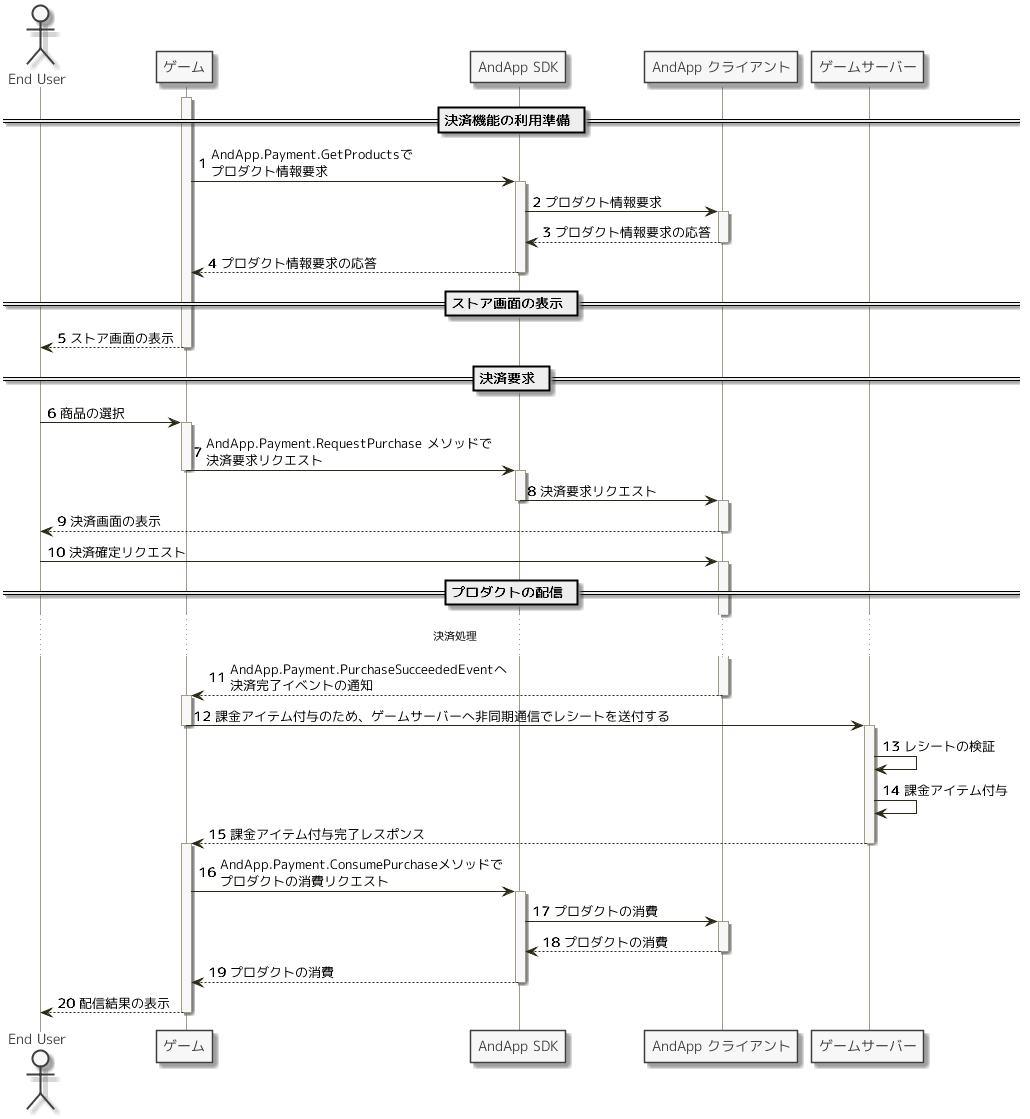
The payment flow is roughly divided into the following 6 processes:
- Acquisition of the product information
- Display of the product list page
- Payment Requirement
- Distribution of a product
- Verification of a receipt
- Recovery Processing
The methods to implement these processes are as follows:
Acquisition of the product information
To use the payment function of the In-App Payment, the following preparations are required.
Passing the array of product IDs to AndApp.Payment.GetProducts(), you get the information of the products. The information of the products can be obtained in List
| string[] productIds = { "com.yourdomain.product_id100", "com.yourdomain.product_id500", "com.yourdomain.product_id1000" }; AndApp.Payment.GetProducts (productIds, (error, products, invalidProductIds) => { // Product information is obtained from List |
Display of the product list page
If you want to display a product on the product list page in a game, the game need to know, in advance, the product IDs of all such products. By using ‘Acquisition of the product information,’ get the product information of all the products displayed in the product page list.
Payment Requirement
Payment Requirement for the product a user wants to buy is done using the following steps.
- Register callback events for success or failure of the payment.
- Specify the productId as the argument and execute AndApp.Payment.RequestPurchase().
| void requestPurchase() { AndApp.Payment.PurchaseSucceededEvent += OnPurchaseSucceeded; AndApp.Payment.PurchaseFailedEvent += OnPurchaseFailed; AndApp.Payment.RequestPurchase (productId); } |
As above, when AndApp.Payment.RequestPurchase() is executed, the payment page will be displayed on the AndApp client side. Then, when the user sends Payment Establishment Request, the payment will be completed.
From AndApp SDK 0.2.0, Developer Payload can be optionally specified to AndApp.Payment.RequestPurchase. Note: developerPayload is optional.
AndApp.Payment.RequestPurchase ( string productId, string developerPayload = null)
Specified developerPayload will be included in the receipt.
Distribution of a product
A short time after the payment has been established, the notice of payment establishment will be sent to OnPurchaseSucceeded, designated as AndApp.Payment.PurchaseSucceededEvent.
The argument AndApp.Purchase contains the purchased product and relevant receipt information. The game server verifies this receipt information, and the game distributes the product to the user.
A product is distributed according to the following steps:
- Receipt transmission to the game server
- Receipt verification on the game server side
- Product distribution on the game server side
- Product consumption processing on the game side
| void OnPurchaseSucceeded (AndApp.Purchase purchase) { // When payment is established, // Transmit Receipt information to the game server. sendReceipt(purchase.Receipt, (error, transactionId) => { if(!error){ // Error handling return; } // Consumption processing AndApp.Payment.ConsumePurchase(transactionId, (consumeError) => { // Response for consumption processing. Generally, no action is required. }); }); } void OnPurchaseFailed (AndApp.Error error, string productId){ // When cancellation or error occurred } |
After receipt verification and product distribution on the game server side have been completed, and after waiting for the completion response from the game server, execute the product consumption processing as follows.
Note: sendReceipt() in the above list is a special method to send a receipt to the game server.
| AndApp.Payment.ConsumePurchase(transactionId, (consumeError) => { // Response for consumption processing. Generally, no action is required. }); |
Verification of a receipt
A receipt is verified on the game server side.
AndApp.Purchase.Receipt contains the following information. Send the information directly to the game server.
| eyJhbGciOiJIUzI1NiIsIn.R5cCI6IkpXVCJ9 |
Note: Members of AndApp.Purchase are as follows:
| Key | type | Value |
|---|---|---|
| TransactionId | int | Transaction ID provided by the store |
| Receipt | string | JWT in which transaction information is stored. Information such as developerPayload is also stored in it. |
Verification of receipt information
Receipt information consists of JSON Web Tokens, and needs to be verified.
Receipt information can be verified using the following two methods.
- Using the introspection API
- Decoding and verifying JWT using a public key
Using the Introspection API
When a receipt is sent to the Introspection API, the receipt information is verified. For details of the Introspection API, see here.
To verify the receipt information, send the following request to the Introspection API.
HTTPS Request
| POST /1.0.0/payment/introspection HTTP/1.1 Host: sb-api.andapp.jp:443 Content-Type: application/json Authorization: Bearer {access_token} { "transactionToken": "eyj..." } |
The request to the Introspection API requires using an Access Token obtained following the OAuth 2.0 procedure.
For the method to obtain an Access Token, see here .
If the request to the Introspection API succeeded and the receipt information was acceptable, “HTTP Status: 200 OK” and the content of the receipt are returned in response to the request.
HTTPS Response
| HTTP/1.1 200 OK Content-Type: application/json { "iss": "https://sb-api.andapp.jp/1.0.0/payment", "sub": "https://sb-api.andapp.jp/1.0.0/users/6104524", "aud": "https://sb-api.andapp.jp/1.0.0/clients/189268204754", "typ": "transaction_token", "iat": 1464095267, "exp": 1464096167, "transaction": { "id": 1234567890123456, "clientId": 189268204754, "userId": 1234567890123456, "product": { "id": "xxx.yyy.zzz.3000", "clientId": 189268204754, "type": "CONSUMABLE", "state": "AVAILABLE", "prices": [ { "value": 3240, "currency": "JPY", "taxRate": 8 } ], "language": "ja-JP", "title": "Name of the item", "description": "Description of the item", "createdAt": 1463468400, "updatedAt": 1463468400 }, "quantity": 2, "totalPrice": { "value": 6480, "currency": "JPY", "taxRate": 8 }, "state": "PURCHASED", "developerPayload": "", "refundTo": null, "refundedBy": null, "consumedAt": null, "purchasedAt": 1463468400, "createdAt": 1463468400, "updatedAt": 1463468400 } } |
Decoding and verifying JWT using a public key
For the method to verify JWT on the game server, refer to “Verifying procedure of JWT” at the following URL.
https://docs.mobage.com/display/JPANDAPP/DevelopmentUnity_JSONWebToken_AndApp
Confirmation of receipt
After the receipt information has been verified, confirm the contents of the receipt.
Confirm what product was purchased, based on product ID, price, etc.
| { "iss": "https://sb-api.andapp.jp/1.0.0/payment", "sub": "https://sb-api.andapp.jp/1.0.0/users/6104524", "aud": "https://sb-api.andapp.jp/1.0.0/clients/189268204754", "typ": "transaction_token", "iat": 1464095267, "exp": 1464096167, "transaction": { "id": 1234567890123456, "clientId": 189268204754, "userId": 6104524, "product": { "id": "xxx.yyy.zzz.3000", "clientId": 189268204754, "type": "CONSUMABLE", "state": "AVAILABLE", "prices": [ { "value": 3240, "currency": "JPY", "taxRate": 8.0 } ], "language": "ja-JP", "title": "Name of the item", "description": "Description of the item", "createdAt": 1463468400, "updatedAt": 1463468400 }, "quantity": 2, "totalPrice": { "value": 6480.00, "currency": "JPY", "taxRate": 8.0 }, "state": "PURCHASED", "developerPayload": "", "purchasedAt": 1463468400, "createdAt": 1463468400, "updatedAt": 1463468400 } } |
The contents of a transaction in a receipt are as follows:
| property | title | type | required | description |
|---|---|---|---|---|
| iss | Issuer claim | string | true | URI which represents the issuer Depending on execution environment, it appears as follows: sandbox |
| sub | Subject claim | string | true | URI which represents a Player who has paid. Depending on the execution environment, it appears as the following URI (URI Template format). sandbox |
| aud | Audience claim | string | true | URI which represents the Client ID of a game which has demanded payment Depending on the execution environment, it appears as the following URI (URI Template). sandbox |
| typ | Type of token | string | true | Fixed value: “transaction_token” |
| iat | UNIX timestamp of issued date and time | integer | true | UNIX timestamp of date and time when the transaction_token was issued |
| exp | UNIX timestamp of expiring date and time | integer | true | UNIX timestamp of date and time when the transaction_token will expire The transaction Token after the expiry date and time have passed |
| transaction | Transaction object | object | true | |
| transaction.id | Transaction ID | integer | true | Up to 16 digits |
| transaction.product | Purchased product object | object | true | |
| transaction.clientId | Client ID which has created transaction object | integer | true | Up to 16 digits |
| transaction.userId | Player ID which has created transaction object | integer | true | Up to 16 digits |
| transaction.product.id | Product object ID | string | true | |
| transaction.product.clientId | Client ID which has created product object | integer | true | Up to 16 digits |
| transaction.product.type | Type of product | string | true | Fixed value: “CONSUMABLE” |
| transaction.product.state | State of product | string | true | Fixed value: “AVAILABLE” |
| transaction.product.prices | List of tax-included prices of products for each currency | array | true | |
| transaction.product.prices[] | Object of tax-included prices of products for each currency | object | true | |
| transaction.product.prices[].value | Price | number | true | |
| transaction.product.prices[].currency | Currency unit | string | true | Fixed value: “JPY” |
| transaction.product.prices[].taxRate | Tax rate (%) | number | true | Value from 0 to 100 |
| transaction.product.language | Language | string | true | Fixed value: “ja-JP” |
| transaction.product.title | Name of product | string | true | |
| transaction.product.description | Description of product | string | true | |
| transaction.product.createdAt | UNIX timestamp of created date and time of product | integer | true | |
| transcation.product.updatedAt | UNIX timestamp of updated date and time of product | integer | true | |
| transaction.quantity | Number of purchases | integer | true | |
| transaction.totalPrice | Object of tax-included sum of purchase price | object | true | |
| transaction.totalPrice.value | Price in total | number | true | |
| transaction.totalPrice.currency | Currency unit | string | true | Fixed value: “JPY” |
| transaction.totalPrice.taxRate | Tax rate (%) | number | true | Value from 0 to 100 |
| transaction.state | State of transaction | string | true | Fixed value: “PURCHASED” |
| transaction.developerPayload | Arbitrary payload specified by developer at the time of payment request | string | true | |
| transaction.refundTo | Transaction ID of refund destination | integer | true | Fixed value: null |
| transaction.refundedBy | Transaction ID of refund source | integer | true | Fixed value: null |
| transaction.consumedAt | UNIX timestamp of date and time of product consumption | integer | true | Fixed value: null |
| transaction.purchasedAt | UNIX timestamp of date and time of payment establishment | integer | true | |
| transaction.createdAt | UNIX timestamp of date and time of transaction creation | integer | true | |
| transaction.updatedAt | UNIX timestamp of date and time of transaction update | integer | true | |
| developerPayload | Developer can enter this field arbitrarily | string | true | Length of string is from 0 to 4096 (default value is ""). |
Recovery Processing
In case of failure of “Payment Establishment Request” or “Product Consumption Request” to the game server, you need to implement recovery processing beforehand.
Using AndApp.Payment.GetPurchases, you can get a list of products not yet consumed. So execute “Payment Establishment Request” and “Product Consumption Request” again to the game server.
Even if the result of Payment Completion Request to the game server showed that the item was already granted, execute the subsequent consumption request (AndApp.Payment.ConsumePurchase()).
Also, apply recovery processing at the time that the game side wants to do recovery (for example, Start() or OnApplicationPause()).
| void Start() { // Get information of purchased and not consumed products AndApp.Payment.GetPurchases((AndApp.Error error, List<AndApp.Purchase> purchases) => { Foreach (AndApp.Purchase purchase in purchases){ SendReceiptToGameServer(purchase.Receipt); } }); } void SendReceiptToGameServer(string receipt){ // Payment Establishment Request // Send receipt information to the game server sendReceipt(receipt, (error, transactionId) => { // Consumption Processing(Even if the item was already granted.) AndApp.Payment.ConsumePurchase(transactionId, (consumeError) => { // Response for consumption processing. Generally, no action is required. }); }); } |
Update History
- March 13, 2017
- Error handling was added in the case of error before consumption.
- February 22, 2017
- The comment (Payment implementation did not change after MobaCoin was introduced) was added.
- December 16, 2016
- It was corrected because there was an error in the argument of AndApp.Payment.GetPurchases () which was described.
- November 2, 2016
- The comment (From AndApp SDK for Unity 1.0.0, invalidProductIds is added to the callback argument of AndApp.Payment.GetProducts) was added.
- October 5, 2016
- Omitted descriptions (transaction.clientId and transaction.userId) of receipt information were added.
- August 23, 2016
- The comment (developerPayload can be specified to RequestPurchase) was added.
- July 28, 2016
- The method of verifying receipt information using the Introspection API was added.
- July 26, 2016
- The comment (productId is added as the second argument of callback function which is set as AndApp.Payment.PurchaseFailedEvent) was added.
- The first argument of AndApp.Payment.GetPurchases () was productIds, but since it became unnecessary due to specification change, it is deleted
- July 25, 2016
- The argument of AndApp.Payment.RequestPurchase was changed, and callback when UI is closed was deleted.
- The first argument of AndApp.Payment.ConsumePurchase was changed to transactionId.
- June 6, 2016
- Newly created