[Deprecated] Old Player Authentication on Application Server
Although this flow is not recommended, it is still available as just a function.
Check “About Checking Implementation of Player Authentication" when player authentication has been implemented, and then send the Excel sheet to us.
This page explains how to manage the linkage between an app user and a player ID using an app server. Be aware that the presence of IdP federation is required to be determined on the server side whether the authentication is implemented on the app server.
In principle, an AndApp player ID is always linked with an app user ID one to one, and vice versa.
“AndApp player ID linked with an app user ID” and “App User ID linked with AndApp player ID” shall be one-to-one relationships. Be aware that one-to-many and many-to-one relationships are prohibited.
Obtaining IDToken
Obtain AndApp.UserSession using the AndApp.UserSession.GetCurrent() method after the initialization of AndApp SDK is completed. PlayerID / IDToken can be taken out from AndApp.UserSession. Player authentication is processed using the obtained IDToken. Send the ID Token to the game server. * If you send Player ID directly to the game server, it may be altered. Therefore, make sure to send the IDToken.
AndApp.UserSession session = AndApp.UserSession.GetCurrent();
Debug.Log ("Player ID : " + session.PlayerID);
AndApp.UserSession.GetCurrent().GetIDToken((AndApp.Error error, string idToken) => {
    Debug.Log ("idToken : " + idToken);
});
Verifying IDToken
First, send the obtained IDToken to the game server, and then verify it on the game server using JSON Web Token (hereinafter “JWT”).
Verifying JWT
IDToken consists of JSON Web Token. For verifying JWT, “Verify the validity of a signature using x5c” and “Verify JWT Claims Set” should be performed.
For details verifying JWT, refer to “Procedure Verifying JWT” at the following URL.
Https://docs.mobage.com/display/JPANDAPP/DevelopmentUnity_JSONWebToken_AndApp
The following example shows JWT Claims. Extract the sub value (https://api.andapp.jp/1.0.0/users/{PlayerID}) which is a player ID.
{

    "iss" : "`https://connect.andapp.jp",`
    "sub" : "https://api.andapp.jp/1.0.0/users/4503599627370495",
    "aud" : "https://api.andapp.jp/1.0.0/clients/1125899906842624",
    "typ" : "id_token",
    "iat" : 1464182557,
    "exp" : 1464186157
}
Implementing Player Authentication
Perform the player authentication on the application side according to the following flow.
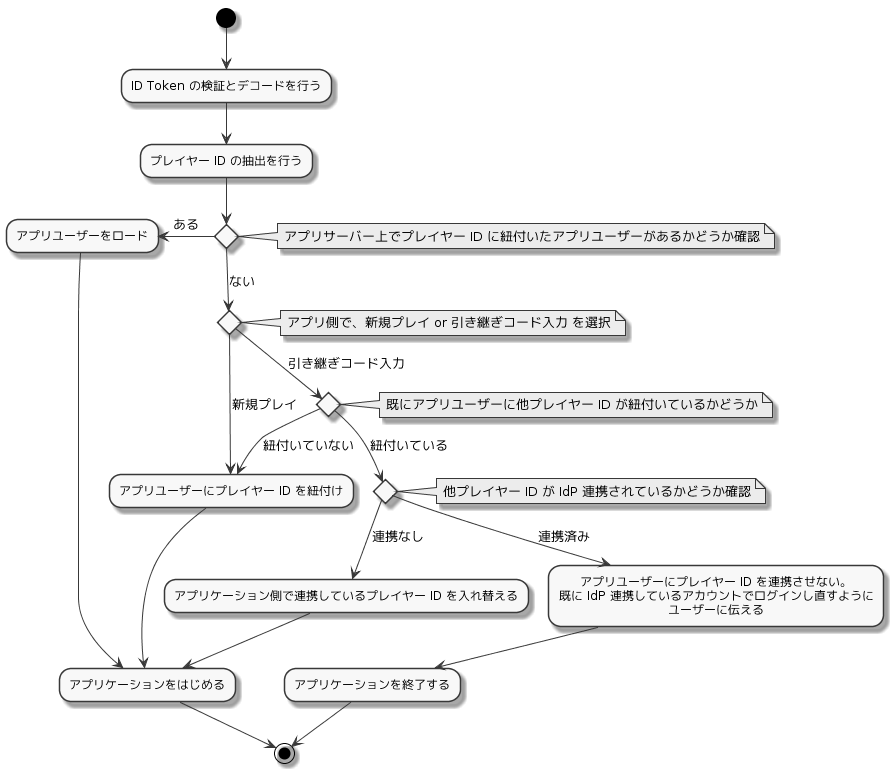
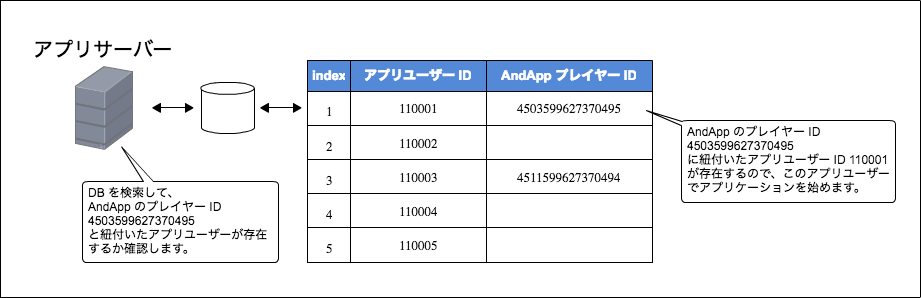
Checking whether the data linked with the player ID is on the app server or not
Before starting the application with a player ID, check whether the player ID is already linked with an app user or not. If the player ID is linked with an app user, start the application with that app user.
No App User linked with Player ID
Select "New play" or "Input takeover code or Federate with other accounts" on the app side.
New Play
Link a player ID with the newly created app user, and start the application as a new play.
Other player ID is not linked with App User with Input Takeover Code or Other Accounts Federation
Check whether the app user obtained through the takeover code or other account federation is already linked with other player ID or not. If not linked, link the player ID with the app use, and then play the application.
Other player ID is linked with App User with Input Takeover Code or Other Accounts Federation
If the app user obtained through the takeover code or other account federation is already linked with other player ID, check whether the other player ID is applied to Idp federation or not.
Pass the player ID to Player API of AndApp REST API to check whether that player ID is already applied to IdP federation or not.
Check whether the player ID is applied to IdP federation or not, by using Player API. For details about Player API, click here.
The following request and response to Player API are displayed when the player ID is 4511599627370494.
HTTPS Request
GET / 1.0.0 / users / 4511599627370494 HTTP / 1.1 Host: sb-api.andapp.jp: 443 Authorization: Bearer {access_token}
HTTPS Response
HTTP / 1.1 200 OK  Content-Type: application / json
    {  "Id": 4511599627370494,  "Links": {  "Mobage": {  "CreatedAt": 1439726867,  "UpdatedAt": 1439726867  }  },  "CreatedAt": 1439726867,  "UpdatedAt": 1439726867  }
If the IdP federation object (links) included in the response from Player API has any object, the player ID is applied to IdP federation.
If IdP federation object does not have any object, the player ID is not applied to IdP federation.
Other player ID is applied to IdP federation
If other player ID is already applied to IdP federation, ensure that the application prevents other player IDs from being federated. Notify user to log in again with the federated account on the application side.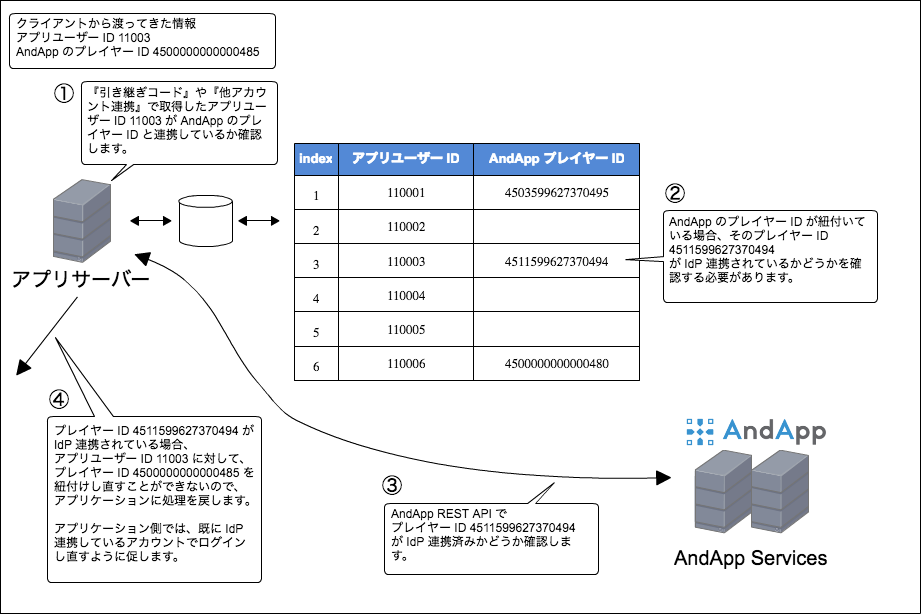
Other player ID is not applied to IdP federation
Interchange the player ID linked with the app user on the application side.
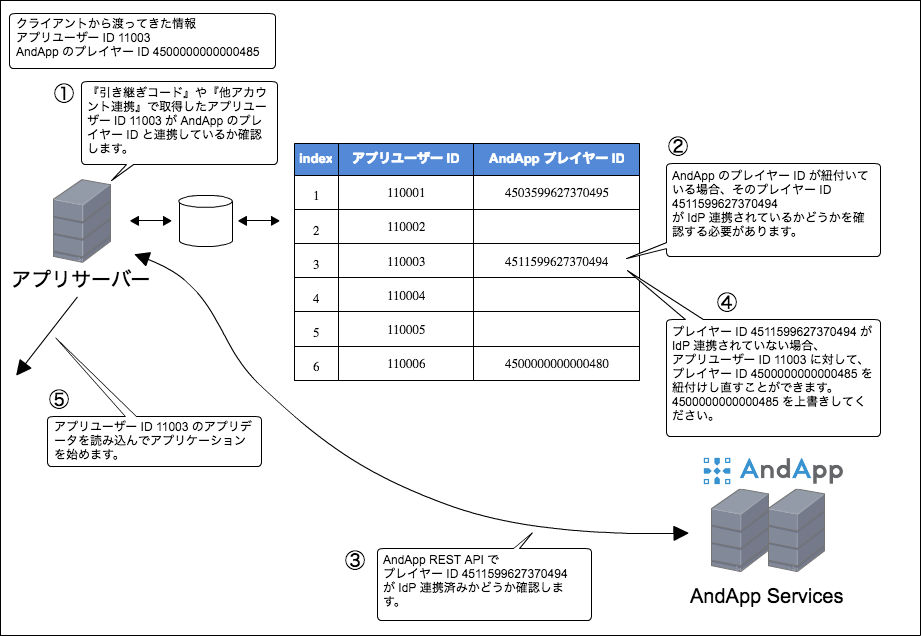
The old AndApp player ID, which has been overwritten with the AndApp player ID linked with the app user ID, must be discarded.
Therefore, if the app user ID is linked with AndApp player ID, the app user ID is transferred from “Source AndApp Player ID” to “Destination AndApp Player ID” in the takeover. Delete the app user ID linked with “Source AndApp Player ID”, and then treat “Destination AndApp Player ID” as a new play on the application side.
Update History
- February 15, 2017
- Title changed from “Player Authentication on Application Server” to” [Not recommended] Previous Player Authentication on Application Server”
- December 1, 2016
- Clearly displayed that one linked to many and many linked to one between an app user and a player ID are prohibited.
- November 2, 2016
- Since AndApp SDK for Unity 1.0.0, AndApp.UserSession.IDToken property is changed to AndApp.UserSession.GetIDToken API
- The content of the beginning is deleted and the description of requirements is elaborated.
- “Game” was changed to “Application”. As result of this change, “Game Server” was changed to “App Server”.
- October 20, 2016
- Descriptions about takeover from PC to PC added to the beginning
- September 18, 2016
- Flowchart replaced
- July 28, 2016
- Description about Player API added
- June 6, 2016
- Newly created