New Player Authentication on Application Server
This page describes Player Authentication on servers.
In Player Authentication on server, the app server calls RESTful API to authenticate the player to link Application User ID to Player ID.
inAppUserId only accepts ASCII string.
Now player authentication can be even after the initial launch (from 2017/03/15).
Once linking an application user and an AndApp player by player authentication, prohibiting that application user from re-linking in other environments other than the smartphone application.
Please confirm the implementation confirmation of player authentication and send the excel sheet to DeNA as soon as player authentication is implemented.
Player Authentication
Get IDToken
After the initialization of AndApp SDK, the game client gets AndApp.UserSession with AndApp.UserSession.GetCurrent(). AndApp.UserSession contains Player ID and ID Token. The ID Token needs to be sent to app server for Player Authentication. Please use the ID Token for Player Authentication not the player ID as the player ID can be altered in transmission.
AndApp.UserSession session = AndApp.UserSession.GetCurrent();
Debug.Log ("Player ID : " + session.PlayerID);
AndApp.UserSession.GetCurrent().GetIDToken((AndApp.Error error, string idToken) => {
    Debug.Log ("idToken : " + idToken);
});
Validate IDToken
The ID Token needs to be sent to the app server. The app sever verifies the ID token which is in form of JSON Web Token (JWT).
Validate JWT
The ID Token is in form of JWT. The validation of JWT consists in two part – validating x5c signature, and validating JWT Claims Set.
Please refer the document following for details about validation of JWTs.
Https://docs.mobage.com/display/JPANDAPP/DevelopmentUnity_JSONWebToken_AndApp
sub claim ( https://api.andapp.jp/1.0.0/users/{PlayerID } ) represents the player ID.
{

    "iss" : "`https://connect.andapp.jp",`
    "sub" : "https://api.andapp.jp/1.0.0/users/4503599627370495",
    "aud" : "https://api.andapp.jp/1.0.0/clients/1125899906842624",
    "typ" : "id_token",
    "iat" : 1464182557,
    "exp" : 1464186157
}
The APIs called like the following:
AndApp.UserSession session = AndApp.UserSession.GetCurrent();
session.SetInAppUserId().
- Call Player Link API.
- Set inAppUserId to be linked to the player ID.
- PlayerLink API can set the application user ID.
- extras can be set through client API and cannot to be set through REST API.
- Player API can get the existing link information.
- inAppUserId can be set even if the given inAppUserId is linked to another player with some exception. The existing link to the player will be lost.
- inAppUserId cannot be set if the given inAppUserId is linked to another player and the player is linked to an IdP account. SetInAppUserId() returns 409 error.
- inAppUserId cannot be set if the given inAppUserId had been linked to another player before and the player is linked to an IdP account. SetInAppUserId() returns 422 as error code.
| Status | Title | Description |
| 409 | Conflict | inAppUserId is linked to another player and the player is linked to an IdP account. The game needs to handle the error displaying user friendly message. The message describes the user needs to start the game with new account or specifies the different inAppUserId to start with.
|
| 422 | TARGET HAS ONCE LINKED MBGA | inAppUserId is had been linked to another player before and the player is linked to an IdP account |
- Call Player API to get the link information.
- inAppUserId and extras can be obtained.
- no link.app object returned if there is no inAppUserId linked to the player.
Use case
We assumes the following implementation of smartphone application.
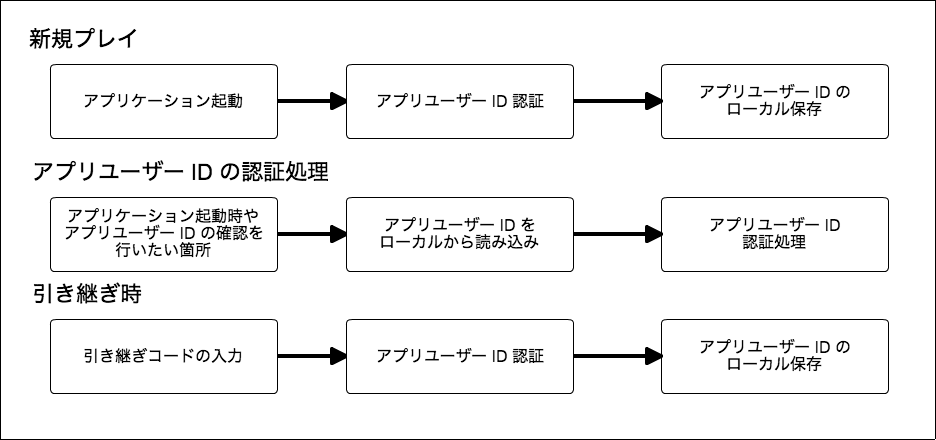
The following marked as red needs to be implemented.
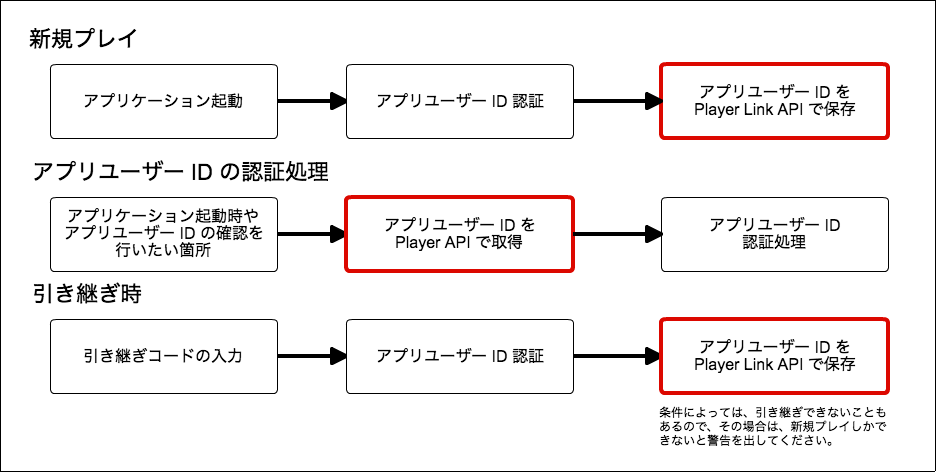
Only change for the game is to use RESTful API (Player Link API or Player API) to get or set application user id instead of application specific storage. Player authentication does not need further changes in most cases.
The game requires to implement error handling for Player Link API. The game client needs to display a user friendly error message. For example, "The application user is already linked to another player. Please login with Mobage user to play with the application user".
Reference Implementation
The following is reference implementation for player authentication. The implementation detail may be varied up to applications.
- player_link.php
- Sample code for P layer Link API and Player API .
- define ( 'CLIENT_ID', 'xxxxxxxxxxxxxxxxx' );
- define ( 'CLIENT_SECRET', 'xxxxxxxxxxxxxxxxxxx');
- After linking InApp UserId, obtain the result.
- Sample code for P layer Link API and Player API .
Change log
- 2017/10/30
- Added to warning of About re-linking.
- 2017/07/04
- There was a misspelling in player_link.php, so I fixed it.
- 2017/04/11
- Add description about implementation confirmation of player authentication
- 2017/03/15
- Along with behavior change of the Player Link API, relaxation of various constraints and addition of error codes.
- 2017/02/16
- Create New