New Player Authentication on Client
You can leave the link between the player ID and the application user to the AndApp side, and perform the player authentication procedure with the client API.
- Please be sure to implement after reading the overview .
- InAppUserId can not be set except ASCII string. Extras can be set other than ASCII character strings, so please use it if necessary.
- From 2017/03 / 15, it is now possible to hand over data except applications for the first time.
As soon as the implementation of player authentication is completed, please confirm the implementation confirmation of player authentication, and send the excel sheet to us.
API to use
After AndApp SDK initialization, use the following client API after obtaining AndApp.UserSession with AndApp.UserSession.GetCurrent () method .
AndApp.UserSession session = AndApp.UserSession.GetCurrent ();
Call it like session.SetInAppUserId ().
AndApp.UserSession.SetInAppUserId (string inAppUserId, IDictionary <string, object> extras, UnityAction < AndApp. Error> onComplete)
- Set the application user in the application to be associated with the player ID.
- InAppUserId can set the user ID of the application user, extras can set key / value type additional information.
- The set information can be obtained using the GetInAppUserId () API.
- inAppUserId is already another player ID and have pegging can be set even if they were. In that case, it will be tied off with another player ID, and it will be reassociated with the player ID when set. (Replacement of Player ID)
- If inAppUserId is already associated with another player ID and another player ID is linked with IdP, player ID can not be exchanged, so -21061 below is returned as an error.
- If inAppUserId has been tied to a player ID that has been linked with IdP in the past, other player IDs can not be exchanged, so -21063 below is returned as an error.
| Code | Description |
|---|---|
| -21061 | When inAppUserId is associated with a player ID already linked with IdP |
| -21063 | InAppUserId specified at run time of SetInAppUserId may already be associated with another IdP linked player ID (Under AndApp client 1.1.1, in this case -21061 will be returned) |
AndApp.UserSession.GetInAppUserId (UnityAction <AndApp.Error, string, IDictionary <string, object >> onComplete)
- You can get the value of inAppUserId and additional information extras.
- If inAppUserId associated with the player ID does not exist, the following -21062 is returned as an error.
| Code | Description |
|---|---|
-21062 | When there is no inAppUserId attached to the player ID |
Usage assumption
For smartphone applications already, we assume that the implementation is as follows.
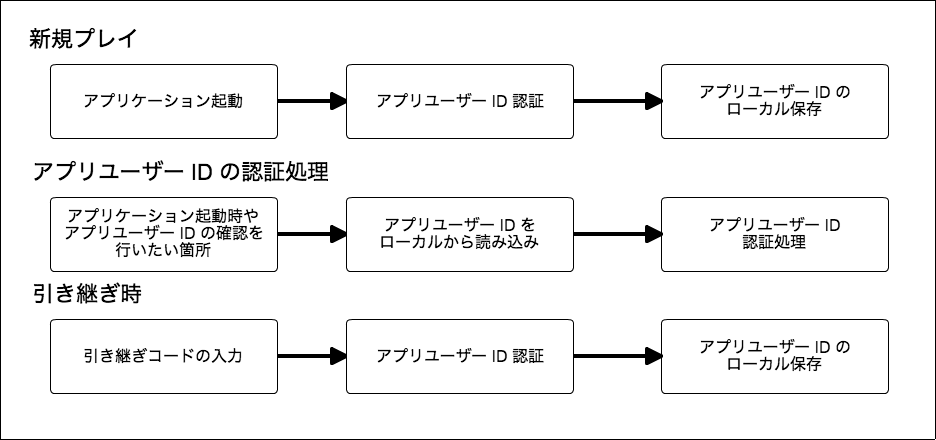
When assuming the above implementation, it is necessary to refurbish the following red frame.
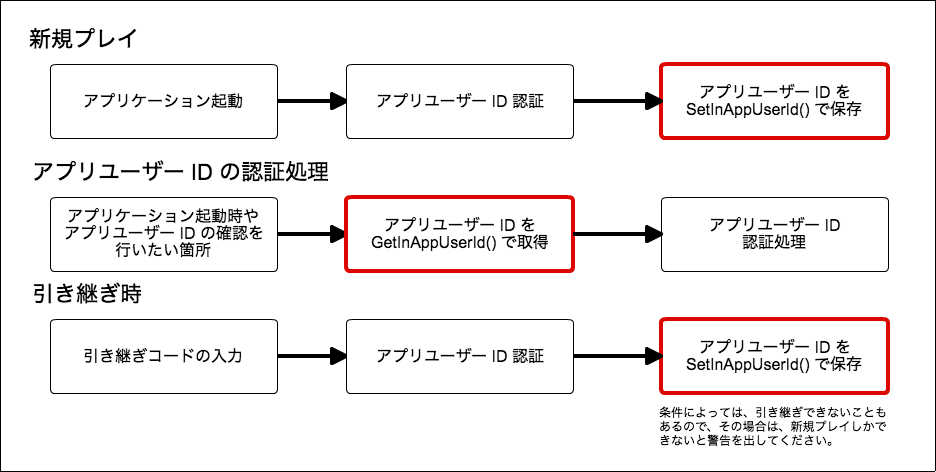
Basically the destination of such things as the application user ID of the application client API to be prepared from local our SDK ( AndApp.UserSession. SetInAppUserId and AndApp.UserSession. GetInAppUserId and you'll change it to), most of the application of implementation It is assumed that user authentication can be introduced without changing it.
In addition, when calling SetInAppUserId (), the following error may be returned if it is already linked with IdP linked with the player ID, but in that case: "Since the user who has already taken over from the smartphone is already linked with IdP, the Mobage ID Please log in or select a new play "Please warn me like" Please log in.
Implementation example
Be sure to call the following code after the AndApp SDK initialization processing is finished.
保存処理
String inAppUserId = "test_inappuserid";
IDictionary <string, object> extras = null;
AndApp.UserSession session = AndApp.UserSession.GetCurrent ();
Session.SetInAppUserId (inAppUserId, extras, (AndApp.Error error) => {
    If (error! = Null) {
        If (error.Code == -21061) {
            / / Processing when linking with a player ID already linked with IdP
        } Else if (error.Code == -21063) {
            / / Processing when the InAppUserId that has been linked with the player ID already linked with IdP in the past is specified
        } Else {
        	// Processing on error
		}
    }
    / / Continue the application
});
取得処理
AndApp.UserSession session = AndApp.UserSession.GetCurrent ();
Session.GetInAppUserId ((AndApp.Error error, inAppUserId, extras) => {
    If (error! = Null) {
        If (error.Code == -21062) {
            // processing when InAppUserId associated with player ID is not set
        } Else {
           // Processing on error
 		}
 	}
    // Continue the application using inAppUserId
});
Once linking an application user and an AndApp player by player authentication, prohibiting that application user from re-linking in other environments other than the smartphone application.
Change log
- 2017/10/30
- Added to warning of About re-linking.
- 2017/04/11
- Add description about implementation confirmation of player authentication
- 2017/03/15
- Alleviating various restrictions and adding error codes with the behavior change of AndApp SDK (SetInAppUserId (), GetInAppUserId ()).
- 2017/01/30
- Added to inAppUserId that it can not be set except ASCII string
- 2016/11/02
- Create New