Implementing AndApp IAP Flow
Implementation for the payment flow will not change even if the payment method is newly added.
The sample code may be changed at any time.
This page will explain how to process payment with AndApp IAP Flow.
About the product
A product is content you want to sell in the application using In-App Payment. In order to sell content, you need to create a product for Sandbox on AndApp Developer Dashboard.
The product type can be set for the product. The product type currently supported by AndApp is as follows.
- Consumable Product
- A consumable product is a product that can be used up in the application. For example, digital contents like virtual currency or consumption items.
In the future, we will also provide product types other than consumable products.
When creating a product, you need to enter the following set of attributes on AndApp Developer Dashboard. For example, when selling a virtual currency, register multiple products for the price range of virtual currency (100 Point, 200 Point etc).
attribute | Description |
|---|---|
| Product ID | Enter an alphanumeric identifier of the product. Identifiers should be unique across the applications.
|
| Product type | Only consumable products are selectable. |
| Name | Enter the product name.
|
| Description | Description of the item. (Optional)
|
| Price | Enter the actual price users pay in Japanese yen. |
After creating the product in the Sandbox and the payment flow is implemented using In-App Payment, you can create the product for Production. At this time you can copy the product from Sandbox to Production.
Implementing AndApp IAP Flow
This section describes how to implement payment flow using AndApp IAP.
Glossary
- Application
- Application that implement the AndApp SDK
- AndApp SDK
- AndApp development kit
- AndApp client
- AndApp client application
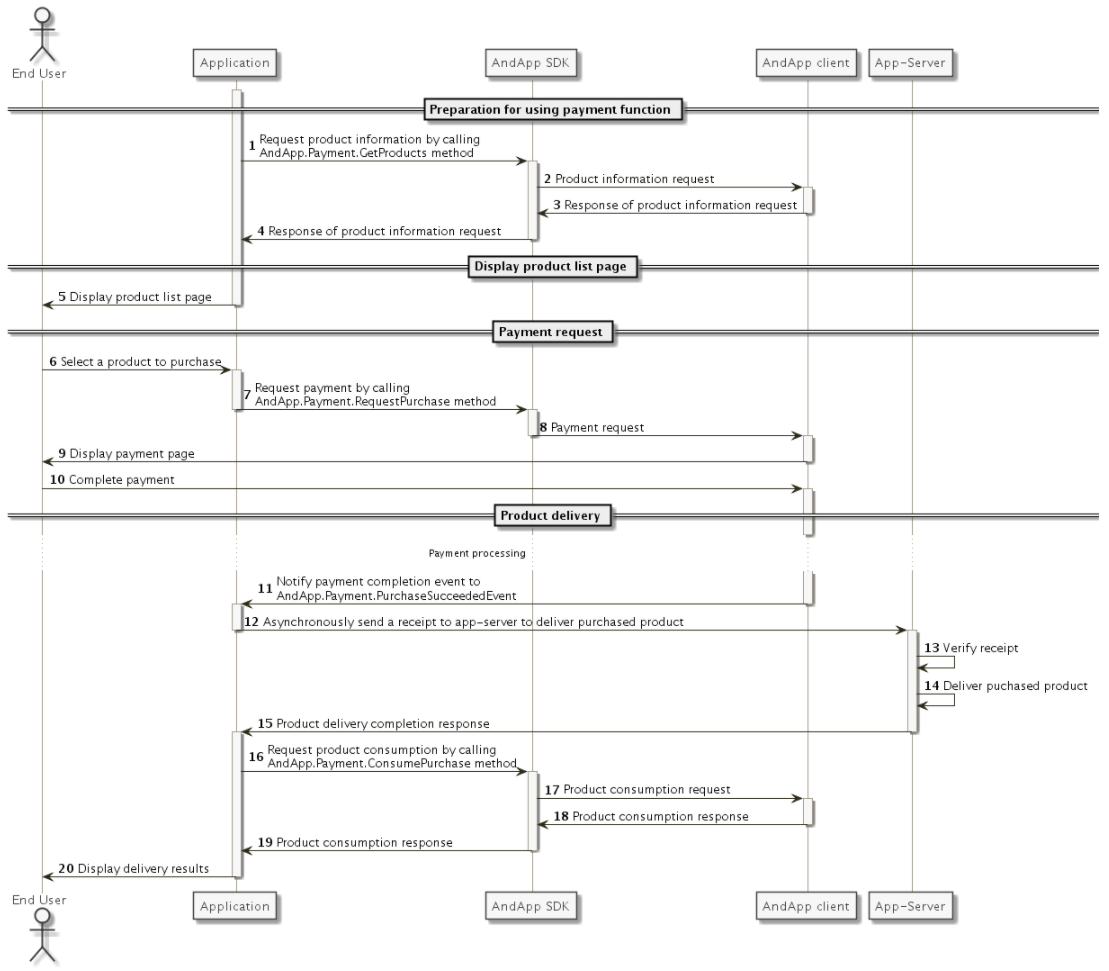
AndApp IAP Flow is roughly divided into the following six steps.
- Retrieve product information
- Display product list page
- Request payment
- Deliver products
- Verify receipt
- Recover purchase
The following explains how to implement each step.
Retrieve product information
In order to use the payment function of In-App Payment, the following preparation is required.
- Pass the array of product IDs to AndApp::Payment::GetProducts() to get the product information. Product information can be obtained with std::vectorAndApp::Product type. ※ Call after AndApp::SDK::Initialize() is completed.
std::vector<std::string> productIds;
productIds.push_back("com.yourdomain.product_id100");
productIds.push_back("com.yourdomain.product_id500");
productIds.push_back("com.yourdomain.product_id1000");
AndApp::Payment::GetProducts(productIds, [](const AndApp::Error &error, const std::vector<AndApp::Product> &products, const std::vector<std::string> &invalidProductIds) {
    if (error.GetCode() != 0) {
        // Processing on failure
        return;
    }
    // Retrieve information from products
});
Display product list page
To display products in the application's product list page, application should know the Product ID of all the product. To do so, retrieve all product information displayed in the application.
Request payment
Follow the steps below to start payment transaction for the product user requested to purchase.
- Register callback events for the purchase success and purchase failure.
- Set productId in argument and call AndApp::Payment::RequestPurchase().
void requestPurchase(std::string productId) {
    AndApp::Payment::SetPurchaseSucceededEventCallback(OnPurchaseSucceeded);
    AndApp::Payment::SetPurchaseFailedEventCallback(OnPurchaseFailed);
    AndApp::Payment::RequestPurchase(productId) ;
}
Once AndApp::Payment::RequestPurchase() is called, payment page will appear on the AndApp Client. After user completes the payment on payment page, registered callback events will be invoked.
From AndApp SDK 0.2.0, Developer Payload options is added to AndApp::Payment::RequestPurchase . * developerPayload is optional.
AndApp::Payment::RequestPurchase( const std::string & productId, const std::string & developerPayload)
The specified developerPayload will be included in the receipt.
Deliver products
After the payment is completed, OnPurchaseSucceeded set to AndApp::Payment::SetPurchaseSucceededEventCallback will receive a callback.
The AndApp::Purchase class object of the argument contains the information of the product user purchased and the receipt. After verifying this receipt on the app-server, application can deliver the product to the user.
Deliver the product by the following procedure.
- Send receipt to the app-server
- Verify receipt on the app-server
- Deliver purchased product on the app-server
- Consume purchased product on the application
void OnPurchaseSucceeded(const AndApp::Purchase &purchase) {
    // On purchase succeed
    // Send receipt to app-server
    std::string receipt = purchase.GetReceipt();
    sendReceipt(receipt, [](std::string error, std::string transactionId) {
        if(!error.empty()) {
            return;
        }

        // If processing succeeds after sending receipt
        // Consume purchased product
        AndApp::Payment::ConsumePurchase(transactionId, [](const AndApp::Error &error) {
            // Response of consume purchased product. Usually no special action is required.
        });
    });
}
void OnPurchaseFailed(const AndApp::Error &error, const std::string &productId) {
    // On purchase error or cancel
}
After the receipt verification and product delivery on the app-server, wait for the response from the app-server and consume the product as follows. ※ sendReceipt () is an example method to send receipt to app-server.
sendReceipt(receipt, [](std::string error, std::string transactionId) {
    if(!error.empty()) {
        return;
    }

    // If processing succeeds after sending receipt
    // Consume purchased product
    AndApp::Payment::ConsumePurchase(transactionId, [](const AndApp::Error &error) {
        // Response of consume purchased product. Usually no special action is required.
    });
});
Verify receipt
This section describes how to verify receipt on the app-server.
AndApp.Purchase.Receipt contains the receipt like below. Send it as is to the app-server.
eyJhbGciOiJIUzI1NiIsIn.R5cCI6IkpXVCJ9
* The method of the AndApp::Purchase class is as follows.
Method name | Return type | Description |
|---|---|---|
| GetProductID() | std::string | Returns ID of the product user purchased. |
| GetReceipt() | std::string | Returns JWT which stores information of payment transaction. Information such as developerPayload is also stored. |
| GetTransactionID() | std::string | Returns Transaction ID provided from the store. |
Verifying receipt
The receipt is an information of payment transaction formatted as JSON Web Token.
There are two ways to verify the receipt.
Use the Introspection API
Receipt verification can be done by sending receipt to Introspection API. For more details on Introspection API see here.
In order to verify the receipt with Introspection API, send a request as follows.
HTTPS Request
POST /1.0.0/payment/introspection HTTP/1.1
Host: sb-api.andapp.jp:443
Content-Type: application/json
Authorization: Bearer {access_token}

{
    "transactionToken": "eyj..."
}
To send a request to the Introspection API, you must set an Access Token retrieved by OAuth 2.0 flow.
For details on how to retrieve Access Token see here.
If the request to the Introspection API succeeds and the receipt is valid, HTTP status: 200 OK and the contents of the receipt are returned as a response as follows.
HTTPS Response
HTTP/1.1 200 OK
Content-Type: application/json

{
    "iss": "https://sb-api.andapp.jp/1.0.0/payment",
    "sub": "https://sb-api.andapp.jp/1.0.0/users/6104524",
    "aud": "https://sb-api.andapp.jp/1.0.0/clients/189268204754",
    "typ": "transaction_token",
    "iat": 1464095267,
    "exp": 1464096167,
    "transaction": {
        "id": 1234567890123456,
        "clientId": 189268204754,
        "userId": 1234567890123456,
        "product": {
            "id": "xxx.yyy.zzz.3000",
            "clientId": 189268204754,
            "type": "CONSUMABLE",
            "state": "AVAILABLE",
            "prices": [
                { "value": 3240, "currency": "JPY", "taxRate": 8 }
            ],
            "language": "ja-JP",
            "title": "Item Name",
            "description": "Description of Item",
            "createdAt": 1463468400,
            "updatedAt": 1463468400
        },
        "quantity": 2,
        "totalPrice": { "value": 6480, "currency": "JPY", "taxRate": 8 },
        "state": "PURCHASED",
        "developerPayload": "",
        "refundTo": null,
        "refundedBy": null,
        "consumedAt": null,
        "purchasedAt": 1463468400,
        "createdAt": 1463468400,
        "updatedAt": 1463468400
    }
}
Decode and verify JWT using public key
For details on how to verify JWT on app-server, please refer to the "JWT verification procedure" below.
https://docs.mobage.com/display/JPANDAPP/DevelopmentUnity_JSONWebToken_AndApp
Confirm receipt
After the receipt verification, check the contents of the receipt, such as ID of the product, price.
HTTP/1.1 200 OK
Content-Type: application/json

{
    "iss": "https://sb-api.andapp.jp/1.0.0/payment",
    "sub": "https://sb-api.andapp.jp/1.0.0/users/6104524",
    "aud": "https://sb-api.andapp.jp/1.0.0/clients/189268204754",
    "typ": "transaction_token",
    "iat": 1464095267,
    "exp": 1464096167,
    "transaction": {
        "id": 1234567890123456,
        "clientId": 189268204754,
        "userId": 1234567890123456,
        "product": {
            "id": "xxx.yyy.zzz.3000",
            "clientId": 189268204754,
            "type": "CONSUMABLE",
            "state": "AVAILABLE",
            "prices": [
                { "value": 3240, "currency": "JPY", "taxRate": 8 }
            ],
            "language": "ja-JP",
            "title": "Item Name",
            "description": "Description of Item",
            "createdAt": 1463468400,
            "updatedAt": 1463468400
        },
        "quantity": 2,
        "totalPrice": { "value": 6480, "currency": "JPY", "taxRate": 8 },
        "state": "PURCHASED",
        "developerPayload": "",
        "refundTo": null,
        "refundedBy": null,
        "consumedAt": null,
        "purchasedAt": 1463468400,
        "createdAt": 1463468400,
        "updatedAt": 1463468400
    }
}
The explanation of the receipt contents are as follows.
| property | title | type | required | description |
|---|---|---|---|---|
| iss | Issuer claim | string | true | The URI that represents the issuer. The following value is specified depending on each environment. sandbox https://sb-api.andapp.jp/1.0.0/payment
Production https://api.andapp.jp/1.0.0/payment
|
| sub | Subject claim | string | true | The URI which represents the player who made the payment. The following URI format (URI Template) is specified depending on each environment. sandbox https://sb-api.andapp.jp/1.0.0/users{/playerId}
Production https://api.andapp.jp/1.0.0/users{/playerId}
|
| aud | Audience claim | string | true | Will URI representing the game of Client ID, which was carried out a payment request. By the execution environment will be URI format (URI Template format) as follows. sandbox https://sb-api.andapp.jp/1.0.0/clients{/clientId}
Production https://api.andapp.jp/1.0.0/clients{/clientId}
|
| typ | Token type | string | true | Fixed value: "transaction_token". |
| iat | UNIX timestamp of the issue date and time | integer | true | The UNIX timestamp when the transaction_token issued. |
| exp | UNIX time stamp of the expiration date and time | integer | true | The UNIX timestamp which represents the date and time when the transaction_token is expired. The Transaction Token is invalid after the expiration date and time. |
| transaction | Transaction object | object | true |
|
| transaction.id | Transaction ID | integer | true | Up to 16 digits |
| transaction.product | Product objects that were purchased | object | true | |
| transaction.clientId | Client ID that created the transaction object | integer | true | Up to 16 digits |
| transaction.userId | Player ID that created the transaction object | integer | true | Up to 16 digits |
| transaction.product.id | ID of product object | string | true | |
| transaction.product.clientId | Client ID that created the product object | integer | true | Up to 16 digits |
| transaction.product.type | Product type | string | true | Fixed value: "CONSUMABLE". |
| transaction.product.state | The state of the product | string | true | Fixed value: "AVAILABLE". |
| transaction.product.prices | Currency by tax-inclusive price list of products | array | true | |
| transaction.product.prices[] | Currency by tax-inclusive price object of the product | object | true | |
| transaction.product.prices[].value | price | number | true | |
| transaction.product.prices[].currency | Currency unit | string | true | Fixed value: "JPY" |
| transaction.product.prices[].taxRate | tax rate(%) | number | true | Between 0 and 100. |
| transaction.product.language | language | string | true | Fixed value: "ja-JP" |
| transaction.product.title | Name of Product | string | true | |
| transaction.product.description | Product description sentence | string | true | |
| transaction.product.createdAt | UNIX time stamp of the product of the creation date and time | integer | true | |
| transcation.product.updatedAt | UNIX time stamp of the product update date and time of | integer | true | |
| transaction.quantity | Purchase number | integer | true | |
| transaction.totalPrice | Tax total purchase price object | object | true | |
| transaction.totalPrice.value | Total Price | number | true | |
| transaction.totalPrice.currency | Currency unit | string | true | Fixed value: "JPY". |
| transaction.totalPrice.taxRate | tax rate(%) | number | true | Between 0 and 100. |
| transaction.state | The state of the transaction | string | true | Fixed value: "PURCHASED". |
| transaction.developerPayload | Any of the payload that has been specified by the developer at the time of payment request | string | true | |
| transaction.refundTo | Transaction ID of the refund destination | integer | true | Fixed value: null |
| transaction.refundedBy | Refund the original transaction ID | integer | true | Fixed value: null |
| transaction.consumedAt | UNIX time stamp of product consumption date and time | integer | true | Fixed value: null |
| transaction.purchasedAt | UNIX time stamp of payment fixed date | integer | true | |
| transaction.createdAt | UNIX time stamp of the transaction of the creation date and time | integer | true | |
| transaction.updatedAt | UNIX time stamp of the transaction update date and time of | integer | true | |
| developerPayload | Fields that developers can be any input | string | true | This length is between 0 and 4096. By default, it contains the "". |
Recover purchase
Purchase recovery must be implemented in case of "payment completion event" to the application or "product delivery request" to the app-server fails.
Retrieve unconsumed products by calling AndApp::Payment::GetPurchases method and send "product delivery request" to the app-server with receipt.
Even when the product is already delivered on the app-server, call the following AndApp::Payment::ConsumePurchase() method.
Also, call purchase recovery method at the timing you want the application to recover (eg. at startup or on resume). ※ Call after AndApp::SDK::Initialize() is completed.
int main(int argc, char *argv[]){
    // Retrieve purchased but unconsumed product information
    AndApp::Payment::GetPurchases([](const AndApp::Error &error, const std::vector<AndApp::Purchase> &purchases) {
        int i = 0;
        for(i = 0; i < purchases.size(); i++) {
            SendReceiptToGameServer(purchases[i].GetReceipt());
        }
    });
}

void SendReceiptToGameServer(std::string receipt) {
    sendReceipt(receipt, [](std::string error, std::string transactionId) {
        if(!error.empty()) {
            return;
        }

        // If processing succeeds after sending receipt
        // Consume purchased product (even product is already delivered on the app-server)
        AndApp::Payment::ConsumePurchase(transactionId, [](const AndApp::Error &error) {
                // Response of consume purchased product. Usually no special action is required.
        });
    });
}
Change log
- 2017/02/22
- With the introduction of Moba Coin, we added that there was no change in payment implementation.
- 2016/11/02
- Since AndApp SDK for C ++ 1.0.0, since invalidProductIds was added to Callback argument of AndApp::Payment::GetProducts, it was added
- 2016/10/05
- As for the explanation of the receipt information, since description of transaction.clientId and transaction.userId was missing, I added it.
- 2016/08/30
- Since error handling of GetProducts was not described, I added it.
- 2016/08/23
- Since it is now possible to add developerPayload with RequestPurchase, I added it.
- 2016/08/19
- Changed capture of lambda expression of std::function from [=] to [].
- We corrected the sample to perform ConsumePurchase if it succeeds after sending the receipt.
- 2016/08/18
- We changed the argument of the callback method passed to the AndApp SDK as a whole by reference with the const qualifier.
- The variable name of the second argument of OnPurchaseFailed (const AndApp::Error & error, const std::string & productId) has been changed from temp to productId.
- 2016/07/28
- Create New