Overview
Now player authentication can be after the initial launch (from 2017/03/15)
Games are no longer required to display options of "New play" and "Data handover" on the initial launch sceen.
Please confirm the implementation confirmation of player authentication and send the excel sheet to DeNA as soon as player authentication is implemented.
Please check user and player for overview of users, and players.
Concept of Player Authentication
An AndApp application (game) needs to link an application user and a player ID issued by AndApp service. All the link needs to be 1:1 relationship. We call this linking process as Player Authentication. An application needs to be able to get application user information through player ID after the Player Authentication.
An application user and an AndApp player must be 1:1 relationship. An application user must not be linked to multiple AndApp users. An AndApp user must not be linked to multiple application users as well.
The following describes the process to authenticate a player, and to link the player to the application user.
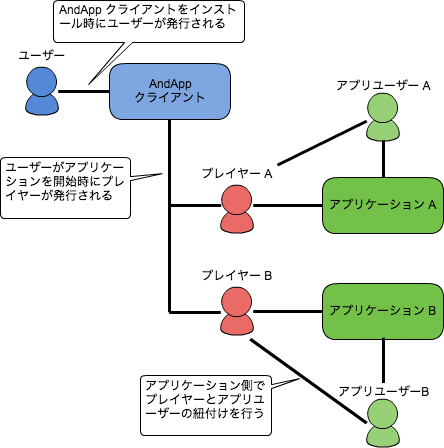
There are two way to implement Player Authentication.
- New Player Authentication
- through Client API (Client)
- or through RESTful API (Server)
- Old Player Authentication
- though RESTful API (Server)
The following sections describe New Player Authentication and Old Player Authentication for each.
New Player Authentication
Purpose
We introduced New Player Authentication for the following purpose.
- Let AndApp authenticate the players so that the multiple client can share the same application data
- AndApp creates a user when AndApp client is installed
- AndApp provides Mobage User Linkage to share the same user account in multiple machines, and to backup the data
The following restrictions are applied when the user is linked to an IdP account.
- An application user cannot be linked to another AndApp user on the following conditions:
- An application user is already linked to an AndApp user, and the AndApp user is already linked to an IdP account.
- An application user can be unlinked even if the application user is linked to an AndApp user, and the AndApp user is linked to an IdP account.
Notes
The following cases are prohibited on AndApp.
- Player Authentication without checking the status of an AndApp user, especially check whether the AndApp user is linked to an IdP account or not
Switching an application user which is linked to an AndApp user, and the AndApp user is linked to an IdP account
Requirements
The following need to be implemented before an application is published.
- Using a handover code for Player Authentication
- A game can accept handover code anytime even after initial launch
- A game are recommended to be able to issue handover code to support handover to a smartphone app from a PC app
- Using an SNS linkage (Twitter / Facebook Authentication)
- A game can accept existing SNS linkage anytime even after initial launch
- A game are recommended to be able to start linking to an SNS account to support handover to a smartphone app from a PC app
An application should check if the handover code is issued from different platform (smartphone to PC, or PC to smartphone). Otherwise, the application cannot prevent PC to PC handover.
The check is recommended to be implemented and is not required as long as the application uses our API correctly. However, please do not advertise PC to PC handover code capability to users even it is possible.
PC to PC handover code compromises the identity management of AndApp and degrade the advantage of single sign on. A user needs to input handover code anytime he or she changes PC in this case.
The detail implementation can be different depending on applications. Please consult us if you have any questions.
Old Player Authentication
Purpose
The following are the purpose of Old Player Authentication.
- Let AndApp authenticate players so that the multiple client can share the same application data
- AndApp creates a user when AndApp client is installed
- AndApp provides Mobage User Linkage to share the same user account in multiple machines, and to backup the data
The following restrictions are applied when the user is linked to an IdP account.
- An application user cannot be linked to another AndApp user on the following conditions:
- An application user is already linked to an AndApp user, and the AndApp user is already linked to an IdP account.
Notes
The following cases are prohibited on AndApp.
- Player Authentication without checking the status of an AndApp user, especially check whether the AndApp user is linked to an IdP account or not
Switching an application user which is linked to an AndApp user, and the AndApp user is linked to an IdP account
Requirements
The following need to be implemented before an application is published.
- Using a handover code for Player Authentication
- A game can accept handover code anytime only when an initial launch of a game
- A game are recommended to be able to issue handover code to support handover to a smartphone app from a PC app
- A game needs to display options of 'new game' and 'data handover'. Data handover page needs to accept handover code
- Using an SNS linkage (Twitter / Facebook Authentication)
- A game can accept existing SNS linkage only when an initial launch of a game
- A game are recommended to be able to start linking to an SNS account to support handover to a smartphone app from a PC app
- A game needs to display options of 'new game' and 'data handover'. Data handover page authenticates the SNS account to process data handover
An application should check if the handover code is issued from different platform (smartphone to PC, or PC to smartphone). Otherwise, the application cannot prevent PC to PC handover.
The check is recommended to be implemented and is not required as long as the application uses our API correctly. However, please do not advertise PC to PC handover code capability to users even it is possible.
PC to PC handover code compromises the identity management of AndApp and degrade the advantage of single sign on. A user needs to input handover code anytime he or she changes PC in this case.
The detail implementation can be different depending on applications. Please consult us if you have any questions.
Change log
- 2017/04/11
- Add description about implementation confirmation of player authentication
- 2017/03/15
- Along with the behavior change of the API, we allowed take over at the timing other than the first launch, eliminate the forcedness of the screen which gives the choice of new / takeover at the first launch.
- 2016/12/01
- We made it clear that it is prohibited to link 1: many, many: 1 with the application user and player ID.
- 2016/11/02
- Create New