[Deprecated] Old Player Authentication on Application Server
This flow is deprecated but you can continue to use its function.
This page describes the method to control the association between an application user and a Player ID using the application server. Keep in mind that if you implement this flow on the application server, you need to determine whether IdP-cooperation exists or not on the server side.
As a rule, there is only one “AndApp Player ID associated with an application user ID.” Also, there is only one “Application user ID associated with an AndApp Player ID.”
The relation between the “AndApp Player ID associated with the given application user ID” and the “Application user ID associated with an AndApp Player ID” is one to one. Please understand that a one-to-many or many-to-one relation is not allowed.
After you have completed the implementation of Player Authentication, check “Confirming the implementation of Player Authentication” and send the Excel Sheet to our company.
Obtaining an IDToken
After AndApp SDK initialization, obtain AndApp.UserSession using AndApp.UserSession.GetCurrent() methods. You can get the PlayerID and the IDToken from the property of AndApp.UserSession. Player Authentication proceeds using the obtained IDToken. Send the IDToken to the application server. Note: If you directly send the Payer ID to the application server, it may be falsified. Therefore, be sure to send the IDToken.
AndApp::UserSession *session = AndApp::UserSession::GetCurrent();
printf("Player ID : %s", session->GetPlayerID().c_str());

session->GetIDToken([](const AndApp::Error &Error, const std::string &idToken) {
    printf("idToken : %s", idToken.c_str());
}
Verification of an IDToken
The obtained IDToken is sent to the application server, and verified by JSON Web Token (from now on, referred to as “JWT”) on the application server.
Verification of JWT
An IDToken consists of JSON Web Token. To verify JWT, verification described in “Verification of signature validity using x5c” and “Verification of JWT Claims Set” should be conducted.
For details of JWT verification, see “Verification procedure of JWT” at the following URL.
Https://docs.mobage.com/display/JPANDAPP/DevelopmentCpp_JSONWebToken_AndApp
The example of JWT Claims is shown below. The value of “sub”
( https://api.andapp.jp/1.0.0/users/{PlayerID } ) is the Player ID. Extract it.
{

    "iss" : "`https://connect.andapp.jp",`
    "sub" : "https://api.andapp.jp/1.0.0/users/4503599627370495",
    "aud" : "https://api.andapp.jp/1.0.0/clients/1125899906842624",
    "typ" : "id_token",
    "iat" : 1464182557,
    "exp" : 1464186157
}
Player Authentication
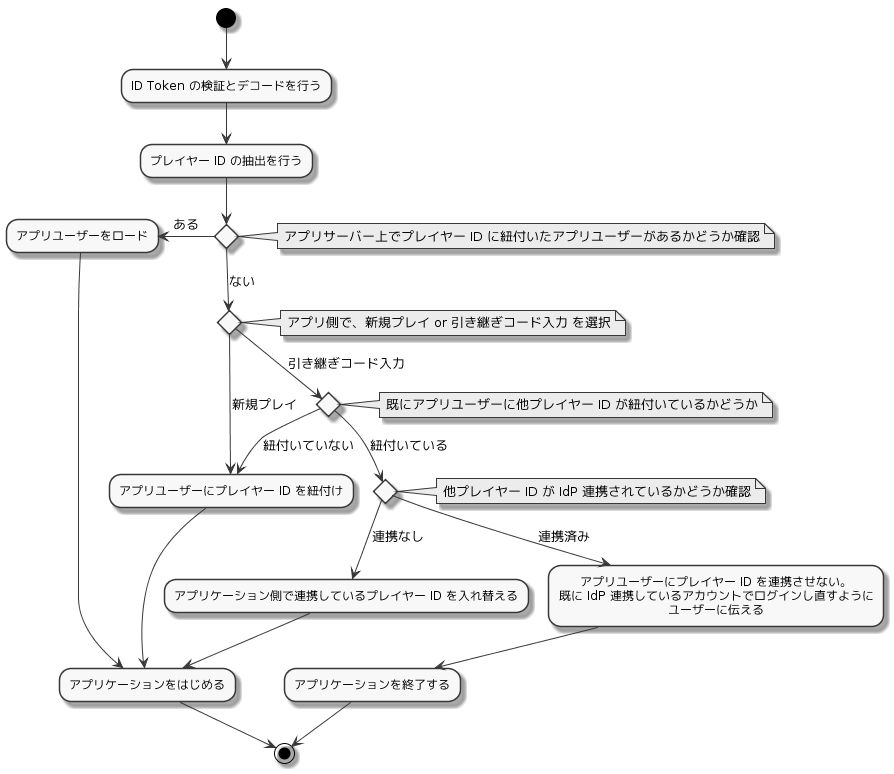
Following the flow below, Player Authentication should be conducted on the application side.
According to the flow below, it is necessary to perform player authentication on the application side.
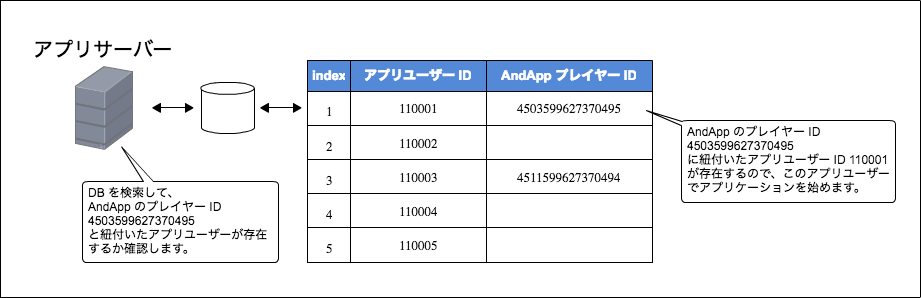
Checking whether there is data that has been associated with the Player ID on the application server
To start the application with the Player ID, check if there is an application user who has already cooperated with the Player ID. When there is an application user who has been already associated with the Player ID, start the application with this application user.
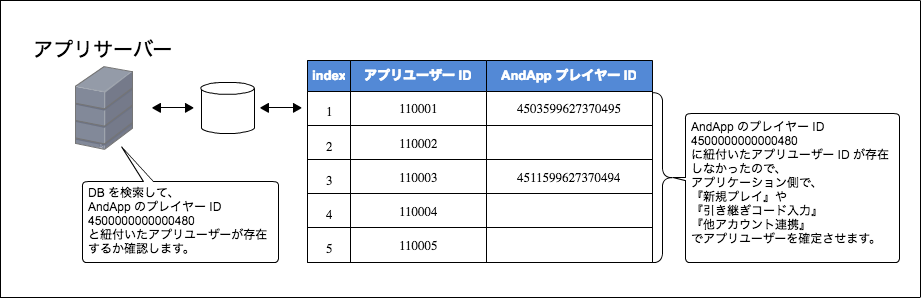
When there is no application user who has been associated with the Player ID
On the application side, let the user choose between “New Play” or “Transition code input or Association with other account.”
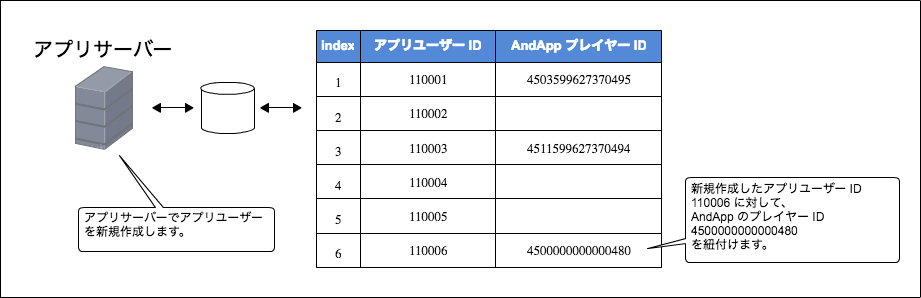
The case of a new play
The Player ID will be associated with the newly created application user, and the user newly plays the application.
In the case of “Transition code input,” or “Association with other account,” and when no other Player ID has been associated with the application user
Check whether the application user gotten from “Transition code input” or “Association with other account” procedure has been already associated with other Player ID or not. If not associated, associate the application user with the Player ID and play the application.
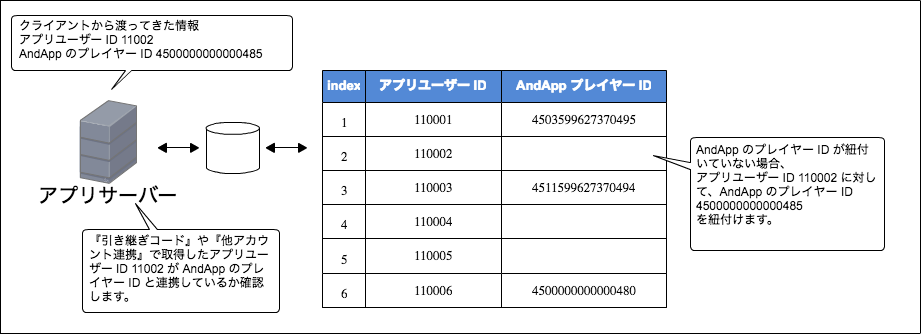
In the case of “Transition code input,” or “Association with other account,” and when other Player ID has been associated with the application user
When the application user gotten from “Transition code input,” or “Association with other account” procedure has been already associated with other Player ID, check whether the other Player ID is already in the state of IdP-linked or not.
By passing the Player ID to the Player API of AndApp REST API, it is possible to check whether the Player ID is IdP-linked or not.
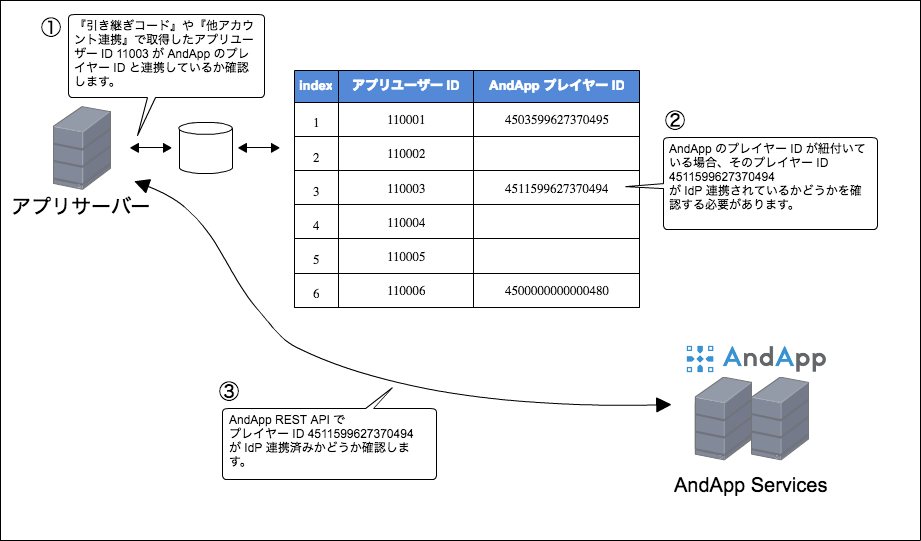
To check the state of IdP-cooperation of a Player ID, use the Player API. For details of the Player API, see here.
When the Player ID is 4511599627370494, request to the Player API and its response are as follows:
HTTPS Request
GET /1.0.0/users/4511599627370494 HTTP/1.1
Host: sb-api.andapp.jp:443
Authorization: Bearer {access_token}
HTTPS Response
HTTP/1.1 200 OK
Content-Type: application/json

{
    "id": 4511599627370494 ,
    "links": {
        "mobage": {
            "createdAt": 1439726867,
            "updatedAt": 1439726867
        }
    },
    "createdAt": 1439726867,
    "updatedAt": 1439726867
}
If the IdP-linked object (links) included in response to the Player API has any object, the Player ID is in the state of IdP-linked.
If the IdP-linked object has no object, the Player ID is not in the state of IdP-linked.
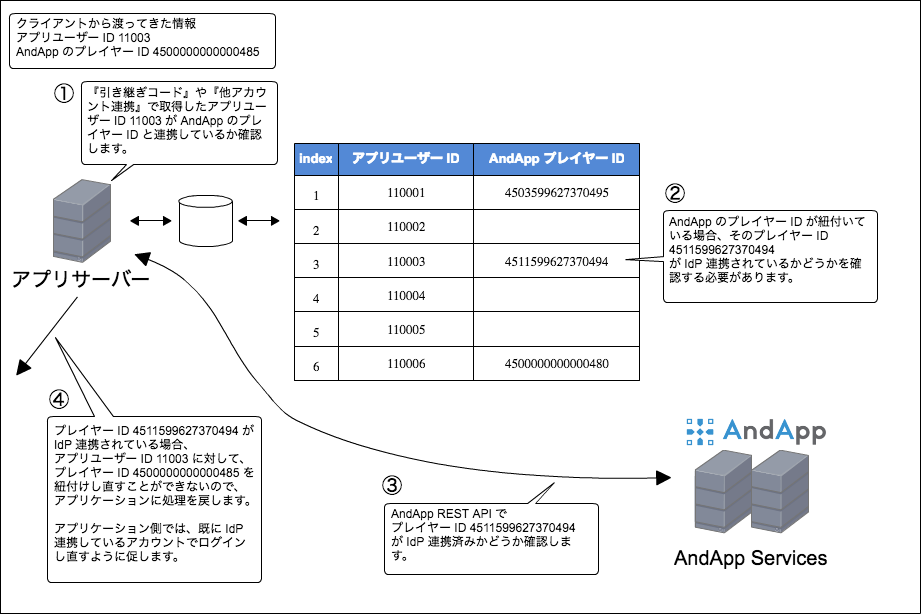
When the other Player ID is IdP-linked
When the other Player ID has been already IdP-linked, prevent the application from newly cooperating with the Player ID. On the application side, tell the user to log in again with the already cooperated account.
When the other Player ID is not IdP-linked
On the application side, replace the Player ID associated with the application user.
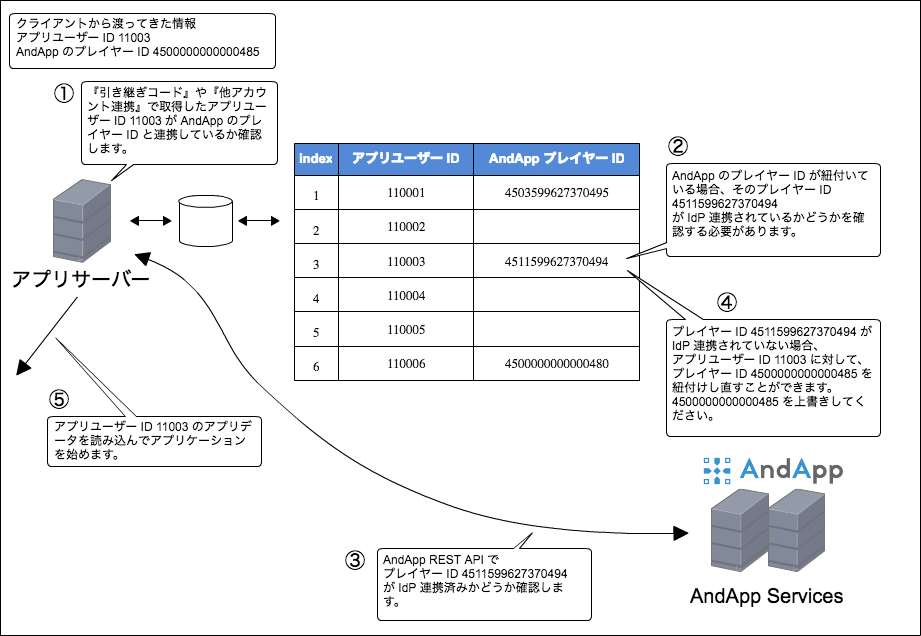
As overwriting is for an AndApp Player ID which has been associated with the application user ID, the old AndApp Player ID needs to be destroyed.
Therefore, when an AndApp Player ID is associated with an application user ID, transition of the application user ID occurs from the “AndApp Player ID of transition source” to the “AndApp Player ID of transition destination.” On that occasion, please delete the application user ID which was associated with the “AndApp Player ID of transition source,” and when “AndApp Player ID of transition source” comes on the application side, treat it as a new play.
Update History
-
April 17, 2017
- The description of implementation confirmation of the player authentication was added.
-
February 15, 2017
- The title was changed from “Player authentication on the application server” to “(Deprecated) Previous player authentication on the application server.”
-
December 1, 2016
- It was clearly stated that association of a one-to-many or many-to-one relation between an application user and a Player ID is prohibited.
-
November 2, 2016
- From AndApp SDK for C++ 1.0.0, the AndApp::UserSession::GetIDToken method became asynchronous processing. The corresponding description was modified.
- The opening paragraph was deleted, and the description of the prerequisites, etc. was expanded.
- The term “game” was changed to “application.” The term “game server” etc. was changed to “application server” etc.
-
October 20, 2016
- description of the transition from PC to PC was added at the opening paragraph.
-
September 18, 2016
- Replacement of flowchart
-
July 28, 2016
- The description of the Player API was added.
- Newly created